Use case
AI girlfriend chat: personality, photos and video
Start an AI girlfriend chat in agent mode: shape her personality, build a continuing story, generate photos and video, and control your spending.

You can now start an AI girlfriend chat in API Stock through the “Chat with a girl” workflow in agent mode. Choose a personality, describe an appearance and set an opening scene, or leave those details blank and let the AI introduce a fictional adult character. Continue the conversation with her, generate images as the story develops and request short videos. You choose a spending limit before starting; the models you use determine the cost.
The interesting part comes after “hello.” A character might argue for a different film, suggest a detour on an imaginary walk or bring an unfinished joke back into the scene. A small shared situation gives that conversation more to work with than a list of supposedly perfect qualities.
What is an AI girlfriend chat?
It is a conversation with a fictional adult character played by a language model. You give her a voice, interests and a situation to respond to. The story can be romantic, playful or entirely friendly: if you want an AI companion without romance, make that preference part of the setup.
This workflow supplies instructions for staying in character, continuing the story, taking initiative within replies and responding to your changes. It is designed to keep a conversation from repeatedly reverting to an introduction or a general assistant response. Those are instructions for the model, rather than a promise that it will never lose the thread.
Generated photos can give the character a recognisable appearance within the story. They remain AI-generated images: there is no person taking a selfie on the other side of the conversation.
How do you start the new girlfriend workflow?
Open agent workflows, sign in and choose “Chat with a girl.” You can write the setup in English and continue in ordinary messages.
- Describe as much or as little as you want. Appearance, personality and the opening situation are optional. One useful sentence is enough to begin; leaving all three blank is also supported.
- Add a reference portrait if appearance matters. This is optional too. A fictional portrait provides a visual reference, rather than making the character the real person in a photograph.
- Keep the default models or choose your own. Conversation, images and video use separate models. You can begin with the workflow defaults and explore alternatives later.
- Set a spending limit and launch the workflow. The conversation opens so you can introduce yourself or continue the first scene.
With an empty setup, the workflow is instructed to invent an adult character and introduce her through the conversation. You do not need to complete a long character questionnaire first. The agent guide explains the broader interface, model settings and spending controls.
How do you give a virtual girlfriend a distinctive personality?
“Kind, smart and beautiful” leaves almost everything about the conversation unspecified. Habits and small contradictions are more useful. Perhaps she likes spontaneous walks but carefully chooses the soundtrack, has a dry sense of humour but knows when to drop a joke, or enjoys debating books without agreeing with every opinion you offer.
Consider Ada, a 27-year-old film restorer who notices old shop signs and collects peculiar second-hand books. Her work and interests give you something to talk about beyond how her day went.
| Setup field | Example | What it contributes |
|---|---|---|
| Appearance | “Ada, 27, short copper curls, understated city clothes” | A visual starting point for the story and generated images |
| Personality | “Curious, dryly funny, loves old films. Will disagree, but never sneers” | A conversational voice with opinions of her own |
| Situation | “We met recently. We have ducked into a second-hand bookshop after the rain and cannot agree what to buy” | An opening scene with a natural topic |
| Reference portrait | A fictional adult portrait that fits the description | A guide for the character’s appearance in later images |
Here is a personality prompt you can adapt:
Speak warmly, with a dry sense of humour and without constant compliments.You have your own tastes: old films, evening walks and unusual bookshop finds.If you disagree, explain why. Sometimes introduce a topic or suggest whathappens next, without ending every reply with a question.Do not decide my thoughts, feelings or actions for me. Let romance developgradually if I respond to that tone.
This is a writing recipe, rather than a transcript from a conversation test. Adjust it to the kind of story you enjoy. A quiet companion and an opinionated partner in a fictional adventure need different instructions.
What can you say instead of “Hi, how are you?”
A useful opening introduces a choice, a disagreement or a small event. You do not need a complicated plot.
For a quiet evening:
It has been a noisy day. Let’s each choose one place in the city we would go right now and explain why. You first—just one place, rather than a whole list.
That creates a manageable rhythm: one choice, a short story and a reason to respond. You can join in without recounting your entire day.
For a playful disagreement:
We’re picking a film for tonight. I want a familiar comedy; you have something unexpected in mind. Try to win me over with your own taste and a little humour, without giving a lecture.
This gives the character room to have preferences. You can notice whether her arguments fit the personality you chose and whether she picks up on your jokes.
For a slowly developing romantic story:
We know each other a little and have met for an evening walk. Start with a small, awkward but funny moment. Keep it understated, without an instant declaration of love or deciding my actions for me.
You can follow the scene, change the setting or keep the relationship friendly. The next turn remains yours to shape.
Can you change the tone without starting over?
Yes. The workflow is instructed to carry explicit changes forward into later turns. A specific adjustment is easier to act on than “make this better.”
- Too many questions: “Don’t end every reply with a question. Sometimes share something of your own or suggest what happens next.”
- Too much flattery: “Use fewer pet names and compliments. Give me more ordinary conversation and gentle irony.”
- A scene that has stalled: “Let’s leave the bookshop and go for a walk. Introduce one small new event.”
- A different relationship: “Let’s keep this friendship-only from here.”
Change one thing at a time. If you rewrite the biography, setting and tone together, it becomes harder to tell which change improved the conversation.
How do photos and videos fit into the conversation?
The workflow allows photos when you ask for them or when an image fits the conversation. It does not require a new picture after every message. If you want text alone, say so: “Let’s just talk for now, without photos or videos.”
For a photo that continues an established scene, you could write:
Show me what you look like outside that bookshop. Keep Ada’s short copper curls and a relaxed smile. Make it a vertical portrait without text.
The workflow uses a suitable reference or an earlier portrait to help preserve the character’s appearance. This can improve continuity, but facial likeness may vary between generations. If a particular portrait works well, use it as the reference and check later results against it.
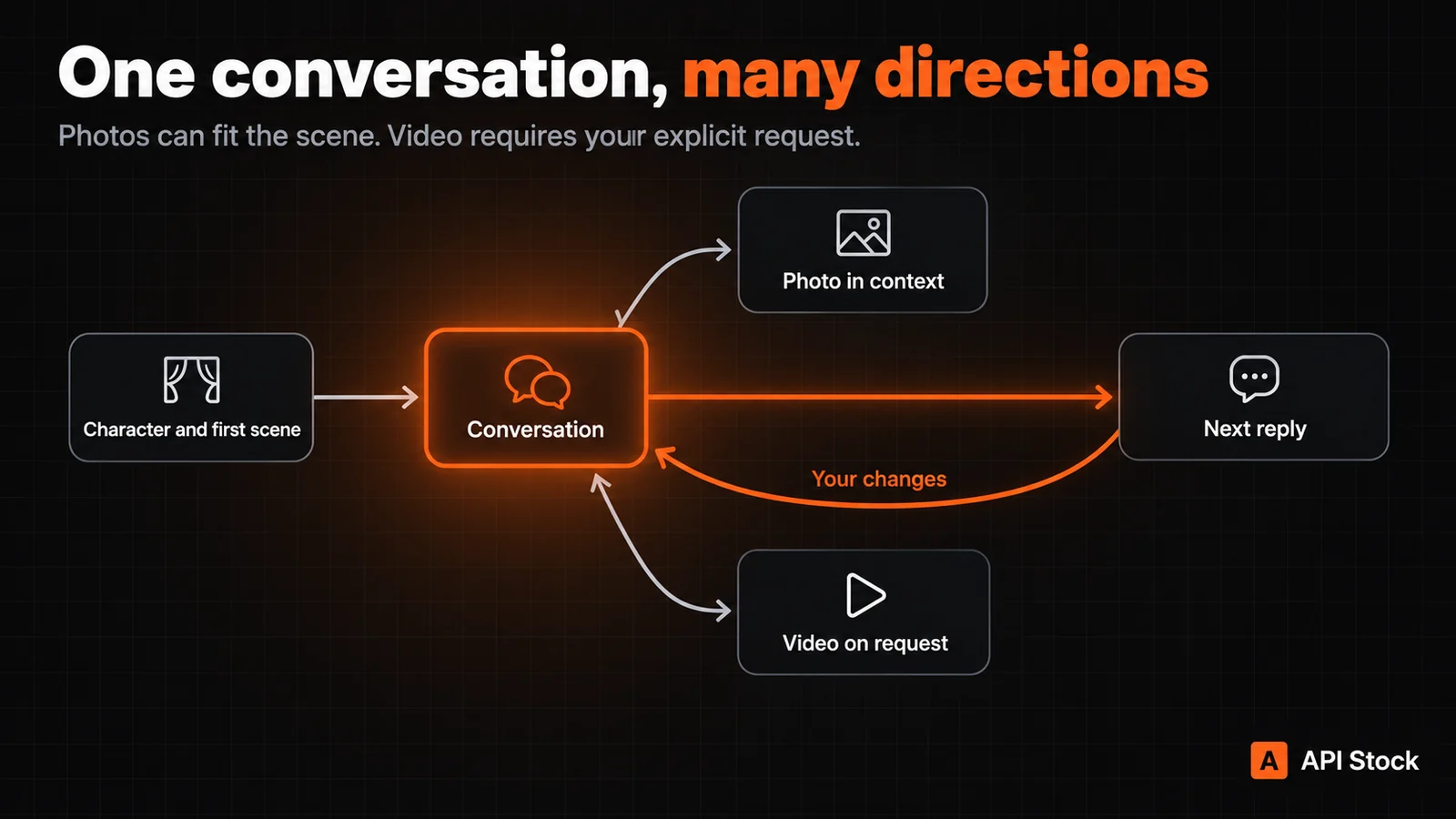
Video requires an explicit request. An animated exchange, a photo request or a change to video settings is not itself an instruction to generate a clip. For example:
Make a five-second video from this portrait: Ada smiles gently and waves, with a stationary camera. Preserve her appearance.
The initial image model is Seedream 5.0 Pro at 1K. Video starts with Wan 3.0 Pro, 480p and a five-second duration. You can change models and supported parameters. A generated clip appears as a media file in the conversation; the workflow does not provide a live video call.
Temporary images, videos and reference files are available for up to three days. Download anything you want to keep, or use the paid storage option in the interface. Continuing to have the text history does not mean every old media file remains available.
Will she remember the earlier conversation?
Stay in the same conversation to continue the same introduction and story. The workflow retains the original setup and uses the introduction alongside the conversation context; your explicit changes are also meant to carry forward.
Long conversations have a practical limit: part of the history may be passed to the model as a summary. That is not perfect recall of every sentence. If an important detail slips out of the story, a short reminder can help:
We agreed that Ada dislikes noisy bars. Let’s continue our walk by the river and leave the film debate for tomorrow.
A new chat should not be assumed to inherit the relationship from an earlier one. Keeping one story in one conversation makes its continuity easier to manage.
How much does an AI girlfriend chat cost?
There is no single fixed price per message. Text is billed by tokens; images and video use their respective model tariffs. The history supplied to the model and the length of its replies can change the text cost from turn to turn.
Catalog prices checked on October 19, 2026. Amounts are in USD.
| Operation | Model and assumptions | Price |
|---|---|---|
| Text input | Grok 4.6, per million input tokens | $2.10 |
| Text output | Grok 4.6, per million output tokens | $6.30 |
| One generated photo | Seedream 5.0 Pro, 1K | $0.042 |
| Five-second video | Wan 3.0 Pro, 480p at $0.086 per second | $0.430 |
| Ten-second video | Same model and resolution | $0.860 |
As a hypothetical calculation, 2,000 input tokens and 600 output tokens with Grok 4.6, without caching, cost $0.00798. This is not a measured average reply price. Longer history, additional model calls and context summarisation can change the actual total.
One 1K photo plus a five-second 480p clip costs $0.472 for those media generations alone. The agent’s text work is additional, and Seedream charges $0.004 for each reference image after the first. Choose a limit for the whole run, rather than treating the media subtotal as its full cost.
Your spending limit is a cap, rather than a flat charge for every reply. Check actual usage in the interface and consult current pricing, especially after changing models or resolution. The pricing evidence records the catalog snapshot and calculation assumptions.
What does an “AI relationship” mean here?
It can describe the experience of returning to a fictional romantic story: getting acquainted, disagreeing, flirting and building on shared scenes. An expressive response does not establish that a model has human feelings, a life between messages or commitments to you.
Treat the character as part of an interactive story you can steer. You choose its pace, level of intimacy and how much time to spend with it. A fictional character is enough to make that story interesting; you do not need someone else’s private messages or a real person’s identity.
To try it, open agent workflows, choose “Chat with a girl” and give the character two or three sentences of personality. After the first few replies, look for a recognisable voice, some initiative beyond asking questions and a response to the changes you request. Those observations are more useful than perfecting a long biography before the first conversation.
FAQ
Is AI girlfriend chat free?
The workflow uses paid models, so you should not assume unlimited free chat. Your account shows the available balance and current terms. For an initial conversation, use text only and set a small spending limit.
Do I need to upload a photo or write a character description?
No. The reference photo, appearance, personality and opening situation are all optional. With no setup, the workflow is instructed to invent a fictional adult character and an introduction.
Can the character suggest a topic herself?
Yes. The workflow encourages initiative within replies, including new topics, activities and ways to continue the scene. This does not promise background messages or notifications while you are away.
Will she remember everything I tell her?
There is no guarantee of verbatim recall. The workflow uses the conversation history, introduction and summaries of longer exchanges. Continue in the same chat and remind her of important details when needed.
Can I make voice or video calls?
This workflow provides text conversation with generated images and short video files. Generating a clip is not a voice call or a live video call.
Can I request a photo without generating a video?
Yes. Ask for a still image and specify the appearance or setting you want. Under the workflow’s rules, video requires an explicit request for video; asking for a photo is not that request.
- agent
- virtual-girlfriend
- roleplay
- workflows
Agent
Text, images, video and music in one conversation
Read next
 Use caseAI agent: turn a brief into text and imagesUse the new agent to turn a brief and reference files into text and images, choose models, set a spending limit and keep results in projects.·7 min read
 Use caseAI YouTube thumbnails: prompts, real screenshots and costMake an AI YouTube thumbnail backdrop for $0.014, add your real video still and editable title, then check the crop with practical tutorial prompts.·8 min read
 Use caseAI wall paint color preview: your room, three shades and costPreview wall paint colors in your own room photo with Seedream Pro from $0.042 per image, using paint-only prompts and checks before buying real samples.·9 min read