New: Nano Banana 2.1Try the model
API Stock
← AI model catalog

API Stock

AI image generation API

Choose an image generation API for product visuals, illustrations and reference-based edits. Compare current prices, supported sizes and input requirements, then test models in the playground.

Choose around what must stay fixed: the product, the layout or only the idea. A new illustration from a prompt and an edit of a supplied product photo need different controls. Use the current catalog below to shortlist compatible routes, then inspect text, geometry and reference fidelity on your own brief.

Choose for your task

Create a new illustration or ad concept

When there is no source image to preserve, compare text-to-image models on composition, subject detail and the amount of usable space left for your layout.

Start with the cheapest suitable resolution for drafts. Compare the actual output size and accepted aspect ratio before budgeting final assets.

Edit a product photo or keep a reference

For background replacement, product variants or visual continuity, evaluate models that accept image references. Compare what stays unchanged as carefully as what is edited.

Reference input does not guarantee pixel-perfect preservation, inpainting or mask support. Check media limits and validate logos, proportions and packaging after every edit.

Prepare a large final asset

Shortlist routes whose resolution field includes 4K when the layout needs a large source image. Compare the final resolution tier rather than each model’s cheapest thumbnail-sized output.

A 4K setting is an output option, not proof of print readiness. Inspect fine text, edges and dimensions at full size; colour preparation and final typesetting may still be needed.

Models and current API prices

Starting prices come from the live catalog and refer to each model’s cheapest published tier. Per-second rates and whole-generation prices buy different amounts of output. Compare the same duration, resolution and audio settings on the model page. Options below are individual schema values; not every combination is supported.

ModelStarting priceInputs and controlsDeclared optionsAll prices and parameters
FLUX 3 ImageFrom $0.06per generation
  • text-to-image
  • image-to-image
  • urls
  • size: auto | 21:9 | 2:1 | 16:9 +12
  • resolution: 768SQ | 1K | 1.5K | 2K +1
All prices and parameters
GPT Image 2From $0.013per generation
  • text-to-image
  • image-to-image
  • urls
  • size: auto | 1:1 | 16:9 | 9:16 +12
  • resolution: 1k | 2k | 4k
All prices and parameters
GPT Image 2.5 FlareFrom $0.01per generation
  • text-to-image
  • image-to-image
  • urls
  • size: auto | 1:1 | 16:9 | 9:16 +12
  • resolution: 1k | 2k | 4k
All prices and parameters
GPT Image 2.5 SunburstFrom $0.01per generation
  • text-to-image
  • image-to-image
  • urls
  • size: auto | 1:1 | 16:9 | 9:16 +12
  • resolution: 1k | 2k | 4k
All prices and parameters
Grok Imagine 1.5 ImageFrom $0.022per generation
  • text-to-image
  • image-to-image
  • urls
  • size: 1:1 | 16:9 | 9:16 | 3:2 +1
All prices and parameters
Grok Imagine 2.0 ImageFrom $0.022per generation
  • text-to-image
  • size: 1:1 | 2:3 | 3:2 | 3:4 +3
All prices and parameters
Nano BananaFrom $0.015per generation
  • text-to-image
  • image-to-image
  • urls
  • size: 1:1 | 2:3 | 3:2 | 3:4 +10
  • resolution: 512px | 1K | 2K | 4K
All prices and parameters
Nano Banana 2From $0.022per generation
  • text-to-image
  • image-to-image
  • urls
  • size: 1:1 | 2:3 | 3:2 | 3:4 +10
  • resolution: 512px | 1K | 2K | 4K
All prices and parameters
Nano Banana 2 LiteFrom $0.005per generation
  • text-to-image
  • image-to-image
  • urls
  • size: 1:1 | 2:3 | 3:2 | 3:4 +10
  • resolution: 512px | 1K | 2K | 4K
All prices and parameters
Nano Banana 2.1From $0.014per generation
  • text-to-image
  • image-to-image
  • urls
  • size: 1:1 | 2:3 | 3:2 | 3:4 +10
  • resolution: 1K | 2K | 4K
All prices and parameters
Nano Banana ProFrom $0.04per generation
  • text-to-image
  • image-to-image
  • urls
  • size: 1:1 | 2:3 | 3:2 | 3:4 +10
  • resolution: 512px | 1K | 2K | 4K
All prices and parameters
Seedream 4.5From $0.036per generation
  • text-to-image
  • image-to-image
  • urls
  • size: 1:1 | 4:3 | 3:4 | 16:9 +6
  • resolution: 2K | 4K
All prices and parameters
Seedream 5.0 FlashFrom $0.02per generation
  • text-to-image
  • image-to-image
  • urls
  • size: 1:1 | 4:3 | 3:4 | 16:9 +4
  • resolution: 1K | 1.5K | 2K
All prices and parameters
Seedream 5.0 LiteFrom $0.033per generation
  • text-to-image
  • image-to-image
  • urls
  • size: 1:1 | 4:3 | 3:4 | 16:9 +6
  • resolution: 2K | 3K | 4K
All prices and parameters
Seedream 5.0 ProFrom $0.042per generation
  • text-to-image
  • image-to-image
  • urls
  • size: 1:1 | 4:3 | 3:4 | 16:9 +6
  • resolution: 1K | 2K
All prices and parameters
Wan 2.7 ImageFrom $0.029per generation
  • text-to-image
  • image-to-image
  • urls
  • size: 1:1 | 16:9 | 9:16 | 4:3 +3
All prices and parameters
Z-ImageFrom $0.01per generation
  • text-to-image
  • image-to-image
  • urls
  • size: 1:1 | 4:3 | 3:4 | 16:9 +1
All prices and parameters

What to check before integrating

  • Compare the same resolution, aspect ratio and quality tier. The cheapest published option can be smaller than the asset your application needs.
  • For product work, test reference fidelity, small lettering and shape preservation. A text-to-image capability does not imply editing or a mask input.
  • Each media API request returns one output. To produce a set, create separate tasks and include rejected drafts in the cost per accepted asset.
  • Check input file requirements and any resolution limits before batch work. Save completed files into your own storage and review them at the intended display size.

Inspect a result before choosing

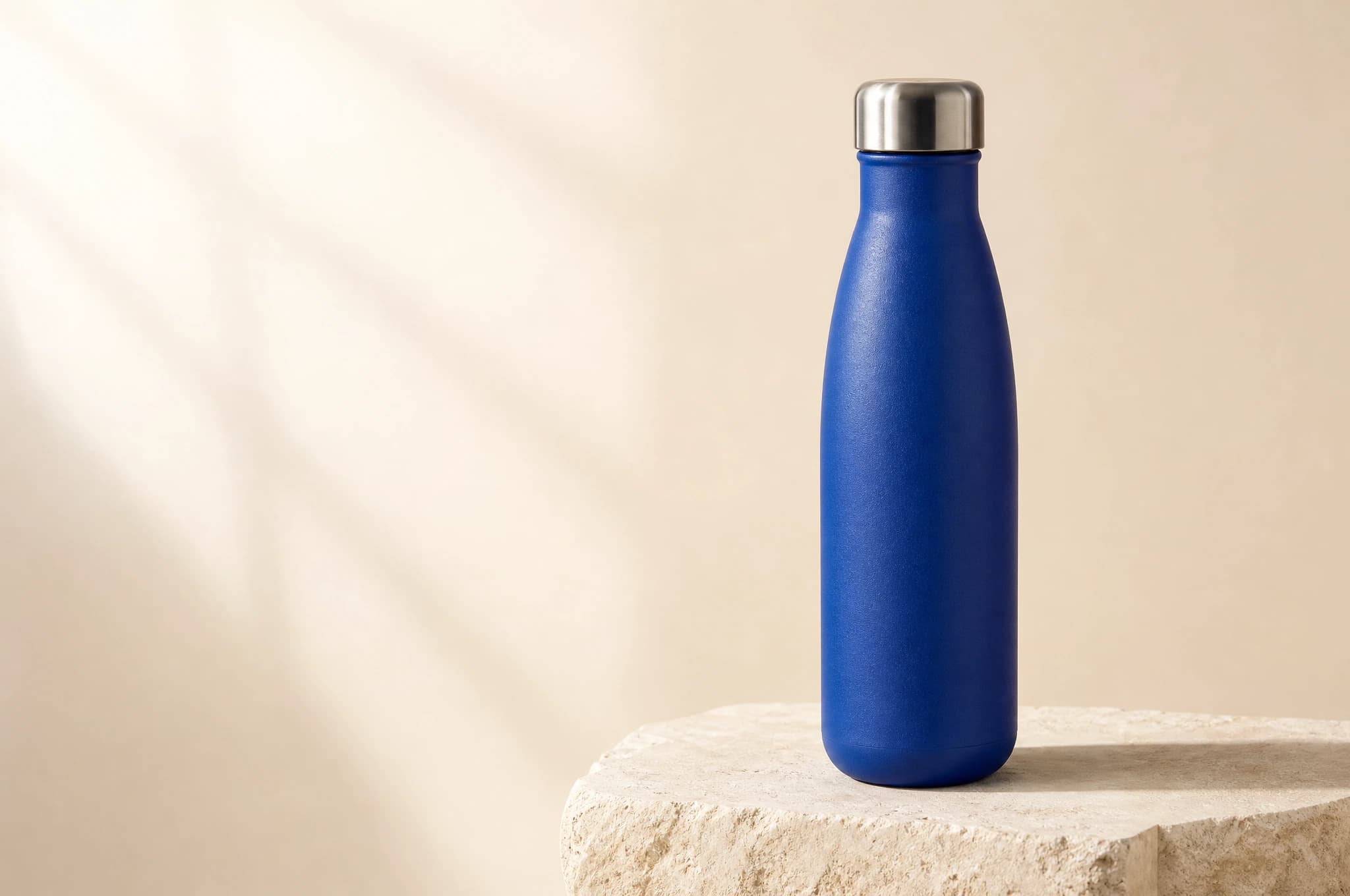
GPT Image 2: a cobalt-blue product bottle on limestone, with room for headline copy. The result was generated through our API; inspect the cap, contact shadow and empty space when comparing alternatives.

GPT Image 2

One example shows a workflow, not a quality ranking. Compare your own brief across models before committing a production budget.

Prompt used for this example

{
  "prompt": "Studio product photograph for a small design brand.\nA single matte cobalt-blue insulated water bottle with a brushed stainless-steel\ncap stands on a pale limestone block. Three-quarter view, bottle fully visible,\ncentered in the right half of a wide composition. Warm ivory seamless background,\nsoft window light from the upper left, a believable contact shadow, fine\npowder-coated texture and restrained reflections on the cap. Leave the left\nthird empty for headline copy added later. No text, no logo, no extra bottles,\nno decorative props.",
  "size": "3:2",
  "resolution": "2k"
}
Try this model in the playground

Compare model options

Questions before integrating

Which image generation API fits product visuals?

If the product must resemble an existing photo, shortlist models with image-to-image input and test reference fidelity. For a new concept without a source, start with text-to-image. Compare packaging, small text and geometry at the final output size.

How much does an image API request cost?

The table uses the live catalog’s starting price per generation. Resolution and quality can change that price. Each media request asks for one output; for a batch, multiply the selected tariff by the number of separate tasks and allow for rejected drafts.

Can I edit an existing image?

Choose a route marked image-to-image and check its reference fields. Reference-based editing, masked inpainting and exact preservation are different capabilities. The image-editing guide covers how to describe the intended change and review what remained unchanged.

How can I compare results before integrating?

Use the linked playground on each model page with the same brief, aspect ratio and comparable resolution. Inspect output details and the estimated charge, then use the selected model through the shared generation API.