활용 사례
AI background music for voiceovers: prompts and cost
Make instrumental background music for a voiceover with Suno from $0.075 per request, then test it under speech, trim it and budget for alternate takes.
For AI background music under a voiceover, start with a sparse instrumental on Suno: a standard music request through API Stock costs $0.075, or 7.5 cents, as of 12 October 2026. Turn on the instrumental option, describe a restrained arrangement, then audition the result beneath your actual narration before trimming it. The price buys a generation attempt; it does not guarantee a usable mix or an exact running time.
What makes background music work under a voiceover?
A music bed gives an explainer, tutorial or narrated product video a mood without becoming the thing the audience follows. You want listeners to understand the sentence first and feel the music second.
That calls for a different brief from a standalone song. A catchy lead melody can compete with a speaker. A dramatic build can arrive during a quiet explanation. Even a track with no singing can feel busy if its instruments keep introducing new ideas.
Start with your recording and rough edit, rather than generating a favourite genre and trying to fit your speech around it. Identify the opening, the longest stretch of narration and the ending. Decide whether music belongs throughout, only in transitions, or just before the first sentence. For dense instructions, silence may be the clearer choice.
For a first attempt, specify a small set of instruments, a steady mood and no prominent solo. Save a bigger musical moment for a section where nobody is talking. You can still make the piece recognisable through one soft motif; it does not need a chorus.
How do you make the first instrumental without writing code?
Use the Suno playground. Sign in and fund your prepaid balance before running it; generations are charged to that balance. You can check the current action tariff on the model page and the broader pricing page.
For the prompts below, use these settings:
- Choose Action: music. This creates a new composition; you do not need to upload your narration.
- Keep Custom off for simple mode. Put the description in Gpt Description Prompt, which may be inside the expanded parameters. The main Prompt field is for custom mode, so it is not the field to use for this first attempt.
- Turn Make Instrumental on. Its default is off; writing “no vocals” in the description is useful direction, but also set the actual instrumental switch.
- Leave Max Mode off, check the displayed request price and run once.
Wait for the audio result and listen to every returned track before ordering another take. This workflow is priced per request, not per second and not per downloaded file; do not assume a guaranteed number of alternatives from one run.
Use these prompts as starting briefs and assess how each result follows them. The music generation guide explains the two modes, and the Suno music reference lists the conditional fields if you later automate the workflow.
Which prompts leave room for spoken words?
Describe the job as well as the style. “Upbeat music” gives little guidance about what should happen beneath a sentence. “A restrained bed for a narrated tutorial, with no featured melody” gives the model a more useful direction.
For a calm tutorial or screen recording:
Instrumental background bed for a clear spoken tutorial. Soft plucked synth, warm sustained chords and a very light electronic pulse. Steady, patient and reassuring. Sparse repeating motif with long gaps between notes, no prominent lead melody, no dramatic build, no vocals or choir. Keep the arrangement understated throughout, with a gentle ending.
The intended result is a quiet sense of progress. If the plucked part feels like a second speaker, change “soft plucked synth” to “soft sustained synth” and ask for fewer changing notes. Do not add more genre labels to solve a problem caused by a busy arrangement.
For a narrated product walkthrough:
Instrumental bed for a narrated product walkthrough. Muted mallet notes, rounded bass and soft dry percussion. Light, confident and practical rather than cinematic. Restrained groove, simple repeating harmony, no busy fills, no bright solo instrument, no vocals. Maintain a consistent mood so the spoken explanation stays in front.
Here the goal is a little energy beneath the demonstration. Listen especially during the sentence that explains the main benefit: if a fill pulls your attention away from it, choose a quieter passage or simplify the percussion in the next request.
For a reflective narrated story:
Instrumental background for a reflective spoken story. Low warm synth pad, occasional soft felted keyboard notes and subtle texture. Intimate, grounded and unhurried. Leave plenty of space between musical phrases, avoid swelling into a climax, no percussion hits that punctuate every sentence, no vocals or spoken samples. A soft, natural finish.
The intended result is continuity without telling the audience how to feel at every turn. If it becomes too sentimental, remove the keyboard notes and ask for a neutral sustained texture. A more elaborate arrangement is not automatically a better fit.
How much should you budget for a usable music bed?
Catalog prices checked on 12 October 2026. These are standard Suno action prices through API Stock, with Max mode off. Each extra generation or editing action is a separate paid request.
| Work | Catalog price | When you need it |
|---|---|---|
New instrumental, music | $0.075 per request | First draft or another musical take |
Keep a selected passage, crop | $0.012 per request | Optional edit of a compatible generated source |
Add an ending fade, fade-out | $0.012 per request | Optional fade on a compatible source |
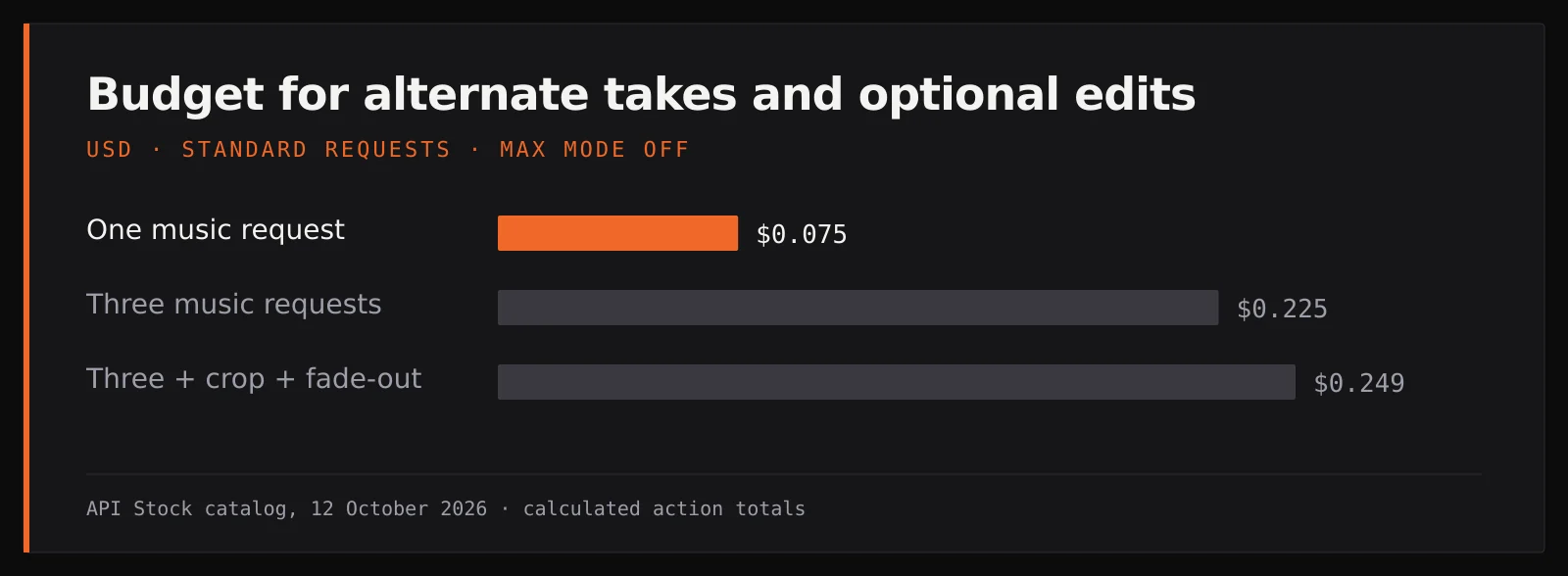
Three independent music requests cost $0.225, or 22.5 cents. If you then use one crop and one fade-out, the combined action budget is $0.249, or 24.9 cents. These calculated totals assume three generations; your number of usable takes will depend on the results.
You can instead download a result and trim, fade and set its level in your existing video or audio editor. That adds no API Stock editing request, although your editor may have its own cost. It is the simplest route when the narration and picture are already on a timeline.
For edits through Suno, source compatibility matters. Keep the original task and the selected track identifier, and check the Suno integration guide before chaining operations. Do not pay for stems or a remaster just because the first draft feels wrong: a quieter arrangement, another passage or lower music level may solve the problem more directly.
How do you tell whether a generated track is usable?
Audition beneath speech, not just on its own. A track that sounds impressive in isolation can be the wrong background for a quiet voice.
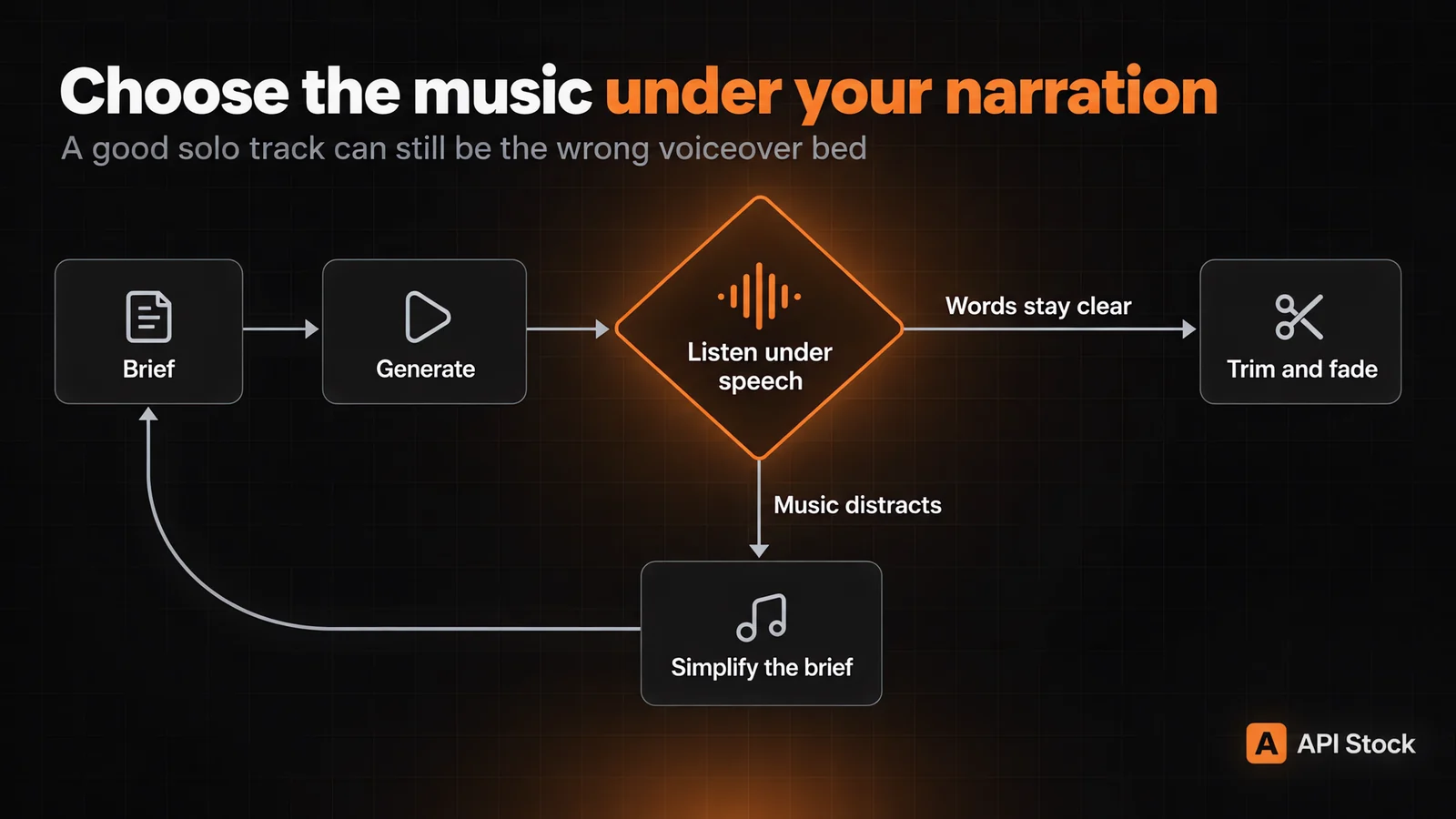
First, put the candidate beneath the most difficult part of the recording: a softly spoken sentence, an explanation with several details or a quick change of topic. Bring the music up from silence until it supplies a mood. If you start following its melody instead of the explanation, lower it or choose another section.
Then listen to the whole edit. Check the start for unwanted singing, humming or speech-like sounds despite the instrumental setting. Check transitions for a sudden fill or build. At the ending, make sure a musical phrase is not chopped halfway through and that a fade does not bury your last words.
Finally, play the exported mix on headphones and the speakers your audience is likely to use. Test at a modest listening volume. If any words become hard to follow, try the narration alone: you may need to fix the recording itself before adding music.
There is no universal volume setting that fits every voice and arrangement. Use level automation or ducking in your editor to lower the bed during speech if needed. For a tutorial with long, information-heavy sections, removing music from those sections can be more useful than trying to make it audible everywhere.
What can a prompt control, and what still needs editing?
You can request instrumentation, mood, restraint and a gentle ending. These are creative directions. They do not guarantee a particular melody, exact tempo, seamless loop or final duration.
The live catalog offers a target duration of 10–360 seconds for music in custom mode, but explicitly says the model decides the actual length. The simple-mode workflow above leaves that field unset. If your voiceover ends at a precise point, select a suitable passage and trim it in the editor rather than relying on “exactly this long” in a description.
A generated track also does not know where your individual sentences begin. You are not supplying the narration in this workflow. Place the music yourself, adjust its level and make the final timing decisions against the recording.
Describe an original musical direction rather than asking for a particular artist or an existing show's theme. Suno's Safety Center, updated 1 October 2026, describes originality rather than imitation and restrictions on recreating existing songs. This post makes no promise of exclusivity, commercial licensing or a claim-free upload from the generation price alone.
Your next step: open the Suno playground, enable Make Instrumental, and paste the calm tutorial brief into Gpt Description Prompt with Custom off. Generate one standard take, then test it under your narration before spending on more versions.
FAQ
Can I generate background music with no vocals?
Yes: Suno exposes a Make Instrumental option, which you should turn on explicitly. Still listen to the finished result for unwanted vocal-like sounds before using it beneath speech.
Does one short instrumental cost less than a long one?
Standard music is $0.075 per request in today's catalog, rather than a per-second tariff. Asking for a shorter piece does not reduce that action price; alternate takes and follow-up edits are charged separately.
Will Suno make a track exactly as long as my voiceover?
An exact duration is not guaranteed. The custom-mode duration setting is a target of 10–360 seconds, so use your editor to make the final cut match the narration.
Is generated music automatically royalty-free for client work?
Do not infer usage rights or a claim-free upload from the generation price. Check the applicable service terms and your client's publishing requirements before delivering a commercial project.
Should I keep regenerating until the music fits?
Listen to each candidate under the actual voice first. If the arrangement works, lowering the level, selecting a quieter passage or fading in your editor may be enough; regenerate when the composition itself is the problem.
- suno
- music
- voiceover
- creators
내 키로 직접 사용해 보기
이 글에 나온 모든 모델은 API Stock 카탈로그에서 바로 사용할 수 있습니다. API 키 하나, 선불 잔액 하나, 공급자 간 자동 전환.
다음 읽을거리
 활용 사례AI music video for your song: models, prompts and costHow to make an AI music video for a song: which model suits which shot, prompts that work, and what three minutes of footage cost, from $2.38.·12분 분량
 활용 사례AI agent: turn a brief into text and imagesUse the new agent to turn a brief and reference files into text and images, choose models, set a spending limit and keep results in projects.·7분 분량
 활용 사례AI YouTube thumbnails: prompts, real screenshots and costMake an AI YouTube thumbnail backdrop for $0.014, add your real video still and editable title, then check the crop with practical tutorial prompts.·8분 분량