应用案例
AI avatar from a photo: prompts, likeness checks and cost
Make a square AI avatar from your photo with Seedream Pro, starting at $0.042 per image; use portrait prompts and check likeness before the circular crop.
To make an AI avatar from your photo, start with one clear reference and a square composition in Seedream 5.0 Pro: one 1K image costs $0.042, with the first reference included, through API Stock as of 8 October 2026. Describe the style you want, then check your likeness and preview a circular crop before using it as a profile picture. An attractive portrait is only useful if it still looks like you at avatar size.
What kind of avatar should you make from your photo?
Pick the destination before the style. A professional profile needs a recognizable face and an uncomplicated background. A gaming profile may benefit from a bolder illustrated silhouette. A channel about plants may be better served by a simple botanical symbol, without a face at all.
For a professional profile, try a modest edit first: simpler background, balanced lighting and a little room around the head. Keep your real facial features, age and hair. You may find that your original photo with a careful crop works better than a generated edit; use it if it already does the job.
For an illustrated profile, choose one visual treatment you can describe: flat editorial shapes, a soft painted portrait or a restrained comic-book look. Combining several styles with dramatic lighting and elaborate costume changes makes it harder to tell which instruction caused a poor result.
The output is an image file, not a talking avatar, a video character or a ready-made account profile. You download it and set it as your profile picture on the service you use. This workflow also does not produce a verified identity photo or guarantee that someone will recognize you.
Which model should you try first?
Seedream Pro is a reasonable starting point for this task because today's catalog supports both image generation and reference-based editing, square output, and 1K or 2K resolution. You can bring your photo and request a specific change rather than describing an imaginary person from scratch. That is a task fit, not a claim that Pro wins a portrait-quality benchmark.
Use 1:1, 1K and a single reference for the first attempt. The square gives you room to preview a circular profile crop; the lower resolution tier lets you judge the composition before paying for a larger version. A 2K image may help when you need a larger crop elsewhere, but more pixels will not correct a changed nose or an unfamiliar expression.
Nano Banana 2 Lite is a cheaper alternative for experimenting with an illustrated look: its listed price is $0.005 per generation, and it supports reference editing. Use 1K for this workflow. The lower price is a reason to test it, not evidence that it preserves likeness as well or needs the same number of attempts.
If you already have a model that handles your face well, staying with it may be more useful than changing models for a small difference in generation cost. For broader reference-editing tasks, read the image-editing guide.
What makes a useful reference photo?
Choose a clear photo where your face is easy to see, rather than one where you look good only because it is tiny. Even lighting and a simple pose make it easier to compare the output with the original. Avoid a source with a strong beauty filter if your goal is a recognizable professional portrait.
Crop away distracting surroundings before uploading, while keeping the whole head visible. A group photo gives the model an unnecessary choice about which person to edit. A photo with sunglasses or hair obscuring the eyes gives you less information for a likeness check.
Start with one reference instead of assembling a large collection. If a second photo is needed to clarify an obscured feature, explain its role. Do not mix pictures of different people and expect the model to know whose identity matters. Use your own image, or an image you have permission to edit; avoid uploading a private photograph just to test a style.
What prompt can you paste for a professional avatar?
In the Seedream Pro playground, upload your photo, set 1:1 and 1K, then paste this prompt:
Edit the supplied photo into a natural professional profile portrait of the same person. Preserve the facial proportions, eye shape, nose, skin tone, age, hairstyle and any glasses. Keep the expression close to the source. Use soft balanced lighting and a plain warm-grey background. Show the head and upper shoulders, centered, with space above the hair and on both sides for a circular crop. Keep believable skin texture. No beauty-filter smoothing, added accessories, text, border or logo.
The intended result is a cleaner profile image, with your identity serving as the anchor. This is a starting prompt, not a portrait result we have tested on your photo. Preserve instructions can guide an edit, but they do not lock individual features or prevent the model from changing them.
Compare the output beside the source before downloading your favorite. Look at the eye spacing, jawline, hairline and glasses. If the result makes you younger, changes the frame shape or replaces your expression, revise that particular problem. Ask for a smaller edit, such as changing only the background, rather than adding more flattering adjectives.
How do you make a cartoon avatar without losing yourself?
Keep the same reference and framing instructions, then ask for one clear illustration style. For a friendly community or gaming profile:
Turn the supplied photo into an editorial cartoon portrait of the same person. Preserve the face shape, hairstyle, skin tone, age and glasses if present. Use broad clean shapes, restrained outlines and simple shading, with a plain muted-blue background. Head and upper shoulders only, centered in a square, with generous room around the hair for a circular crop. Keep the expression recognizable. No costume changes, words, initials, border or logo.
The useful trade-off is simplification. A cartoon can stay legible when small, but it can also erase the features that distinguish you. Check whether the result resembles your face rather than a generic character with similar hair. Reject it if friends would need the username to identify you and recognition is the point of the profile.
For a botanical channel that does not need your face, try a text-only avatar:
A square botanical channel avatar showing one ginkgo sprig with three broad fan-shaped leaves. Make the central leaf warm orange and the other leaves pale cream against a solid charcoal background. Bold simple silhouette, minimal fine veins, flat illustration. Keep the entire sprig centered inside an imaginary circle with generous empty space around it. No person, lettering, border, gradient or logo.
This requests a channel illustration, not a finished trademark or vector logo. Keep the large shapes and remove tiny details if it becomes muddy when small. Do not put your channel name inside the generated picture; the profile interface already displays it separately.
Why should you preview a circular crop before using it?
A square download can look spacious while its circular preview cuts off hair, headphones or the tip of an illustrated leaf. The corner space will disappear on a circular profile surface. Place the features that matter near the center, and use the actual destination's preview to check them.
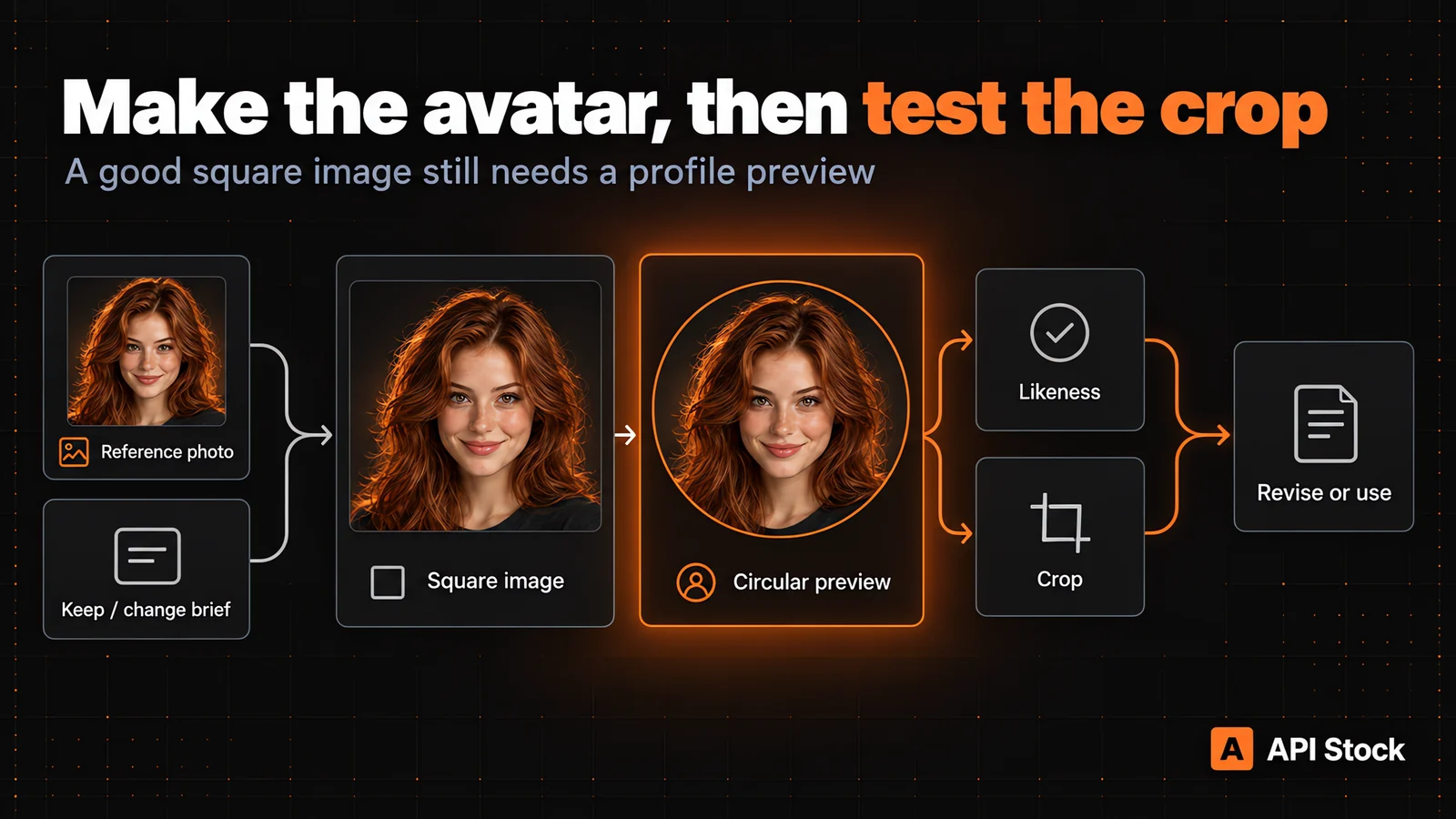
Preview the image small as well as large. Fine background textures, tiny earrings and elaborate outlines may disappear. You want a clear face or symbol first; decoration comes second. Check the background against both light and dark interface surroundings so its edge remains understandable.
You do not need another paid generation to make a simple crop. Use your image editor or the destination's crop control. Regenerate only when the source image lacks the space or composition you need. Keep the original download so you can prepare a different crop for another profile later.
How much does an AI avatar cost, including revisions?
These are USD catalog prices as of 8 October 2026, not a promise of a usable avatar on the first attempt. Check current pricing and the playground's estimate before running a request.
| Model and input for one output | Listed generation cost |
|---|---|
| Nano Banana 2 Lite, 1K | $0.005 |
| Seedream 5.0 Pro, 1K, zero or one reference | $0.042 |
| Seedream 5.0 Pro, 2K, zero or one reference | $0.084 |
| Seedream 5.0 Pro, 1K, two references | $0.046 |
For Seedream Pro, each reference after the first adds $0.004. A source photo plus a separate style image counts as two references. A sentence describing the style is part of your prompt, not an additional reference.
For a planning example, three separate 1K attempts with one reference each cost 3 × $0.042 = $0.126 at the listed rates. Generating one additional 2K version adds $0.084, for $0.21 in generation spend. That is an example attempt budget, not evidence that three attempts will be enough. Higher resolution is another generation, not a free upgrade of the chosen file.
A successfully generated image you discard still contributes to your spend. Your cost per usable avatar depends on how many outputs meet your brief. Stop once the image is recognizable and fits its destination; generating more versions without a specific improvement in mind adds cost without a clear benefit.
What should you do next to get your first avatar?
Open the Seedream Pro playground, sign in and fund your balance, then upload one clear reference photo. Choose 1:1 and 1K, paste the professional-avatar prompt and review the price estimate before generating one image. Playground requests are paid requests; creating an account alone does not fund them.
Judge that first output on two questions: does it look like you, and does it survive the destination's circular crop? If either answer is no, name the problem before making another attempt. Keep the successful source and the prompt together so a future profile update starts from a known brief.
If you later automate profile-image creation, the image-model reference explains the request fields. For this first avatar, you can complete the task in the playground without writing code.
FAQ
Can I make an AI avatar from my own photo without coding?
Yes: use the Seedream Pro playground, upload your reference and describe the edit. Sign in and fund your balance before generating; review the result and set it as your profile picture yourself.
How much does one avatar attempt cost?
Seedream Pro's listed rate is $0.042 at 1K or $0.084 at 2K, with one reference included, as of 8 October 2026. Each additional reference adds $0.004; rejected successful outputs still count toward your spend.
Will the AI avatar look exactly like me?
Exact likeness is not guaranteed. Use a clear reference, ask to preserve distinctive features and compare the result with your photo before using it.
Should I generate a circle or a square?
Generate a square image with space around the head or symbol, then preview the circular crop in your editor or profile interface. This gives you a square source to reuse while checking what the destination will cut away.
Does this create a talking avatar?
No: these image models create a still profile picture. This workflow does not animate a face, synchronize speech or produce a video avatar.
- image
- avatar
- editing
用你自己的密钥试试
文中提到的每个模型都已上架 API Stock 目录 —— 一个 API 密钥、一个预付余额、服务商之间自动切换。
继续阅读
 应用案例AI wall paint color preview: your room, three shades and costPreview wall paint colors in your own room photo with Seedream Pro from $0.042 per image, using paint-only prompts and checks before buying real samples.·阅读约 9 分钟
 应用案例AI product photos for an online store: models, prompts, costHow to turn one phone photo into a full set of product images with AI — which model to use for each shot, prompts that work, and the cost per photo.·阅读约 9 分钟
 应用案例AI agent: turn a brief into text and imagesUse the new agent to turn a brief and reference files into text and images, choose models, set a spending limit and keep results in projects.·阅读约 7 分钟