Tutorial
Suno API guide: all 31 actions, modes and prices
A practical map of all 31 Suno API actions: create songs, edit tracks, extract stems and data, choose simple or custom mode, and price each step.

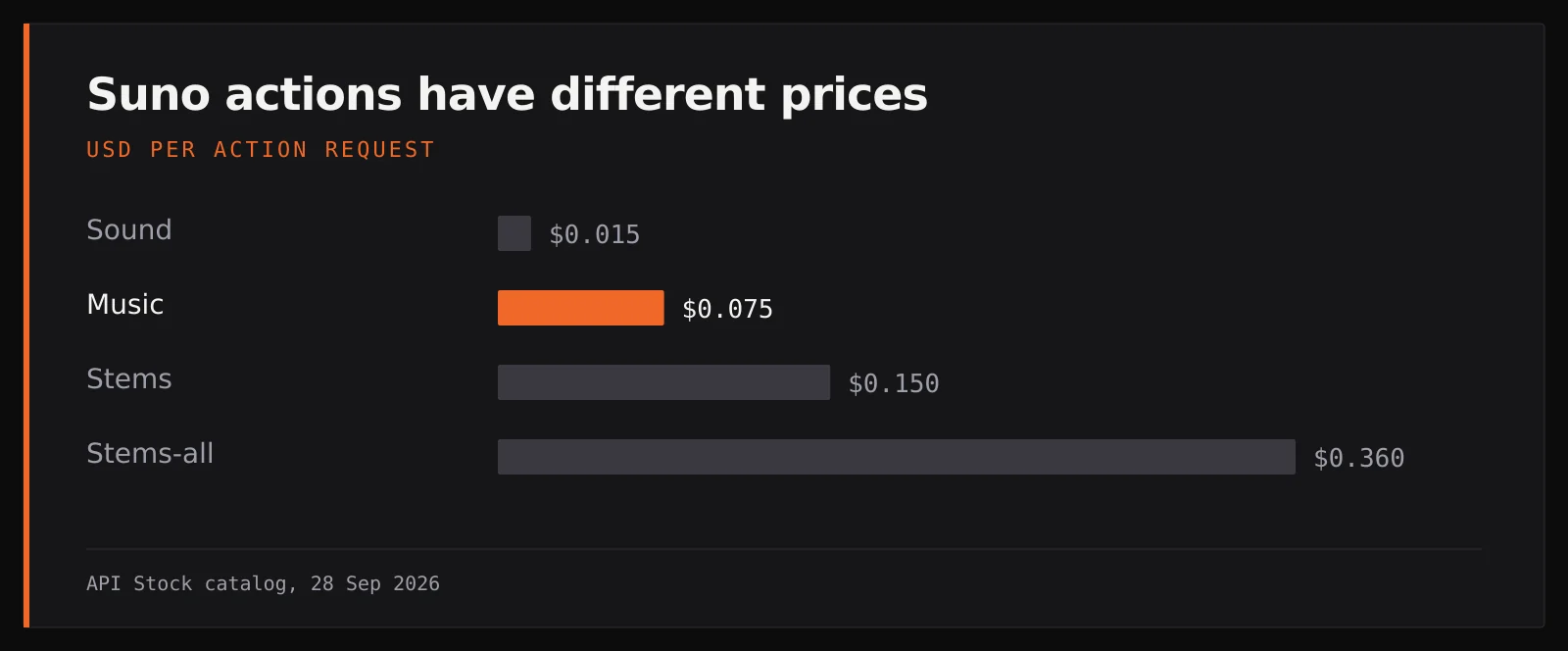
The Suno API in API Stock exposes 31 actions through one model ID, suno. Use music to make a track ($0.075 per generation), sound for an effect ($0.015), extend to continue a song ($0.075), or stems to separate it ($0.15). Set the action in input.action; omitted means music. The live price catalog was checked on 28 September 2026. This guide maps every action to a job and shows how to choose a valid request, rather than treating every audio feature as “generate a song.”
How is one Suno API model organized?
Every call goes to POST /api/v1/generation/create with "model": "suno". input.action picks the operation; input.mv chooses an engine version where that action uses one. The endpoint returns a taskId immediately. A completed media task has downloadable files, while text and analysis actions put structured data in output. Task polling and webhooks work the same way as for video and images.
There are two independent choices people often conflate. action chooses the work: compose, extend, split, trim, export or analyze. custom chooses who writes the music prompt for music, extend and cover: simple mode lets Suno decide lyrics from a description; custom mode supplies your own lyrics or detailed prompt. add-vocals and add-instrumental are separate actions, not custom-mode switches. The music generation guide goes deeper on writing styles and lyrics.
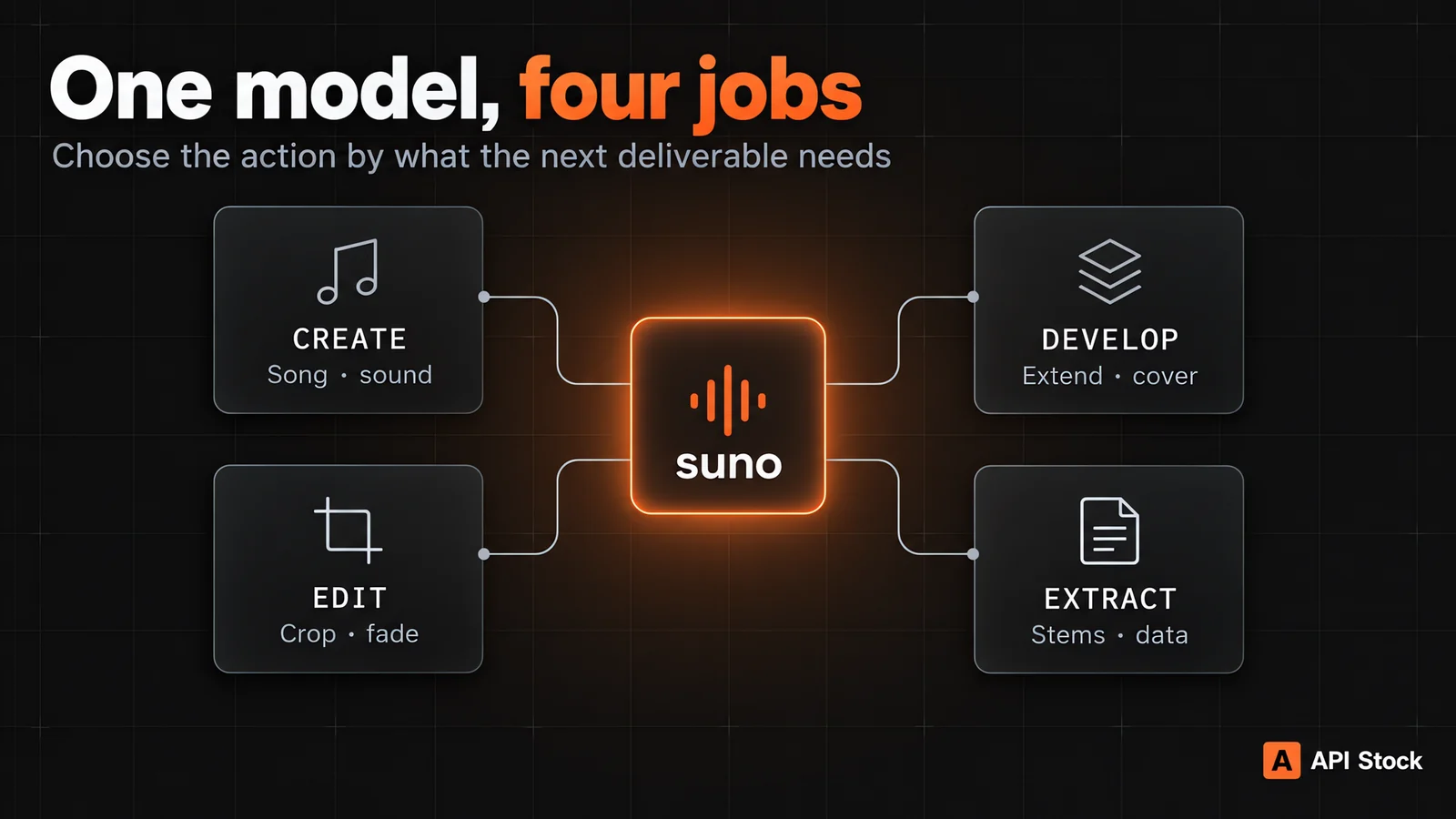
Which action should you choose to start from scratch?
These actions need no earlier Suno task, apart from upload, which starts with an externally hosted audio file. Prices are per generation or action request, not per minute of audio. See the Suno model page for the current tariff.
| Action | Choose it when… | Required starting point | Price |
|---|---|---|---|
music | You want a new song or instrumental. | Simple description, or custom lyrics/instrumental flag | $0.075 |
sound | You need a sound effect or loop, rather than a full song. | prompt; type can be one-shot or loop | $0.015 |
lyrics | You need lyric ideas before recording or generating audio. | prompt; result is text in output | $0.012 |
boost-style | Your style tags are too vague and need expansion. | tags; result is text in output | $0.002 |
inspo | You have one to four public audio references and want a new song inspired by them. | audioUrls with 1–4 URLs | $0.102 |
upload | You need to import external audio before a later track action. | Public audioUrl | $0.006 |
inspo creates a new composition from references; it is not a command to preserve a melody exactly. upload is an import step, not a mastering or conversion operation. Only use audio you have permission to upload and transform. If you simply want a short UI click, select sound instead of paying for a song request.
What is the difference between simple, custom and engine modes?
In simple mode (custom: false or omitted), set gptDescriptionPrompt to a description of up to 500 characters. It can include genre, instruments, mood and the subject of the lyrics; the model supplies the words. For a vocal-free bed, use makeInstrumental: true explicitly rather than relying on “no vocals” in prose.
In custom mode (custom: true), put the lyric sheet or detailed generation prompt in prompt, the production direction in tags, and optionally a title. prompt is not the style field: a phrase such as “cinematic synth-pop” belongs in tags. For an instrumental, makeInstrumental: true can satisfy the custom prompt requirement. music, extend and cover implement this switch; other actions have their own fields and rules.
The public audio engine values are v3.5, v4.0, v4.5, v4.5+, v5.0, v5.5 and custom; the default for audio actions is v4.5+. On v3.5/v4.0, custom prompt is limited to 3,000 characters and tags to 200; later versions allow 5,000 and 1,000. mv: "custom" needs an inline customModel with a name and 6–24 public training audio URLs; it is trained for that request rather than saved as a reusable model. The separate lyrics action accepts mv: "default" or "remi-v1". Version availability can depend on the selected action, so start with the default unless you need a specific engine.
curl -X POST https://api.api-stock.com/api/v1/generation/create \-H "Authorization: Bearer $API_STOCK_KEY" \-H "Content-Type: application/json" \-d '{"model": "suno","input": {"action": "music","custom": true,"mv": "v4.5+","title": "Harbour at Dawn","tags": "indie folk, brushed drums, warm bass, unhurried vocal","prompt": "[Verse]\nThe harbour wakes before the sun\n[Chorus]\nWe sail when morning comes"}}'
This is a copyable custom-mode request. For a fast draft, replace its custom fields with "gptDescriptionPrompt": "An unhurried indie folk song about leaving a harbour town at dawn". The per-action music reference lists the conditional rules.
Which actions develop or rearrange an existing track?
Most of these start from one of your own completed Suno tasks. Pass its public taskId as sourceTaskId; when a task produced several tracks, pass the desired audioId from output.tracks[].audioId. Some actions also accept a public audioUrl. A source is tied to the system that produced it, so not every derived action is available for every source; check a small chain before designing a batch workflow.
| Action | Choose it when… | Important input | Price |
|---|---|---|---|
extend | A good song ends too soon. | Source plus continueAt in seconds | $0.075 |
concat | You need the complete song assembled after an extension. | sourceTaskId from a compatible extend result | $0.002 |
cover | You want a new style from an existing song or audio source. | Source plus style/content fields | $0.075 |
music-cover | You want an automatic cover of a prior generated track. | sourceTaskId; support depends on the source chain | $0.075 |
add-instrumental | You have vocals and need backing music. | A compatible source, usually imported vocal audio | $0.075 |
add-vocals | You have an instrumental and need a sung part. | A compatible source, usually imported instrumental audio | $0.075 |
add-stem | You want to layer another instrument or part. | sourceTaskId; simple mode needs gptDescriptionPrompt | $0.075 |
remaster | The arrangement works, but you want a fresh master. | sourceTaskId; optional intensity | $0.075 |
mashup | You want a new blend of two earlier tracks. | Exactly two sourceTaskIds | $0.075 |
sample | One passage should seed a new song. | sourceTaskId, startS, endS | $0.075 |
The key choice is preserve vs. transform. extend continues a track; concat assembles extension segments. cover changes its presentation, while music-cover automates a cover of a previous generation. sample creates something new from a selected interval; crop below just keeps that interval. remaster revisits production rather than rewriting a time range. For a track you already like, avoid calling music again and hoping it will reproduce it.
Which Suno actions make precise edits?
Use a time range in seconds for operations that edit a portion of a previous track. The API validates endS > startS before queuing the request. This is often more predictable for podcast beds, intros and social cuts than asking a generation prompt to hit an exact duration.
| Action | What changes | Required fields | Price |
|---|---|---|---|
replace-section | Regenerates a selected passage | sourceTaskId, startS, endS; optional fullLyrics | $0.075 |
remove-section | Deletes a selected passage | sourceTaskId, startS, endS | $0.012 |
crop | Keeps only a selected passage | sourceTaskId, startS, endS | $0.012 |
fade-in | Fades in from the start | sourceTaskId, durationS | $0.012 |
fade-out | Fades out toward the end | sourceTaskId, durationS | $0.012 |
adjust-speed | Changes playback speed | sourceTaskId, speed from 0.25 to 4 | $0.036 |
Choose replace-section when the content of a verse is wrong, remove-section when it should disappear, and crop when only the selected range should survive. A fade changes the entrance or exit; it does not shorten the track. adjust-speed has a keepPitch option, true by default, for time-fitting work.
How do you extract stems, timing, MIDI or a video?
These are downstream deliverables, not alternate ways of composing a song. They matter when music enters an editor, a game engine, a karaoke app or a publishing pipeline.
| Action | Delivered result and when to use it | Starting point | Price |
|---|---|---|---|
stems | Vocal/instrumental separation or a selected stemType; use for a karaoke mix. | Compatible audioId or sourceTaskId | $0.15 |
stems-all | Full multistem separation; use when the editor needs individual parts. | Compatible audioId or sourceTaskId | $0.36 |
wav | WAV export for a production workflow. | audioId or sourceTaskId | $0.002 |
vox | Extracts vocal segments, including persona preparation. | sourceTaskId; optional startS/endS | $0.002 |
voice | Creates a reusable voice/persona ID in output. | voiceAudioUrl or a prior sourceTaskId | $0.024 |
timestamped-lyrics | Timed lyric data for subtitles or karaoke in output. | sourceTaskId | $0.002 |
midi | MIDI file URL in output for editing notes. | sourceTaskId | $0.075 |
bpm | Detected tempo as data in output. | sourceTaskId | $0.002 |
music-video | A visualizer-style MP4 around the track, not a filmed performance. | sourceTaskId; optional aspect and quality | $0.002 |
If you only need the vocal and backing track, start with stems; pay for stems-all when individual instrument groups are necessary. voice has two input routes: audio recordings, or a previous track. The recording-verification route requires verificationAudioUrl, phraseId and name together. A persona from a track requires name; pass the returned persona ID as personaId on a later compatible music request. Do not mistake timestamped-lyrics, midi and bpm for audio files: inspect output on the finished task.
How do you chain actions without losing the source track?
Keep the taskId from each create response. When it finishes, record the selected output.tracks[].audioId alongside its file URL. A practical chain is music → listen and choose a track → extend if the song needs another section → concat for the whole arrangement → wav for delivery. For a podcast opener, music → crop → fade-out is usually enough. Each action is billed separately; the example chain costs $0.075 + $0.012 + $0.012 = $0.099 before any retries or alternate takes.
curl -X POST https://api.api-stock.com/api/v1/generation/create \-H "Authorization: Bearer $API_STOCK_KEY" \-H "Content-Type: application/json" \-d '{"model": "suno","input": {"action": "crop","sourceTaskId": "YOUR_FINISHED_SUNO_TASK_ID","startS": 8,"endS": 28}}'
Replace the placeholder with a finished task that belongs to your account. To target a specific track when the source has more than one, include its audioId; do not rely on “first track” in a production workflow. Poll GET /api/v1/task/status/{taskId} or send a top-level webhook and read files or output according to the action. The complete Suno action reference lists request fields one by one.
FAQ
How many modes does the Suno API expose?
The current API Stock suno model lists 31 actions under input.action, from music and sound through editing, stems, analysis and music-video. There is one model ID, not 31 different model IDs. Check the catalog for changes.
How much does a Suno API song cost?
The music action is $0.075 per generation through API Stock as of 28 September 2026. Derived operations have separate prices: extend is $0.075, stems $0.15 and stems-all $0.36. Multiple actions in a workflow add together.
What is the difference between cover and music-cover?
cover accepts a compatible existing audio source plus content or style instructions. music-cover automatically covers a previous generated task. Choose cover when you need to direct the style; availability of either action depends on the source chain.
Can I make instrumental music or sound effects?
Yes. For an instrumental song, use music with makeInstrumental: true; for a one-shot effect or loop, use sound with a descriptive prompt. The actions have different prices and output intent.
Where are lyrics, BPM and MIDI in the task response?
Read the finished task's output for lyrics, timestamped-lyrics, boost-style, bpm and the URL produced by midi. Audio tracks and the visualized music-video use files. See task status docs for the response envelope.
- suno
- music
- api
- pricing
Try it with your own key
Every model mentioned here is live in the API Stock catalog — one API key, one prepaid balance, automatic fallback between providers.
Read next
 ComparisonVideo generation API pricing: what a usable clip costsCompare video API prices by supported duration, resolution and audio. See a 10-second cost table, a worked production budget and a runnable request.·6 min read
 PricingVeo 3.1 API pricing: Lite vs Fast vs Quality, per clipWhat one Veo 3.1 clip costs through the API on each tier, how that compares with Sora 2, Kling 3.0 and Seedance per second, and when Lite is enough.·5 min read