Tutorial
Gemini Omni 1.2 Flash API: video edits, duration and cost
Create, edit or extend video with Gemini Omni 1.2 Flash: compare 1.1 prices, calculate billable seconds, and follow one API task through to a saved file.
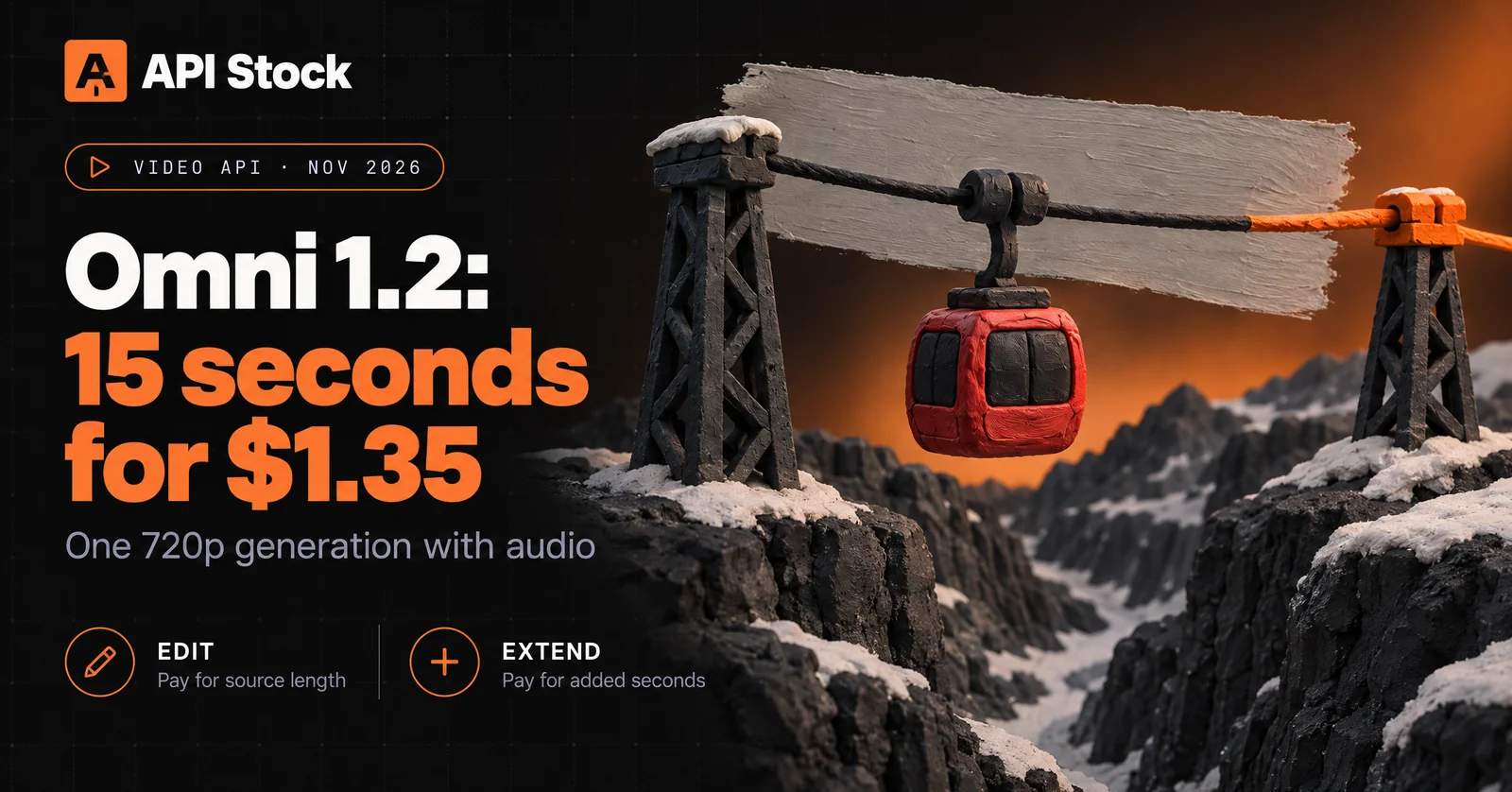
A 15-second Gemini Omni 1.2 Flash generation costs $1.35 at 720p through API Stock. Editing an existing clip bills its full measured length; extending it bills only the added seconds. For a ten-second text-to-video request at 720p, Omni 1.1 is still cheaper in our catalog: $0.477 versus $0.90, checked 10 November 2026. At 360p, Omni 1.2 costs $0.30 and Omni 1.1 costs $0.558.
This guide takes one short cable-car scene from a request to a saved video, then shows how to change the lighting or add an ending without confusing the two operations. The examples are checked against the public API contract, not presented as executed Omni tests. The cover and explanatory diagram are generated editorial artwork, not outputs from either video model.
What changed from Omni 1.1 Flash?
Google announced Omni 1.2 Flash on 5 November 2026, adding generation up to fifteen seconds and conversational video editing. In our API, each edit is a separate generation task with a source-video URL. Do not send a chat-completions request or assume that a conversation automatically retains the previous video.
The table describes the API Stock contract checked 10 November, rather than every feature in Google's applications.
| Requirement | Omni 1.1 Flash | Omni 1.2 Flash |
|---|---|---|
| Text-to-video duration | 4, 6, 8 or 10 seconds | Integer seconds from 3 to 15 |
| First and last frames | imageUrls | imageUrls; two frames limit duration to 10 seconds |
| Subject references | Up to 7 images; up to 5 with source video | Up to 10 images; preferably at most 6 for character consistency |
| Source-video field | referenceVideoUrls | videoUrls |
| Source-video length | 3–10 seconds | At most 15 seconds |
| Source operation | Transformation, billed per generation | Explicit edit or extend |
| Higher output tiers | Upscaled 1080p and 4K | Upsampled 1080p and 4K |
Choose Omni 1.2 when the task needs eleven to fifteen seconds in one new generation or an explicit extension. Keep Omni 1.1 in consideration for a familiar scene of ten seconds or less at 720p or higher. For 360p drafts, Omni 1.2 is cheaper in our catalog. These differences establish supported operations and price, not a quality or speed winner.
For a simple trim, caption or exact end card, use your video editor. Generative editing is useful when you want new scene content; it can also change details you intended to preserve.
How much does the same clip cost?
Public retail prices as of 10 November 2026, USD. These figures come from the live catalog, for text-to-video with generated audio and no source video. Omni 1.1 is priced per generation; 1.2 uses the chosen resolution's per-second rate.
| Clip length at 720p | Omni 1.1 per request | Omni 1.2 calculation | Omni 1.2 per request |
|---|---|---|---|
| 4 seconds | $0.279 | 4 × $0.09 | $0.36 |
| 6 seconds | $0.372 | 6 × $0.09 | $0.54 |
| 8 seconds | $0.465 | 8 × $0.09 | $0.72 |
| 10 seconds | $0.477 | 10 × $0.09 | $0.90 |
| 15 seconds | Not supported | 15 × $0.09 | $1.35 |
Google's announcement quotes $0.07 per second at 720p and a 30% reduction on its own tariff. That is a separate service's rate; it is not a discount on the API Stock prices above. The fifteen-second row also has no matching 1.1 request, so it cannot establish a like-for-like saving.
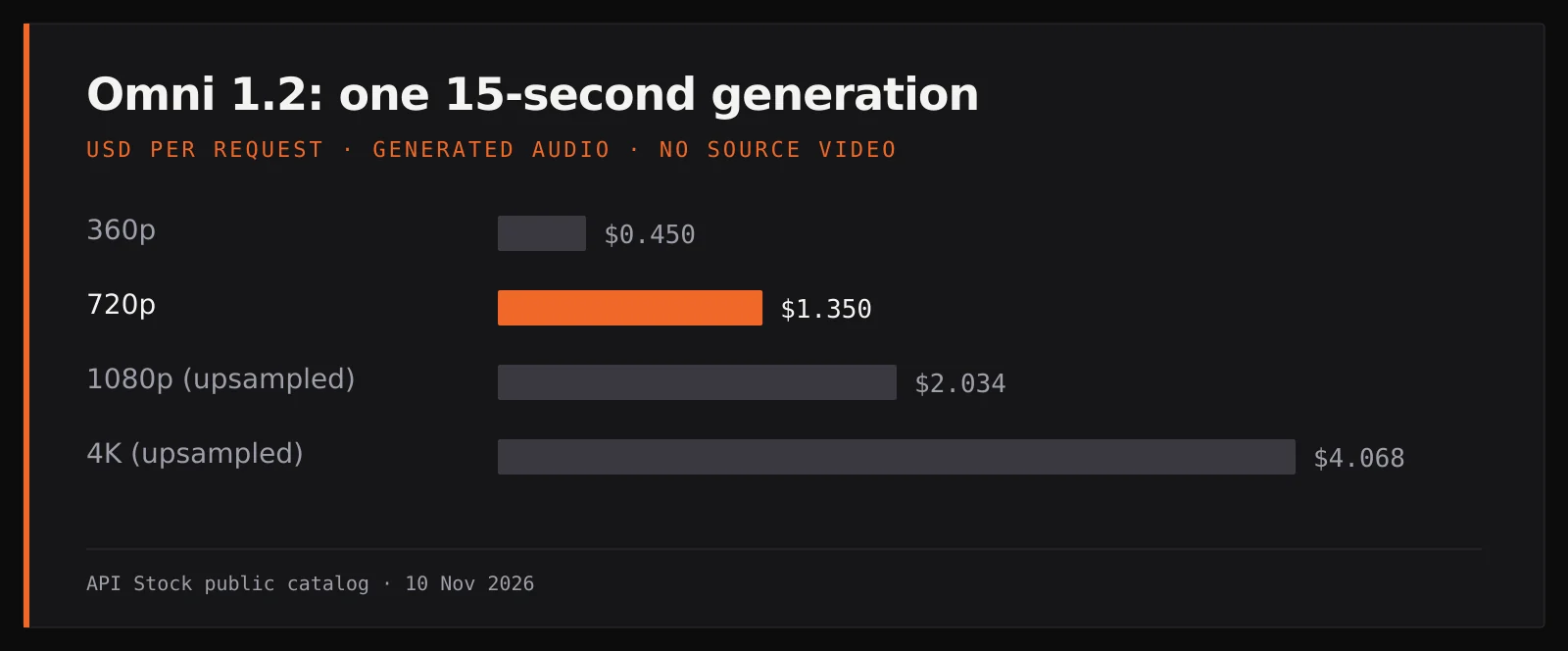
For 1.2, resolution changes the rate:
| Output resolution | USD per billable second | 15-second generation |
|---|---|---|
| 360p | $0.03 | $0.45 |
| 720p | $0.09 | $1.35 |
| 1080p, upsampled | $0.1356 | $2.034 |
| 4K, upsampled | $0.2712 | $4.068 |
Keep the full rate when multiplying; rounding $0.1356 to $0.14 before calculating a batch changes the budget. Upsampled 4K does not mean native 4K generation. The dated tariff and input snapshot preserves the inputs to these calculations; check current prices before starting a batch.
Which seconds are billed for editing and extension?
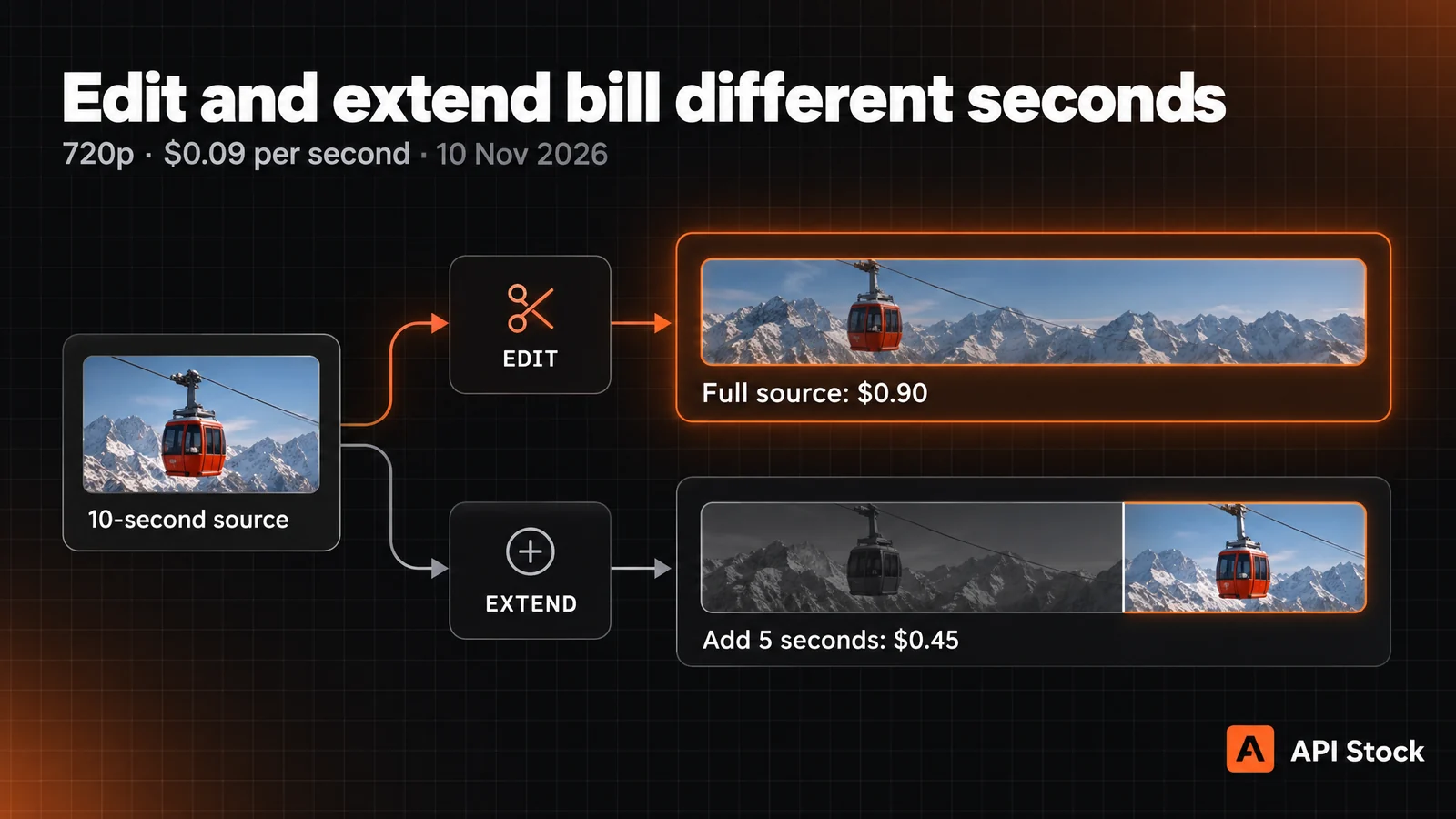
Supply one accessible source video in videoUrls, no longer than fifteen seconds. Set videoMode explicitly so the operation is easy to audit.
For edit, the result follows the source length and duration is ignored. Billing uses the measured source duration, rounded up to a whole second. A 9.2-second source therefore bills ten seconds: $0.90 at 720p, even if the instruction changes only the sky. Setting duration: 3 does not turn that into a three-second edit.
For extend, duration means added seconds, from three to ten. Extending a ten-second source by five seconds bills 5 × $0.09 = $0.45 at 720p. The original generation is a separate charge. A previously paid ten-second generation plus that extension costs $1.35 in total at these rates, before any other attempts.
Do not carry the 1.1 source-video field into a 1.2 request: use videoUrls, not referenceVideoUrls. Likewise, imageUrls cannot be combined with a source video or referenceImageUrls. Two imageUrls mean first/last-frame interpolation and limit a new generation to ten seconds. For a fifteen-second scene, use text alone, one starting frame, or subject references instead. The image-to-video guide explains how to assign those inputs.
Our current 1.2 schema has no audio-reference upload field. A feature described in Google's release is not automatically a field in this endpoint.
How do you create a video and save the result?
Start with a five-second 360p draft for $0.15. A useful test scene is a red cable car moving slowly across a snowy ravine, with a fixed camera and quiet wind. Its simple direction of travel makes continuity easier to inspect.
The Bash example needs curl, jq and your API key. Run it in a shell script: it exits after downloading the result. It creates one generation, reads data.taskId, polls that task, then saves the first returned file. It has been checked against the current schema and an offline response fixture; no paid Omni generation was run for this article.
set -euo pipefail: "${API_STOCK_KEY:?Set your API key}"CREATE=$(curl --fail --silent --show-error --max-time 60 \'https://api.api-stock.com/api/v1/generation/create' \-H "Authorization: Bearer $API_STOCK_KEY" \-H 'Content-Type: application/json' \--data '{"model":"gemini-omni-1.2-flash","input":{"prompt":"A red cable car moves slowly left to right across a snowy ravine. Fixed wide camera, one continuous shot, gentle wind sound. No people, speech, music, text or logos.","duration":5,"resolution":"360p","aspectRatio":"16:9"}}')TASK_ID=$(printf '%s' "$CREATE" | jq -er '.data.taskId')printf 'Task: %s\n' "$TASK_ID"for attempt in $(seq 1 60); doTASK=$(curl --fail --silent --show-error --max-time 30 \"https://api.api-stock.com/api/v1/task/status/$TASK_ID" \-H "Authorization: Bearer $API_STOCK_KEY")STATUS=$(printf '%s' "$TASK" | jq -er '.data.status')case "$STATUS" infinished)FILE_URL=$(printf '%s' "$TASK" | jq -er '.data.files[0].fileUrl')curl --fail --location --show-error --max-time 120 \--proto '=https' --proto-redir '=https' \"$FILE_URL" --output omni-video.mp4exit 0 ;;failed|expired)printf '%s\n' "$TASK" | jq '.data | {status, errorMessage}'exit 1 ;;not_started|processing) sleep 5 ;;*) printf 'Unexpected status: %s\n' "$STATUS" >&2; exit 1 ;;esacdoneprintf 'Polling stopped; resume this task: %s\n' "$TASK_ID" >&2exit 1
The polling limit is a client stop condition, not an estimate of generation speed. If it stops, retain the task ID and resume status checks. If the create response is lost, reconcile whether a task was created before sending another POST: repeating creation can incur another charge. For an application, follow the task and webhook contract and keep the key on your server.
Watch the whole downloaded clip and listen separately. Check that the cabin keeps its shape and colour, stays attached to the cable, travels in one direction and does not jump between shots. These are acceptance criteria, not guaranteed model behaviour. Stop after two attempts repeat the same defect; simplify the movement or prepare a clear starting frame before spending more.
How do you change the lighting or add an ending?
Once you have a source you are entitled to use, host it at an accessible HTTPS URL. Submit a new generation with the same model and this input object, replacing the example URL:
{"prompt": "Change the scene to overcast daylight. Preserve the red cable car, its direction of travel, the fixed camera and the ravine. Keep quiet wind and do not add objects or speech.","videoUrls": ["https://your-media.example/cable-car.mp4"],"videoMode": "edit","resolution": "720p","aspectRatio": "16:9"}
This is a complete edit input, not a request to preserve only the named pixels. Inspect the entire output again for changes to the cabin and cable. A five-second source costs $0.45 to edit at 720p; a fifteen-second source costs $1.35.
For an extension, change videoMode to extend, add duration: 5, and replace the prompt with an ending: “Continue the cable car's slow left-to-right travel for five more seconds, keeping the same camera, snowy ravine and quiet wind.” That adds five seconds for $0.45 at 720p. Poll and save the new task's result using the same flow. This guide does not assume the two model versions share source fields or that repeated extensions produce a validated long-film workflow.
If you want a fresh fifteen-second generation instead, remove videoUrls and videoMode, set duration: 15, and describe the complete shot. That produces another attempt; it does not guarantee a frame-identical enlargement of the accepted draft.
What budget should you reserve before a batch?
For one fifteen-second 720p scene, a hypothetical plan is two five-second 360p drafts, one new final generation and one possible full-length edit:
| Stage | Requests | Cost |
|---|---|---|
| 5-second 360p draft | 2 × $0.15 | $0.30 |
| 15-second 720p generation | 1 × $1.35 | $1.35 |
| Edit a 15-second source at 720p | At most 1 × $1.35 | $1.35 |
| Maximum for this plan | 4 | $3.00 |
Stop at $1.65 if the final generation is accepted without the edit. If all four attempts are used and one final scene is accepted, its generation cost is $3.00. If none is accepted, the spend still occurred; there is no accepted-result cost to report yet. In a batch, divide total generation spend by accepted final scenes, rather than treating every technical completion as a usable deliverable.
Start with the five-second 360p cable-car draft. It lets you inspect motion and sound for $0.15 before committing to a longer scene. Available balance top-ups and their minimum amounts are separate from this per-request budget.
FAQ
Is Omni 1.2 Flash a chat model?
The model covered here, gemini-omni-1.2-flash, generates video with audio. Use the media generation endpoint, not chat completions.
Does editing a small detail cost less than changing the whole clip?
Both bill the full measured source length, rounded up to whole seconds. The area or complexity of the requested change does not reduce the per-second tariff.
Can I interpolate fifteen seconds between two images?
Two first/last-frame images currently limit our request to ten seconds. Fifteen-second generation is available from text, a single starting frame or subject references instead.
Does the 30% launch discount apply to these prices?
Google's announcement compares its own tariff with its predecessor's tariff. The API Stock rates and matched ten-second comparison in this article come from our separately checked public catalog.
Should I replace all Omni 1.1 requests with 1.2?
Choose based on the operation you need and a matched budget. Ten-second text-to-video at 720p costs $0.477 for 1.1 and $0.90 for 1.2 as of 10 November; this guide does not measure their quality or latency.
- gemini
- video
- editing
- pricing
Try it with your own key
Choose a model in the API Stock catalog, check its price and try it in your browser or through the API.
Read next
 TutorialGrok image editing: photo URLs, model choice and costEdit a photo with Grok Imagine 1.5 using a public image URL, not an image ID: copy a request, retrieve the result and budget $0.022 per generation.·5 min read
 TutorialSuno API docs: key, pricing and first songSuno API docs: create an API Stock key, generate music, poll tasks and download audio. Includes curl, a Python client and per-action references.·11 min read
 TutorialAI support ticket summaries: a MiniMax M3 handoff tutorialTurn a support thread into a source-backed agent handoff with MiniMax M3: a reusable prompt, an API example and a $1.08-per-1,000 token-cost scenario.·8 min read