Video
Image to video
Turning a still into a shot — which model to animate it with, first and last frame control, motion transfer, and the prompts that keep the subject intact.
Animate a product photo, character sheet or finished illustration. Describe what should move and what should stay unchanged.
Use the same endpoint as text to video, with source images
in input. The image field differs by model; check it before submitting.
What people build with it
| What you are making | Why a still beats a prompt | Start with |
|---|---|---|
| Product shot that moves | the packshot is already approved | veo3.1-quality, wan2.7-video |
| Character kept consistent across cuts | the face has to survive every shot | seedance-* with imageWithRoles |
| Before/after transition | you own both ends of the shot | pixverse-v6, wan2.7-video |
| Logo or title sting | typography a text prompt will never spell | any model, still as first frame |
| Puppeteering a character with real motion | you have reference footage | kling-3.0-motion-control |
| Animating a Midjourney frame you like | keep the exact look you rendered | midjourney-video |
The unglamorous winner on that list is the last-frame trick: generate the still with an image model until it is exactly right — that loop is cheap and fast — and only then spend video money animating it. Iterating on stills at a fraction of the price and then rendering once is the single biggest cost lever on this endpoint.
Which model, and when
wan2.7-video — the faithful one. Give it a start frame, optionally an end
frame, and it moves the picture without redesigning it. When the brief is "the
product must look exactly like the photo", start here.
veo3.1-fast / veo3.1-quality — the polished one. Best-looking motion of
the group and the only path to 4K, at the cost of a little more drift from the
source. Pair urls with generationType.
seedance-* — the storyboard one. Up to nine images, and
imageWithRoles lets you pin a first_frame and a last_frame so the shot
starts and ends where you said. It also renders audio in the same pass.
pixverse-v6 — the transition one. firstFrameImage + lastFrameImage
gives you a clean interpolation between two framings — the classic
before/after, day/night or empty/full reveal. Both fields are required, and
transition mode only accepts a duration of 5 or 8.
kling-3.0-motion-control — the puppeteer. A character image plus a
reference video: the person in the image performs the motion in the video.
This is the one to reach for when you have a dance, a gesture or a walk cycle
you want repeated by a different character.
midjourney-video — animates a Midjourney frame, either by imageUrls or
by parentTaskId pointing at the grid you already generated.
Prompting a still into motion
With a source image the prompt stops describing the scene and starts describing the change. This is the mistake that costs people their first ten renders: re-describing what is already in the picture makes the model rebuild it, badly.
Bad — the model now thinks it should re-render the whole thing:
A matte-black espresso machine on a concrete counter with steam and morning light
Good — the picture is already there, so only the motion is specified:
Steam rises and drifts left, the light slowly warms, camera pushes in veryslightly. Everything else stays still.
Three rules that hold across every model here:
- Name what must not move. "Camera locked off, product does not move" is worth more than any positive instruction when you are animating a packshot.
- Ask for one motion. A push-in and a pan and a light change in five seconds is how a product turns into a different product halfway through.
- Faces and hands drift first. Shorter durations and smaller moves keep them intact; if a character has to hold up for ten seconds, pin the last frame too.
Recipes
Animate one impossible still — veo3.1-quality, urls: [source],
generationType: "frame", resolution: "720p":
A hyperrealistic macro photo of tiny, miniature surfers riding ocean wavesinside a rustic stone bathroom sink. A vintage brass faucet is running,creating the perpetual surf. Surreal, whimsical, bright natural lighting.
This is the source frame. Starting from a still fixes the objects, palette and composition before the video model has to solve motion.
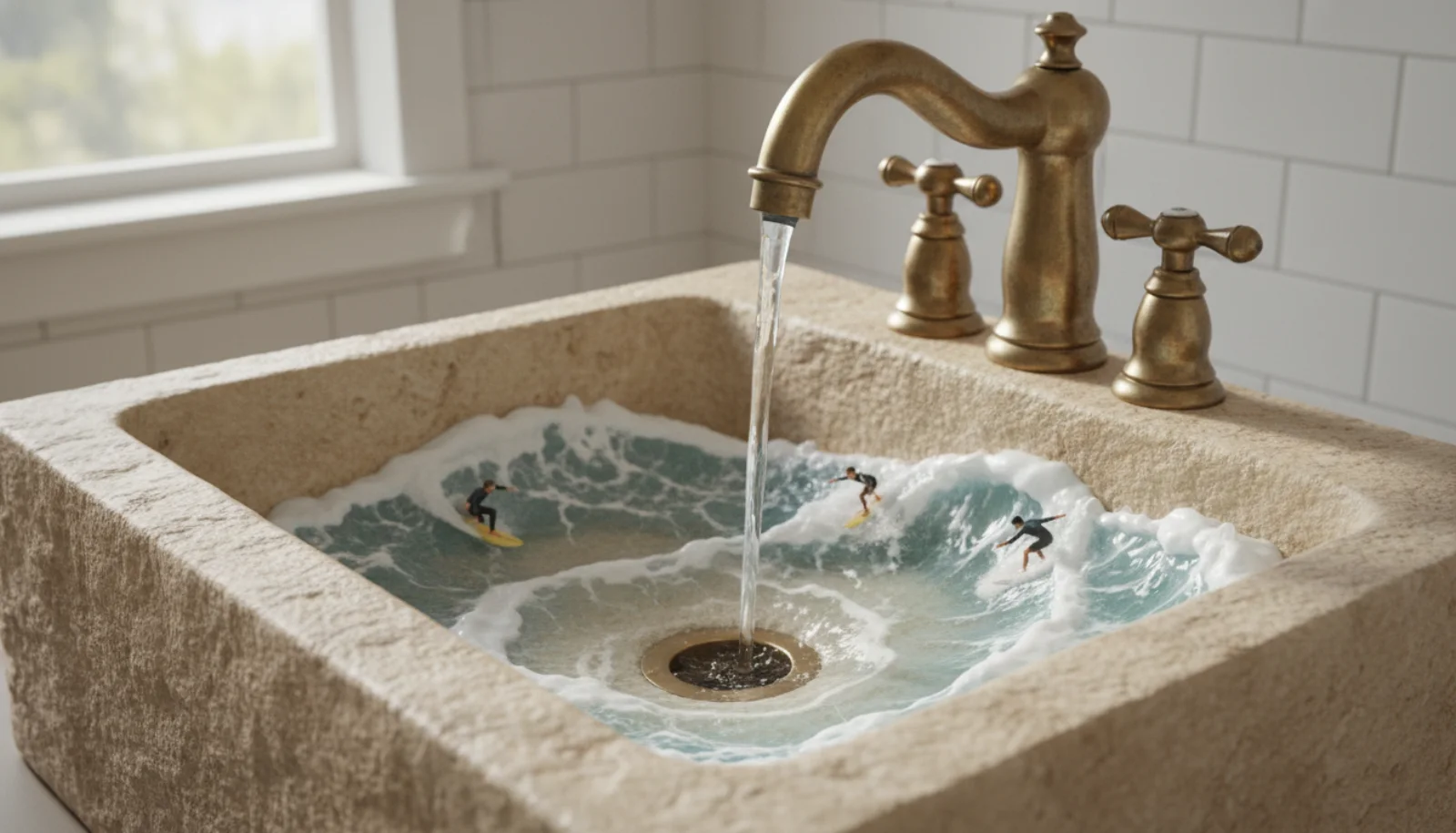
Source: Google AI for Developers, used under CC BY 4.0; format and dimensions adapted.
A surreal, cinematic macro video. Tiny surfers ride perpetual, rolling wavesinside a stone bathroom sink. A running vintage brass faucet generates theendless surf. The camera slowly pans across the whimsical, sunlit scene as theminiature figures expertly carve the turquoise water.
The motion prompt describes what changes — rolling water, moving surfers and a slow pan — while repeating the visual anchors that need to survive.
Source: Google AI for Developers, used under CC BY 4.0; format and dimensions adapted.
Before/after reveal — pixverse-v6, firstFrameImage = empty room,
lastFrameImage = furnished room, duration: 5:
Smooth continuous transition between the two framings, no cuts, naturallighting change
Both frames should be shot from the same position — the interpolation is convincing when the camera did not move and unconvincing when it did.
Character kept across a sequence — seedance-2.0,
imageWithRoles with a first_frame and a last_frame, duration: 8,
generateAudio: true:
The character turns from the window toward the camera and smiles. Room toneand distant traffic. No cuts.
Pinning both ends is what keeps a face recognisable; with only a start frame, eight seconds is usually enough for the model to redesign someone.
Motion transfer — kling-3.0-motion-control, imageUrls: [character],
videoUrls: [reference]:
The character performs the motion from the reference video, keeping their ownclothing and appearance
The motionControlType field decides whether the image or the video dictates
orientation — see Motion transfer with Kling
below.
About these samples. Ready-made examples are copied to our own storage only when their source permits reuse. The exact prompt appears above each result, and the original source and license are linked below the media.
Media input families
There is no single image parameter. Each model group named its media input
independently, and the DTO for the model you pick is the only thing that
validates.
| Model | Image field | Notes |
|---|---|---|
veo3.1-fast, veo3.1-quality | urls | pair with generationType |
grok-imagine-1.5-video | urls | array of strings |
seedance-* | imageUrls or imageWithRoles | up to 9 images |
pixverse-v6 | imageUrls, or firstFrameImage + lastFrameImage, or imgReferences | mode is inferred |
wan2.7-video | imageUrls | [start] or [start, end] |
kling-3.0-motion-control | imageUrls + videoUrls | both required |
midjourney-video | imageUrls or parentTaskId | exactly one of the two |
Reference images must be publicly reachable. The upstream provider fetches the URL directly — pre-signed URLs that expire in seconds, links behind a login, and
localhostaddresses will all fail on the provider side, after the request has already validated and been billed.
gpt-image-2, seedream-*, nano-banana* and midjourney also take
images in urls, but those are image models — see
Image editing.
First frame and last frame
Three models let you pin both ends of the shot; the model then interpolates between them.
seedance-* uses imageWithRoles, an array of { url, role } objects
where role is first_frame or last_frame:
{"model": "seedance-2.0","input": {"prompt": "The camera drifts left as the sun clears the ridge","imageWithRoles": [{ "url": "https://example.com/dawn.jpg", "role": "first_frame" },{ "url": "https://example.com/noon.jpg", "role": "last_frame" }],"resolution": "1080p","duration": 8,"generateAudio": false}}
Seedance also accepts a plain imageUrls array (up to 9 entries) when you do
not care about role assignment.
pixverse-v6 uses two scalar fields instead, and both must be present —
supplying only one is a validation error:
{"model": "pixverse-v6","input": {"prompt": "Slow dissolve between the two framings","firstFrameImage": "https://example.com/dawn.jpg","lastFrameImage": "https://example.com/noon.jpg","duration": 5,"resolution": "720p"}}
Pixverse transition mode only supports a duration of 5 or 8.
wan2.7-video folds both frames into one ordered array: the first URL is the
starting frame, an optional second URL is the ending frame.
{"model": "wan2.7-video","input": {"imageUrls": ["https://example.com/dawn.jpg","https://example.com/noon.jpg"],"resolution": "1080p","duration": 5}}
prompt is optional for the wan2.7-video image-to-video workflow and
required for its other workflows. Note that size is ignored here — the
aspect ratio is derived from the input frames.
Pixverse infers its mode from the fields
pixverse-v6 dispatches on which media fields are present, in this priority
order:
| Fields supplied | Mode |
|---|---|
| none | text to video |
imageUrls | image to video (only the first URL is used) |
firstFrameImage + lastFrameImage | first/last frame transition |
imgReferences (1–7 URLs) | multi-reference fusion |
extendFromTaskId | video extension |
size is only honoured in text-to-video and multi-reference fusion; in the
other modes the geometry comes from the source media.
Motion transfer with Kling
kling-3.0-motion-control is a different shape of job: it takes a character
image and a reference video, and transfers the motion of the video onto
the character. All three of imageUrls, videoUrls and
characterOrientation are required, and the two arrays must hold exactly one
URL each.
{"model": "kling-3.0-motion-control","input": {"prompt": "Studio backdrop, soft key light","imageUrls": ["https://example.com/character.png"],"videoUrls": ["https://example.com/dance-reference.mp4"],"characterOrientation": "image","resolution": "1080p"}}
characterOrientation decides whose framing wins:
| Value | Meaning |
|---|---|
image | the character image drives the orientation |
video | the reference video drives the orientation |
The choice also constrains the reference video length — image orientation
accepts 3–10 seconds, video orientation accepts 3–30 seconds. The
reference video is probed before dispatch, so an over-long clip fails fast.
Provider-side limits apply to the uploads themselves: JPG/JPEG/PNG up to 10 MB for the image, MP4/MOV up to 100 MB for the video.
Midjourney video
midjourney-video is image-to-video only — there is no text-to-video path.
Exactly one of imageUrls (a single first-frame image) or parentTaskId
(a previous successful midjourney imagine generation) must be present;
supplying both, or neither, is a validation error.
{"model": "midjourney-video","input": {"prompt": "Gentle parallax drift toward the archway","imageUrls": ["https://example.com/still.png"],"videoType": "vid_1.1_i2v_720","motion": "high","batchSize": 1}}
Reusing an earlier Midjourney grid instead of an uploaded file:
{"model": "midjourney-video","input": {"parentTaskId": "019ca881-9503-7270-a560-f00fc2b15785","index": 0,"animateMode": "auto","videoType": "vid_1.1_i2v_480"}}
index selects the tile of the parent 2×2 grid and runs 0–3 here —
note that the image model's index runs 1–4. animateMode: "auto"
requires both parentTaskId and index. Setting endUrl auto-upgrades
videoType to a start/end tier, and batchSize of 2 or 4 bills at that
multiple.
A complete run
Animate a still with veo3.1-fast, then wait for the file.
curl -X POST https://api.api-stock.com/api/v1/generation/create \-H "Authorization: Bearer sk-your-key" \-H "Content-Type: application/json" \-d '{"model": "veo3.1-fast","input": {"prompt": "The gulls lift off and the boat rocks in the swell","urls": ["https://example.com/harbour.jpg"],"generationType": "frame","aspectRatio": "16:9"}}'
{"code": 200,"data": {"taskId": "019ca8a1-1c40-73f2-9b6d-4a01d8e2f7c3","status": "not_started","createdAt": "2026-02-28T12:04:11.000Z"}}
Poll until the status is terminal.
const BASE = "https://api.api-stock.com/api/v1";const KEY = process.env.API_STOCK_KEY!;async function animate(imageUrl: string, prompt: string) {const create = await fetch(`${BASE}/generation/create`, {method: "POST",headers: {Authorization: `Bearer ${KEY}`,"Content-Type": "application/json",},body: JSON.stringify({model: "veo3.1-fast",input: {prompt,urls: [imageUrl],generationType: "frame",aspectRatio: "16:9",},}),});const created = await create.json();if (!create.ok) {throw new Error(`${created.error.code}: ${created.error.message}`);}const taskId: string = created.data.taskId;for (;;) {await new Promise((r) => setTimeout(r, 10_000));const res = await fetch(`${BASE}/task/status/${taskId}`, {headers: { Authorization: `Bearer ${KEY}` },});const body = await res.json().catch(() => null);if (!res.ok) {const message = body?.error?.message ?? `${res.status} ${res.statusText}`;throw new Error(message);}const { data } = body;if (data.status === "finished") return data.files[0].fileUrl;if (data.status === "failed" || data.status === "expired") {throw new Error(data.errorMessage);}}}const url = await animate("https://example.com/harbour.jpg","The gulls lift off and the boat rocks in the swell",);console.log(url); // → https://storage.api-stock.com/generated/video-...mp4
The finished payload is identical in shape to any other video job:
{"code": 200,"data": {"taskId": "019ca8a1-1c40-73f2-9b6d-4a01d8e2f7c3","status": "finished","files": [{"fileUrl": "https://storage.api-stock.com/generated/video-9f31c2.mp4","fileType": "video"}],"createdTime": "2026-02-28T12:04:11.000Z"}}
Failure modes specific to image inputs
- Unreachable source URL. Validation only checks that the string is a URL.
A 404 or a timeout on the provider's fetch surfaces later as a task with
status: "failed", after the debit — which is then refunded. - Wrong field name.
imageUrlinstead ofimageUrls, orurlson a model whose DTO calls itimageUrls, fails at create time with 400invalid_input. - Too many images. Seedance caps its images at 9, Pixverse
imgReferencesat 7,wan2.7-videoimageUrlsat 2. Exceeding the cap is a 400, not a truncation. - People in the frame. Reference images containing recognisable or
realistic people are frequently rejected by the upstream safety layer. That
arrives as a terminal
failedtask with a content-policyerrorMessageand is never retried.
Next steps
- Text to video — the prompt-only path.
- Video models — every field for every video model.
- Files & storage — the 24-hour result URLs.
- Webhooks — skip the polling loop.
- Errors & error codes.

Run this with your own key
Choose a model in the API Stock catalog, check its price and try it in your browser or through the API.