Image
Image generation
Which image model to use for the picture you need, prompts that produce it, batching for variants, and the API run from prompt to file URL.
Choose an image model by the result you need, then test one prompt before creating a batch. Resolution, reference inputs and other settings can change the price; check the live image model catalog rather than assuming every image costs the same.
For product visuals, start with the Seedream 5.0 Pro playground. For multiple concepts, compare its single-image workflow with Seedream 5.0 Lite. Check each model’s supported sizes and current pricing before choosing.
This guide covers model selection, prompt recipes and the API path from a request to a downloadable image. The image model reference has the full parameter definitions.
What people build with it
| What you are making | What actually matters | Start with |
|---|---|---|
| Blog and social headers | speed, ratio range, cost | nano-banana-2-lite, z-image |
| Product or packaging visuals | resolution, material realism | nano-banana-pro, Seedream 5.0 Pro |
| Anything with words in the picture | text rendering | gpt-image-2 |
| Fifteen variants to choose from | batching | seedream-5-0-lite (n up to 15) |
| Print-resolution artwork | 4K output | nano-banana-pro, nano-banana-2, gpt-image-2 |
| An art-directed look you tune over time | style controls, upscales, variations | midjourney |
| Ultra-wide banners and skyscraper ads | extreme aspect ratios | nano-banana-2 (8:1, 1:8) |
| Exact pixel dimensions for a slot | width + height | wan2.7-image, wan2.7-image-pro |
| A still to animate afterwards | consistency with your video model | any, then image to video |
Which model, and when
gpt-image-2 — the one that can spell. If the image contains a word, a
sign, a label or a UI mockup, start here; the rest of the field still turns
typography into confident nonsense. quality (low/medium/high) is a real
speed-versus-precision dial rather than a marketing tier, and it takes the
widest ratio set of any model, down to 3:1 and 1:3.
nano-banana family — the everyday workhorse. nano-banana-2-lite is the
cheap draft tier, plain nano-banana is the fast one, nano-banana-pro goes
to 4K, and nano-banana-2 adds the extreme panorama ratios (1:4, 1:8,
4:1, 8:1) that no other model offers — the reason to pick it for a wide
site banner or a tall app-store screenshot.
seedream-5-0-lite — the batch machine. n up to 15 in one
request, one debit, one task, fifteen files back. This is how you explore a
concept: one prompt, fifteen readings of it, pick two. seedream-5-0-pro
is the opposite trade — a single image, quality first — and seedream-4-5
sits in between with a promptOptimizeMode that rewrites your prompt before
rendering.
z-image — the fast plain one. Five ratios, a 1000-character prompt limit,
no resolution tier to think about. When you need a competent picture and not a
decision, this is the least ceremony available.
wan2.7-image / wan2.7-image-pro — the exact-dimensions one. The only
models that take width and height in pixels (1–4096). If a design system
demands 1200×628 and nothing else will do, this is the model that gives you it
without a crop. -pro is the detail-oriented edition.
grok-imagine-2.0-image — text-to-image only, seven ratios, n up to 12;
a fast alternative when you want a second opinion on a concept.
grok-imagine-1.5-image is the previous, cheaper generation.
midjourney — the art-directed one. Not really a single call: it returns a
2×2 grid and then exposes upscale, variation, pan, zoom and reroll
against that grid, plus stylize, chaos and weird as aesthetic dials. Use
it when the look matters more than the turnaround and you intend to iterate.
The action chain is covered in Image editing.
Writing a prompt that lands
Image models respond to specificity in a fairly predictable order:
subject → composition and framing → lighting → material and texture → medium or style reference.
"A coffee cup" is a stock photo. "A ceramic pour-over cone on a scratched steel counter, top-down, hard side light, shallow depth of field, food photography" is a brief. Things worth internalising:
- Say what the picture is of, then how it was made. Naming a medium — 35 mm photograph, editorial illustration, isometric 3D render, risograph print — does more for coherence than a pile of adjectives.
- Framing words are cheap and effective. Top-down, close-up, wide shot, centred with negative space at the top all land, and the last one is how you leave room for a headline.
- Numbers of things are unreliable. "Five bottles" gives you four or six. If the count matters, generate the object once and compose in the design tool.
- Style transfer beats style adjectives. If you have a reference image, do not describe the look — pass the image and edit. See Image editing.
- Use a text-capable model when copy matters.
gpt-image-2,nano-banana-2andnano-banana-procan place short copy deliberately; always proofread the output before it ships.
Recipes
Composition with room for a headline — nano-banana-2, size: "1:1":
A minimalist composition featuring a single, delicate red maple leaf positionedin the bottom-right of the frame. The background is a vast, empty off-whitecanvas, creating significant negative space for text. Soft, diffused lightingfrom the top left. Square image.
The model honours both the corner placement and the empty field. Naming where the subject belongs is more reliable than asking vaguely for "space for text."
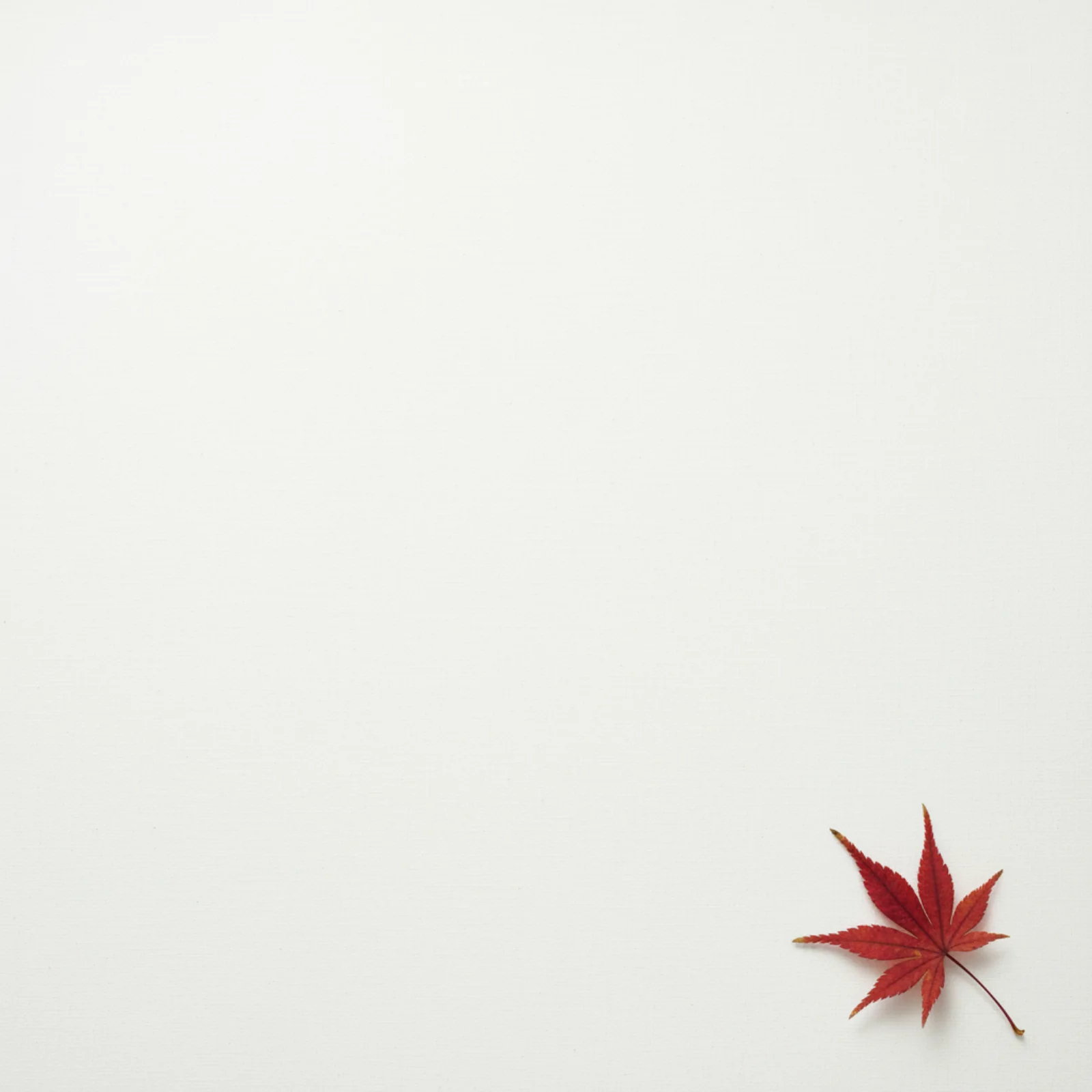
Source: Google AI for Developers, used under CC BY 4.0; format and dimensions adapted.
Commercial product shot — nano-banana-2, size: "1:1":
A high-resolution, studio-lit product photograph of a minimalist ceramic coffeemug in matte black, presented on a polished concrete surface. The lighting is athree-point softbox setup designed to create soft, diffused highlights andeliminate harsh shadows. The camera angle is a slightly elevated 45-degree shotto showcase its clean lines. Ultra-realistic, with sharp focus on the steamrising from the coffee. Square image.
Material, surface, lighting setup and angle do the work. The model has almost no room to substitute its own idea of what "premium product photography" means.
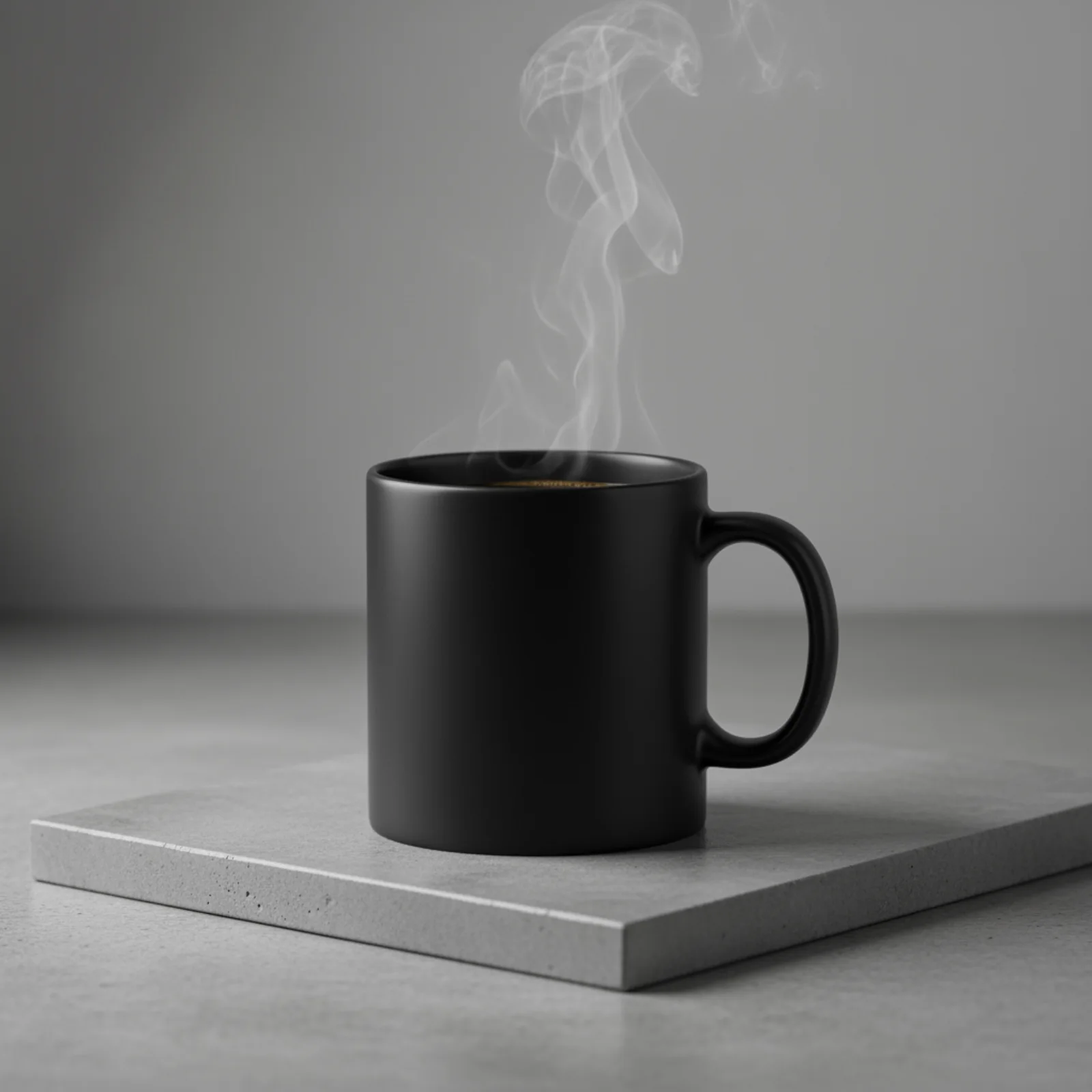
Source: Google AI for Developers, used under CC BY 4.0; format and dimensions adapted.
A picture that contains words — nano-banana-2:
A photo of a glossy magazine cover, the minimal blue cover has the large boldwords Nano Banana. The text is in a serif font and fills the view. No othertext. In front of the text there is a portrait of a person in a sleek andminimal dress. She is playfully holding the number 2, which is the focal point.Put the issue number and "Feb 2026" date in the corner along with a barcode. Themagazine is on a shelf against an orange plastered wall, within a designer store.
Short, quoted copy plus a clear hierarchy gives the text a job in the composition. This example also asks for secondary date and issue details, which is a much harder test than a single sign.
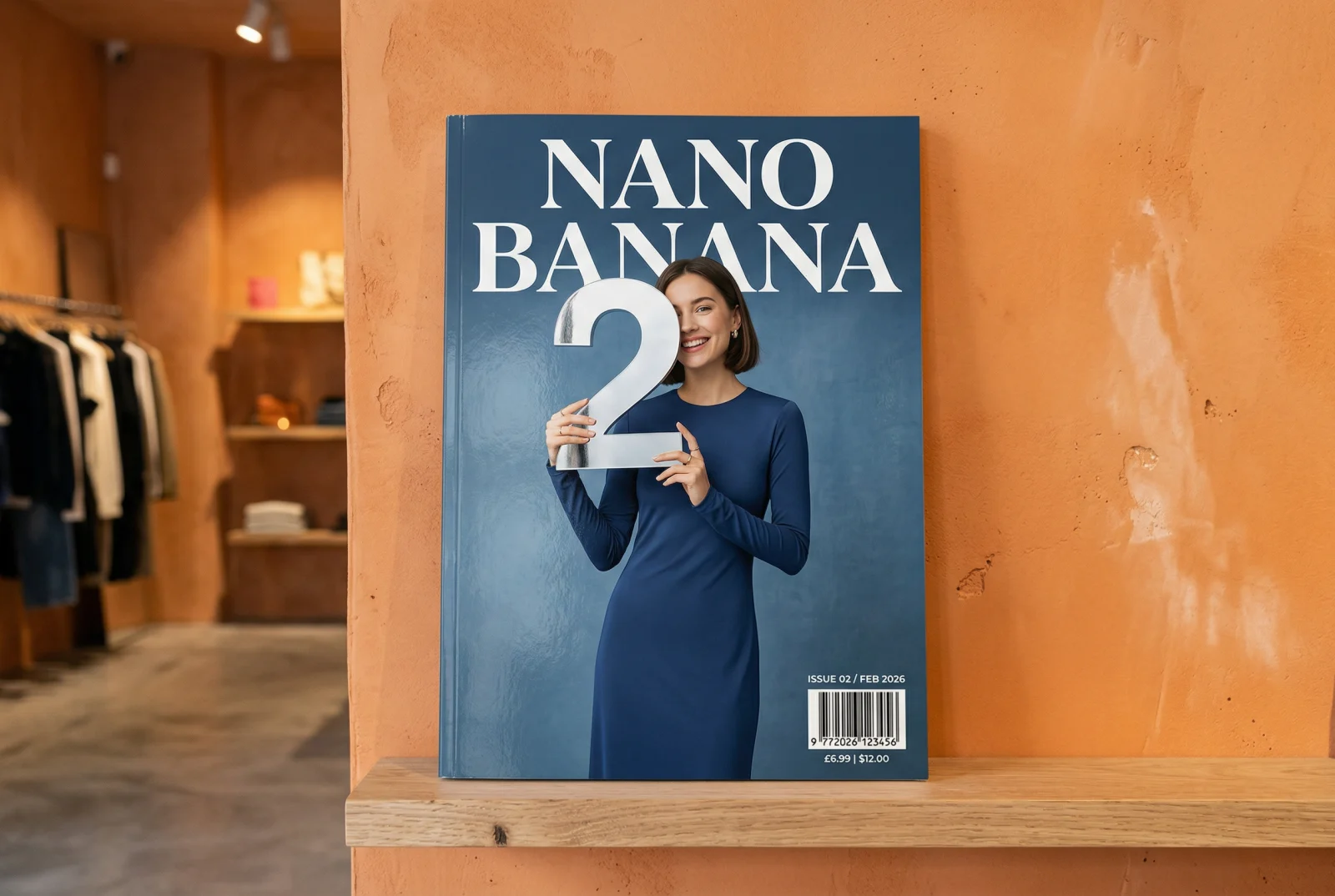
Source: Google AI for Developers, used under CC BY 4.0; format and dimensions adapted.
Fifteen concepts in one request — seedream-5-0-lite,
size: "1:1", resolution: "2K", n: 15:
Mascot character for a developer tool: a friendly otter wearing a smallbackpack, vector illustration, thick outlines, limited palette of teal andsand, plain background
One debit, one task, fifteen files in files. This is the cheapest way to run
a real concept round — and a reminder to read all of files, not just the
first entry.
Exactly 1200×628, no crop — wan2.7-image-pro, width: 1200,
height: 628:
Abstract geometric background, overlapping translucent planes in indigo andamber, soft grain, no text
width and height override size entirely; you get the pixels you asked
for, which is what makes this the right model for a fixed ad slot.
About these samples. Ready-made examples are copied to our own storage only when their source permits reuse. The exact prompt appears above each result, and the original source and license are linked below the media.
Pick a model
| Model | Ratio field | Resolution | Batch | Distinctive |
|---|---|---|---|---|
nano-banana | size | 1K | — | fastest of the family |
nano-banana-pro | size | 1K 2K 4K | — | high-resolution tier |
nano-banana-2 | size | 512px 1K 2K 4K | — | widest ratio set |
nano-banana-2-lite | size | 1K | — | cheap tier, 1K only |
gpt-image-2 | size | 1k 2k 4k | — | quality low/medium/high |
seedream-5-0-lite | size | 2K 3K 4K | n 1–15 | batches, outputFormat |
seedream-5-0-pro | size | 1K 2K | n = 1 | single image, quality-first |
seedream-4-5 | size | 2K 4K | n 1–15 | promptOptimizeMode |
z-image | size | — | — | 5 ratios, 1000-char prompt |
wan2.7-image | size or width+height | — | — | exact pixel sizes |
wan2.7-image-pro | size or width+height | — | — | detail-oriented edition |
grok-imagine-1.5-image | size | — | — | 5 ratios |
grok-imagine-2.0-image | size | — | n 1–12 | text-to-image only, 7 ratios |
midjourney | size | — | — | action, stylize, chaos |
Every image model calls its aspect-ratio field size — unlike the video side,
where the Veo family uses aspectRatio. Exhaustive parameter tables live in
Image models.
Size and resolution
size is an aspect-ratio string, not a pixel dimension. The accepted set is
per model:
| Model family | Accepted size values |
|---|---|
nano-banana, nano-banana-pro | 1:1 2:3 3:2 3:4 4:3 4:5 5:4 9:16 16:9 21:9 |
nano-banana-2, nano-banana-2-lite | the above plus 1:4 1:8 4:1 8:1 |
gpt-image-2 | auto 1:1 16:9 9:16 4:3 3:4 3:2 2:3 5:4 4:5 2:1 1:2 3:1 1:3 21:9 9:21 |
seedream-* | 1:1 4:3 3:4 16:9 9:16 3:2 2:3 21:9 9:21 auto |
z-image | 1:1 4:3 3:4 16:9 9:16 |
wan2.7-image* | 1:1 16:9 9:16 4:3 3:4 3:2 2:3 |
grok-imagine-1.5-image | 1:1 16:9 9:16 3:2 2:3 |
grok-imagine-2.0-image | 1:1 2:3 3:2 3:4 4:3 9:16 16:9 |
midjourney | any w:h string, e.g. 16:9, 21:9, 1:1 |
The extreme panorama ratios — 1:4, 1:8, 4:1, 8:1 — exist only on
nano-banana-2 and nano-banana-2-lite.
resolution is a separate tier field and its casing is not consistent across
families: Nano Banana and Seedream use upper-case 1K / 2K / 4K (plus
512px and 3K respectively), while gpt-image-2 uses lower-case 1k /
2k / 4k. z-image, wan2.7-image*, grok-imagine-1.5-image,
grok-imagine-2.0-image and midjourney have no resolution field at all.
Seedream rejects tiers per model, not per group. The three Seedream models share one DTO but not one capability set —
seedream-5-0-proaccepts only1Kand2K,seedream-5-0-liteonly2K/3K/4K, andseedream-4-5only2K/4K. A tier outside the model's set is a 400invalid_input, not a downgrade.
wan2.7-image and wan2.7-image-pro additionally accept an exact pixel size
through width and height (1–4096 each). Supplying both overrides
size.
Requesting several images
Every image generation request produces one output. To generate a batch,
create one API task per image. outputFormat (jpeg or png) is honoured by
the two Seedream 5.0 models and ignored by seedream-4-5, which instead
exposes promptOptimizeMode (standard or fast).
When a job produces several images, they come back as several entries in
files, in generation order:
{"code": 200,"data": {"taskId": "019ca8b2-77d1-7a04-8c2e-15f9b0d4a6e1","status": "finished","files": [{"fileUrl": "https://storage.api-stock.com/generated/img-1a.png","fileType": "image"},{"fileUrl": "https://storage.api-stock.com/generated/img-1b.png","fileType": "image"},{"fileUrl": "https://storage.api-stock.com/generated/img-1c.png","fileType": "image"},{"fileUrl": "https://storage.api-stock.com/generated/img-1d.png","fileType": "image"}],"createdTime": "2026-02-28T12:41:02.000Z"}}
Always iterate files. Reading files[0] and discarding the rest silently
throws away images you have already paid for.
Submit the request
The minimal text-to-image call:
curl -X POST https://api.api-stock.com/api/v1/generation/create \-H "Authorization: Bearer sk-your-key" \-H "Content-Type: application/json" \-d '{"model": "nano-banana-2","input": {"prompt": "A brass orrery on a walnut desk, single window light, shallow depth of field","size": "3:2","resolution": "2K"}}'
{"code": 200,"data": {"taskId": "019ca8b2-77d1-7a04-8c2e-15f9b0d4a6e1","status": "not_started","createdAt": "2026-02-28T12:41:02.000Z"}}
gpt-image-2 adds a quality dial that trades latency and price against
precision:
| Value | Trade-off |
|---|---|
low | fast and cheap |
medium | balanced (the default) |
high | highest precision |
{"model": "gpt-image-2","input": {"prompt": "A brass orrery on a walnut desk, single window light","size": "3:2","resolution": "2k","quality": "high"}}
Midjourney from text
midjourney is a single public model whose action field selects the
operation. For text to image the action is imagine, which is also the
default when action is omitted.
{"model": "midjourney","input": {"action": "imagine","prompt": "A brass orrery on a walnut desk, single window light","size": "3:2","version": "7","stylize": 250,"chaos": 15,"speed": "relax"}}
| Field | Range | Native flag |
|---|---|---|
stylize | 0–1000 | --s |
chaos | 0–100 | --c |
weird | 0–3000 | --w |
version | 8.1 7 6.1 5.2 5.1 | --v |
quality | 0.25 0.5 1 2 | --q |
speed | relax fast turbo | billing tier |
Native --flags written inside the prompt string are accepted, but a
structured body field overrides the matching flag. Anything without a
structured field can be appended verbatim through extra.
An imagine job produces the familiar 2×2 grid; individual tiles are then
addressed by index (1–4) from a follow-up action. That workflow is
covered in Image editing.
A complete run
const BASE = "https://api.api-stock.com/api/v1";const KEY = process.env.API_STOCK_KEY!;type TaskFile = { fileUrl: string; fileType: "image" | "video" | "music" };async function generateImage(prompt: string): Promise<string[]> {const create = await fetch(`${BASE}/generation/create`, {method: "POST",headers: {Authorization: `Bearer ${KEY}`,"Content-Type": "application/json",},body: JSON.stringify({model: "seedream-5-0-lite",input: { prompt, size: "1:1", resolution: "2K", outputFormat: "png" },}),});const created = await create.json();if (!create.ok) {throw new Error(`${created.error.code}: ${created.error.message}`);}const taskId: string = created.data.taskId;const deadline = Date.now() + 10 * 60_000;while (Date.now() < deadline) {await new Promise((r) => setTimeout(r, 3_000));const res = await fetch(`${BASE}/task/status/${taskId}`, {headers: { Authorization: `Bearer ${KEY}` },});const body = await res.json().catch(() => null);if (!res.ok) {if (res.status === 429) {const retryAfter = Number(res.headers.get("Retry-After") ?? 3);await new Promise((r) => setTimeout(r, retryAfter * 1000));continue;}const message = body?.error?.message ?? `${res.status} ${res.statusText}`;throw new Error(message);}const { data } = body;if (data.status === "finished") {return (data.files as TaskFile[]).map((f) => f.fileUrl);}if (data.status === "failed" || data.status === "expired") {throw new Error(data.errorMessage);}}throw new Error(`timed out waiting for ${taskId}`);}const urls = await generateImage("Isometric cutaway of a lighthouse");console.log(urls.length); // → 1
A 3-second poll interval suits images. The per-IP ceiling is 120 requests per 60 seconds across the whole API — see Rate limits.
For fire-and-forget batches, pass a webhook instead and let the finished
envelope be delivered to you; see Webhooks.
When it fails
A rejected request never reaches a provider:
{"code": 400,"error": {"message": "Resolution \"3K\" is not supported by model seedream-4-5","type": "BadRequest","code": "invalid_input"}}
A rejected generation comes back on the task, with the debit already refunded:
{"code": 200,"data": {"taskId": "019ca8b2-77d1-7a04-8c2e-15f9b0d4a6e1","status": "failed","createdTime": "2026-02-28T12:41:02.000Z","errorMessage": "This generation may violate our content policy. Please try a different prompt."}}
Content-policy rejections are terminal — the platform does not retry them on a reserve provider, because every provider applies the same class of filter. Rewrite the prompt.
Next steps
- Image editing — reference images, and the Midjourney follow-up actions.
- Image models — every field for every image model.
- Polling task status and Webhooks.
- Pricing & balance — how
nandresolutionaffect price. - Errors & error codes.

Run this with your own key
Choose a model in the API Stock catalog, check its price and try it in your browser or through the API.