Use case
AI storyboard: plan three video shots with prompts and cost
Plan a three-shot video with Seedream Pro stills from $0.042 each, using a lighthouse script, reference prompts and continuity checks before motion.
To make an AI storyboard for a short video, split your script into shots, generate one still per shot with Seedream 5.0 Pro, and arrange the images beside editable action notes. Through API Stock, three 1K requests cost $0.126 total with zero or one reference image per request, as of 20 October 2026. That buys three image attempts; you decide whether the pictures communicate the story before paying to generate motion.
What should a three-shot storyboard help you decide?
Use the board to answer a small set of production questions: where are we, what changes, and what does the viewer need to notice? A good-looking image that cannot answer its shot's question is a poor planning asset.
Here is a complete brief for a fictional lighthouse mystery teaser:
At dusk, a deserted lighthouse stands above a quiet sea. Inside, an empty spiral staircase leads toward the lantern room. The lamp comes on, although nobody is there.
Break that brief into three views. Keep sound and movement as notes outside the generated image:
| Shot | What the still must show | Motion or sound to add later |
|---|---|---|
| Establish the location | One white lighthouse, dark lantern, cottage to its left | Slow approach from the sea; wind |
| Build the question | Empty spiral stair inside a weathered tower | Slow upward move; an unexplained footstep |
| Reveal the change | The lamp lit inside the lantern room | Light brightens; a low mechanical hum |
These are proposed creative directions, not features a still-image model can execute. A still can establish the lamp's lit state, but it cannot demonstrate a convincing transition from darkness or synchronize the hum.
This method suits a solo creator planning a teaser, a small campaign or a short scene. If you need a script database, client approvals and a shared production board, a dedicated storyboard tool may suit you better. For example, Boords documents script-to-board conversion; here, you generate individual assets and assemble the board yourself.
Which model settings should you use for the first still?
Open the Seedream Pro playground, sign in and fund your balance if needed. Set 16:9, 1K, and PNG, and leave reference images empty for the opening shot. Review the displayed estimate before running it.
Today's catalog offers text-to-image generation, reference-image editing, 1K and 2K output, and JPEG or PNG files. Those are enough to explore compositions and reuse an approved image as a visual reference. This is a practical recipe, not a claim that Pro is the best storyboard model or that it guarantees continuity.
Use 9:16 instead if you are planning a vertical video. Decide before generating: cropping a wide coastline into a tall view may remove the cottage that establishes the scene's geography. Keep the same aspect ratio across the board unless a format change is deliberate.
What prompt can you paste for the opening shot?
Generate the wide view first. It gives you an image against which to check the tower's shape, roof and setting in later shots:
Create one landscape storyboard still for the opening shot of a fictional lighthouse mystery teaser. Wide establishing view from the sea: a single weathered white cylindrical lighthouse stands on a low rocky headland, with a black domed lantern roof, one narrow seaward window halfway up and a low rectangular keeper's cottage to the left of the tower. The lantern is unlit. Overcast dusk, slate-grey sea, restrained monochrome pencil-and-wash storyboard style, simple readable silhouettes. Place the lighthouse on the right third and leave open water on the left. No people, words, shot numbers, borders, panels or collage. Show one camera view only.
Ask for one view rather than a page of panels. Separate images let you reject or revise the stair shot without replacing an opening composition you already like. Add shot numbers, timing and dialogue in your document or slide editor so they stay editable.
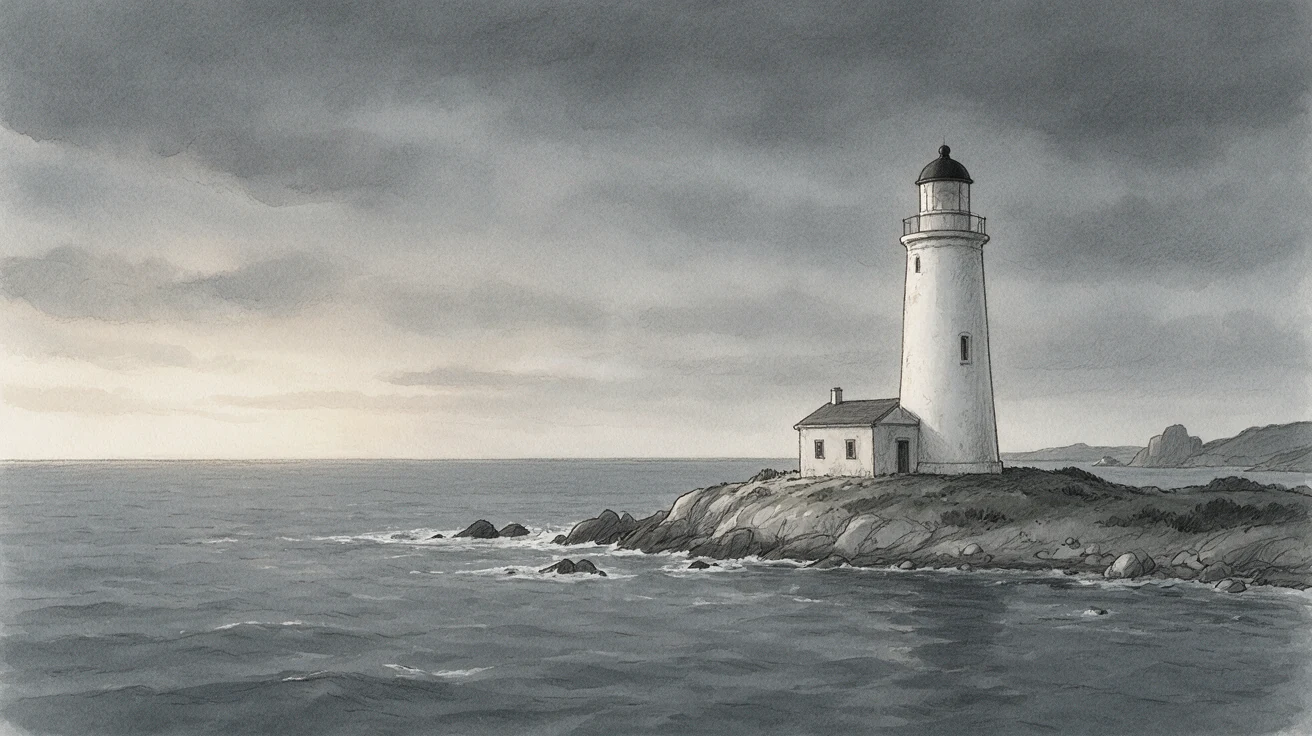
We generated this synthetic location on 20 October 2026 with the exact prompt above: Seedream Pro, 16:9, 1K, PNG, no references, one request, first output retained. It gives us the right-hand tower, left-hand cottage and open water, with no visible lamp glow. It also adds a small opening near the top of the tower beyond the requested single window, so the architecture needs review before it becomes a continuity anchor. The public example is compressed to WebP without cropping; the input and output record includes hashes and limitations.
Judge the composition before adding detail. Can you tell where the tower stands? Is the lamp clearly off? Is the cottage on the intended side? If the setting is wrong, correct this image before treating it as your reference.
How do you prompt the next shots without losing the setting?
Attach the approved opening still as the single reference for each follow-up request. Repeat the style and the physical features that matter. You can use the playground's upload control; the image-editing guide explains reference-based requests.
For the staircase:
Use the attached approved lighthouse image as a reference for the same fictional building and monochrome pencil-and-wash style. Create one interior storyboard still: looking upward from the base of an empty narrow spiral staircase inside the weathered white cylindrical tower. Worn stone steps curve around a central support; dim dusk light enters through one narrow seaward window. No people or visible lamp. Keep the interior simple and readable, with no new rooms, decorative furniture, words, shot numbers, borders or multiple panels. One camera view only.
For the reveal:
Use the attached approved lighthouse image as a reference for the same fictional building, black domed lantern roof and monochrome pencil-and-wash style. Create one close interior storyboard still of its lantern room at dusk. The central lighthouse lamp is now visibly lit, illuminating the surrounding circular structure; a quiet grey sea is visible beyond the windows. No people. Make the lit lamp the clear focal point. No second lighthouse, words, shot numbers, borders or multiple panels. One camera view only.
These two follow-up prompts are recipes, not executed continuity tests. The opening view does not reveal the staircase or the lamp's construction, so the model must invent those interiors. If the interior design matters, approve a separate interior reference before building more shots around it.
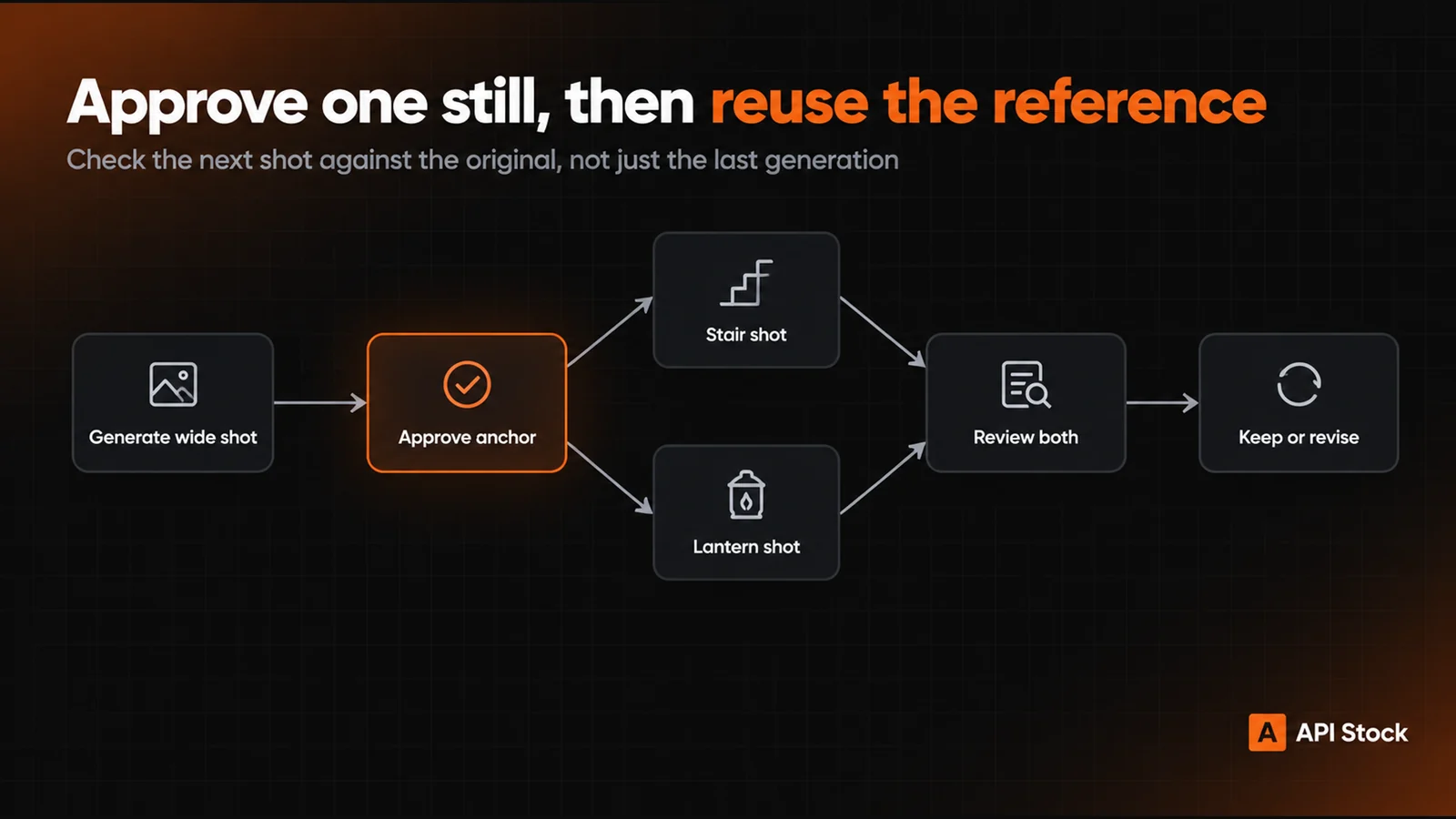
Using the same approved reference for both requests gives you a common visual anchor. It does not lock the architecture, and attaching only the newest generated image can carry an unnoticed change into the next shot. Keep your original alongside the new results and check them together.
How much does the storyboard cost, including revisions?
Prices are from the live API Stock catalog, as of 20 October 2026. The first reference image is included in Seedream Pro's resolution tariff; each additional reference in the same request adds $0.004.
| Request configuration | Price for one output image |
|---|---|
| 1K, zero or one reference | $0.042 |
| 2K, zero or one reference | $0.084 |
| 1K, two references | $0.046 |
| 2K, two references | $0.088 |
For this board, one opening still plus two follow-up stills, each with one reference, is 3 × $0.042 = $0.126 at 1K. Allowing two attempts for each shot makes it 6 × $0.042 = $0.252. Generating three images at 2K also costs 3 × $0.084 = $0.252 with zero or one reference each.
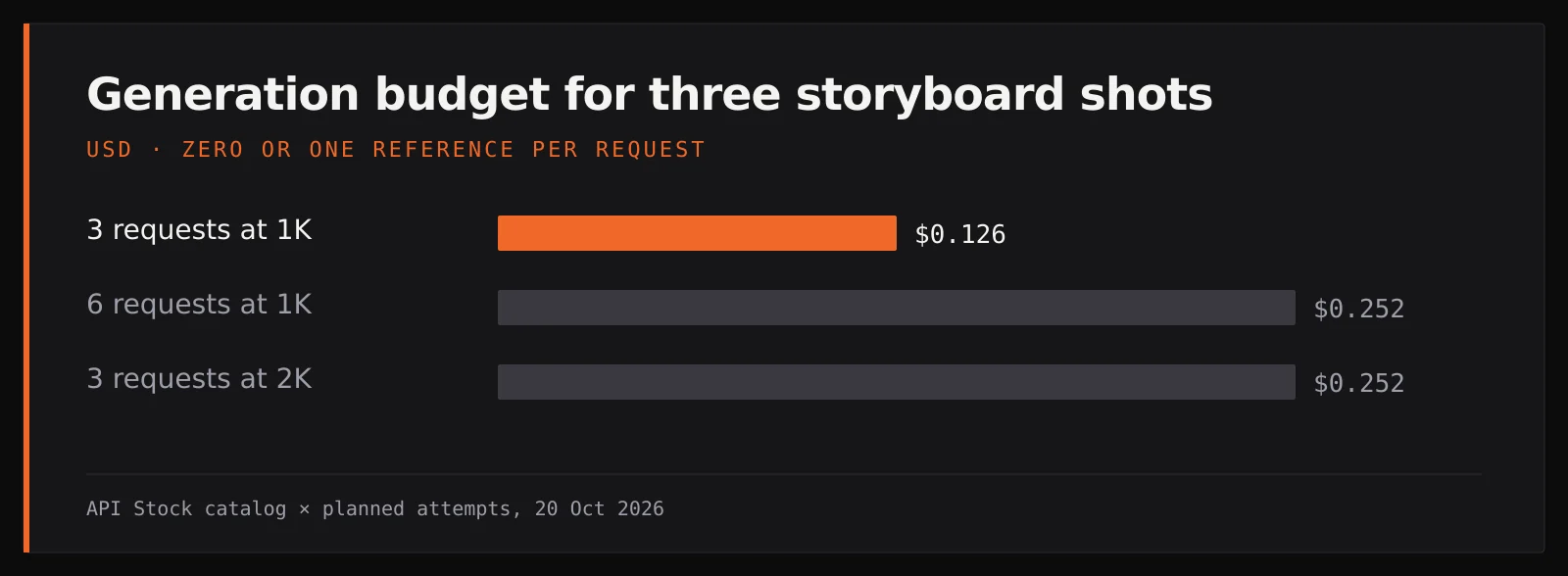
These are attempt budgets, not guaranteed prices for an approved board. A completed image you discard still costs money. A new 2K request is an additional generation; it does not upgrade a previous 1K result in place. The figures exclude video, audio, assembly and review time. Check current pricing and the request estimate before generating.
What should you check before turning stills into video?
Put the images side by side at the size you will use for review. Look for changes that alter the story: a second tower, a different roof, a relocated cottage, a staircase that cannot plausibly belong inside the tower, or a lamp already lit in the opening shot. Correct the affected shot, keeping the reference and the useful parts of its prompt.
Check the sequence as well as the individual pictures. Does the opening make the location clear? Does the stair view suggest a route upward? Does the final image reveal something new? You can test the intended order and pacing by placing the stills on a video-editor timeline, but that remains an animatic made from stills, not evidence that the final motion will work.
If you want to animate a shot later, supply its approved image separately where the chosen video model supports it. Avoid sending a whole board and assuming the model will perform the cuts you wrote. The image-to-video guide covers that next stage; its motion, audio and pricing need their own review.
For your first generation, open the Seedream Pro playground, paste the opening-shot prompt and run one 16:9, 1K image. Approve the setting before generating the other shots. If you later automate the same requests, the image-model documentation describes the API fields.
FAQ
Can I turn a script into an AI storyboard here?
Yes, by breaking the script into shots, generating a separate image for each and arranging them beside your notes. This workflow does not automatically export a storyboard document or an edited video.
How much do three AI storyboard images cost?
Three Seedream Pro 1K requests cost $0.126 total with zero or one reference per request, as of 20 October 2026. Revisions are additional requests, so the cost of a board you approve can be higher.
Will the lighthouse or a character stay identical between shots?
A reference guides the next image but does not guarantee identical buildings, faces or clothing. Inspect each shot against the approved reference; this recipe does not establish a measured continuity success rate.
Should I generate all storyboard panels in one image?
You can request a contact sheet for rough exploration, but this recipe uses one image per shot so you can revise and reuse each view separately. Keep shot numbers and production notes editable outside the images.
Does a storyboard still become a finished video?
No. You can use it to plan a shot or as input to a compatible video model, but motion and sound require separate work and spending.
- storyboard
- video
- images
- seedream
Try it with your own key
Every model mentioned here is live in the API Stock catalog — one API key, one prepaid balance, automatic fallback between providers.
Read next
 Use caseAI images for presentations: prompts and cost per slideCreate wide slide illustrations with Seedream 5.0 Pro from $0.042 per image, keep text editable, and budget for revisions with practical prompts.·9 min read
 Use caseAI agent: turn a brief into text and imagesUse the new agent to turn a brief and reference files into text and images, choose models, set a spending limit and keep results in projects.·7 min read
 Use caseAI YouTube thumbnails: prompts, real screenshots and costMake an AI YouTube thumbnail backdrop for $0.014, add your real video still and editable title, then check the crop with practical tutorial prompts.·8 min read