Use case
Seedream 5.5 transparent PNG: settings, alpha checks and cost
Create a transparent PNG with Seedream 5.5, check its alpha channel before compositing, and budget reference images and rejected attempts with live prices.
Seedream 5.5 lets you request a transparent PNG for a separate design element: set background to transparent and outputFormat to png. A 1K attempt without references costs $0.028302 through API Stock, checked on 17 November 2026. Check the downloaded file on light and dark backgrounds before placing it in a layout; a PNG extension alone does not prove transparency.
This is a settings and acceptance recipe. The cover is editorial artwork, and the price chart is drawn from catalog data; neither shows a Seedream test result. Quality, latency and acceptance rates were not measured.
When is a separate transparent asset useful?
Suppose you are designing a postcard with a small enamel-style kingfisher beside the heading. Keep the heading and address typography in your layout editor, and generate only the bird. You can then reposition or resize the decoration without asking a model to redraw the whole postcard.
ByteDance announced Seedream 5.5 on 9 November, including native RGBA generation. RGBA adds an alpha channel to red, green and blue: alpha controls how transparent each pixel is. Partial transparency is useful for smooth edges. The developer's preservation and quality claims are not measurements of your own assets.
For an approved product photograph, try a conventional mask first. Generative editing can change details that must match the real item. Our product-photo workflow explains checking identity before publishing a listing. This recipe creates a new decorative element; it does not establish pixel-preserving background removal or layered PSD export.
Which settings request a transparent PNG?
Open the Seedream 5.5 playground and start without references:
| API field | First-attempt value | Reason |
|---|---|---|
size | 1:1 | Space around one isolated element |
resolution | 1K | Lower listed attempt price before a larger final |
background | transparent | Explicitly request transparency |
outputFormat | png | JPEG cannot carry the requested transparent background |
promptOptimizeMode | standard | The currently supported optimization mode |
Try this prompt:
One enamel-style kingfisher ornament for a postcard design, shown in full.Short beak, folded wings, a narrow tail, clean readable silhouette.Centered with generous space around the bird. Transparent background.No lettering, mounting pin, packaging, frame or separate cast shadow.
Use the explicit background field even when the prompt mentions transparency. auto leaves that choice to the model. Start with one object so you can inspect its small features; a sheet of tiny stickers makes acceptance harder.
For automation, this request is checked against the public schema, not executed as a model test:
curl "https://api.api-stock.com/api/v1/generation/create" \-H "Authorization: Bearer $API_KEY" \-H "Content-Type: application/json" \-d '{"model": "seedream-5-5","input": {"prompt": "One enamel-style kingfisher ornament, full silhouette, transparent background, no lettering, packaging or cast shadow.","size": "1:1","resolution": "1K","background": "transparent","outputFormat": "png","promptOptimizeMode": "standard"}}'
Save the returned taskId, follow the task-status API, and download the finished file. Poll that task rather than submitting another create because a result is taking time. One request creates one generation; do not add an n parameter for a batch.
How do you check whether the PNG has real transparency?
Download the original file, then place it as a separate layer over a solid white background in an editor. Switch the background to a dark fill. If a rectangle or checkerboard moves with the bird, those pixels are part of the image.
At 100% zoom, inspect the beak, spaces between feathers and tail. Look for a light halo, dirty edge or missing detail, then check again at the size used on the postcard. For this brief, accept a complete bird whose surrounding space disappears on both backgrounds and whose silhouette remains readable in the layout.
For a local file inspection with Python and Pillow installed, save the following as check_alpha.py and run python check_alpha.py result.png:
import sysfrom PIL import Imagewith Image.open(sys.argv[1]) as image:if image.format != "PNG":raise SystemExit("The downloaded file is not PNG")alpha = image.convert("RGBA").getchannel("A")low, high = alpha.getextrema()if low == 255:raise SystemExit("Fully opaque: no transparent pixels")if high == 0:raise SystemExit("Fully transparent: no visible asset")print("Some pixels are transparent; inspect the subject and edge manually")
This checks a necessary file property. It also handles PNG transparency stored in a palette rather than a named alpha band. A file can pass while containing a tiny transparent corner and an otherwise opaque background. Keep the two-background inspection as the acceptance step.
If two further attempts repeat the same edge defect, stop generating. Refine a promising mask manually, or simplify the brief if the shape is wrong. This is a spending rule for the example, not an observed success rate.
How much do references and retries add?
These are API Stock public USD prices per generated image as of 17 November 2026, from the live catalog. They are separate from a minimum top-up or the developer's own tariff. The dated price snapshot preserves the source precision.
| Resolution | No references | Added per reference | With one reference |
|---|---|---|---|
| 1K | $0.028302 | $0.011322 | $0.039624 |
| 1.5K | $0.028302 | $0.011322 | $0.039624 |
| 2K | $0.049529 | $0.019812 | $0.069341 |
Every reference adds a charge, including the first. The formula is base price for the resolution plus reference count times that resolution's reference rate. Supply references as urls, with at most ten input images; check their necessity before attaching several alternatives.
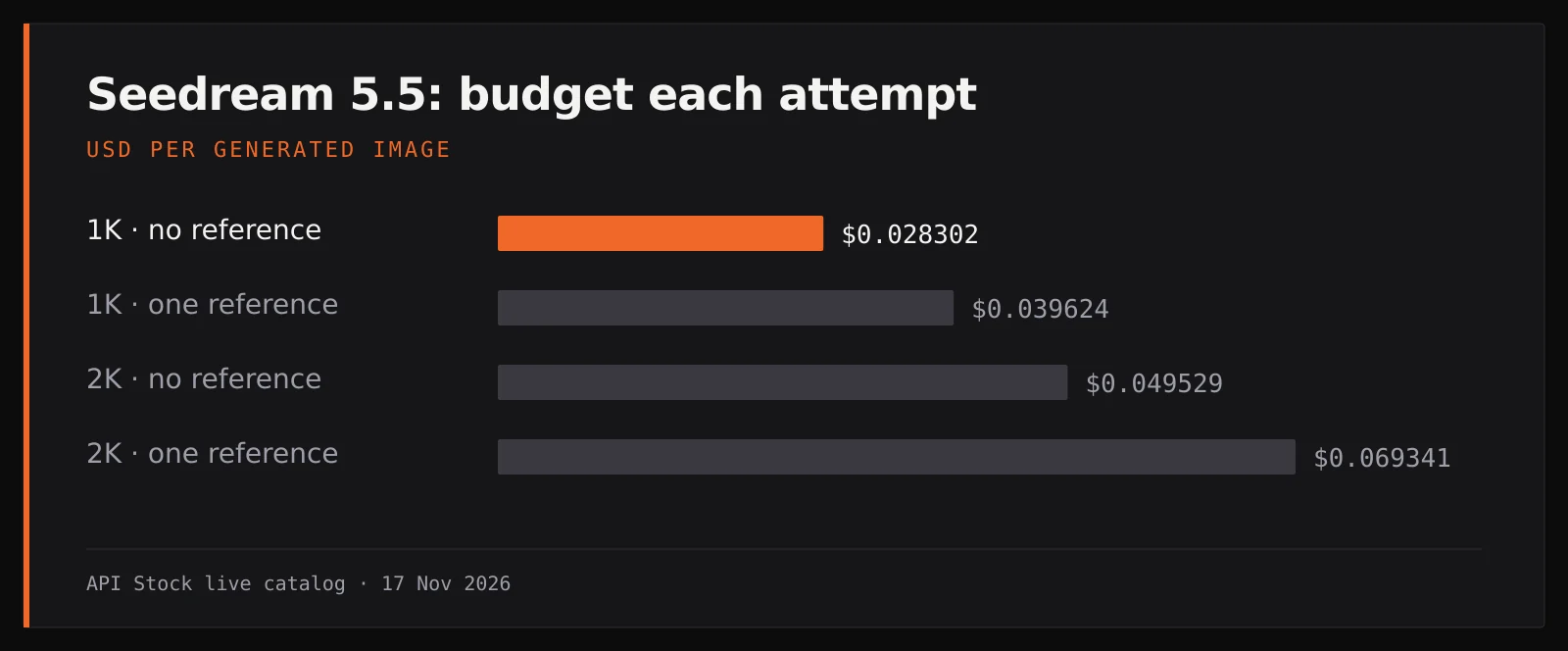
A hypothetical plan of four 1K drafts and two 2K final attempts without references costs 4 × $0.028302 + 2 × $0.049529 = $0.212266. With one reference in each request it becomes 4 × $0.039624 + 2 × $0.069341 = $0.297178. These are budgets for six attempts, not promises of six accepted assets.
Cost per accepted asset is total spending on the considered attempts divided by the number accepted. If the first plan yields two accepted assets, each costs $0.106133 under that assumption; if none are accepted, there is no usable-result unit price. Check the playground's estimate and current pricing before running your own plan.
How do you revise an asset without rebuilding the layout?
Use the chosen PNG as one reference and ask for one change, such as shortening the tail. Keep background: transparent and outputFormat: png explicit. Inspect the whole bird again after editing: an instruction to preserve the rest does not guarantee it stayed unchanged.
Keep final text, placement and sizing in your editor. To begin, generate one 1K candidate without references, check its alpha and edges, then decide whether a 2K final is needed.
FAQ
Does every PNG have a transparent background?
No. A PNG can be fully opaque or contain a painted checkerboard. Inspect the downloaded file over two solid backgrounds.
Can I request JPEG with a transparent background?
Use outputFormat: png for this workflow. The current contract does not allow transparent JPEG output.
Is the first Seedream 5.5 reference included in the base price?
No. Each input image adds $0.011322 at 1K or 1.5K, or $0.019812 at 2K, at the dated tariffs above.
Does passing the alpha check mean the asset is usable?
It confirms some pixels are transparent and some are visible. It cannot judge the silhouette, edge quality or whether the design matches your brief.
Are these pictures measured Seedream results?
No. The cover is editorial artwork and the chart uses catalog prices. This article does not compare quality, latency or success rates.
- seedream
- image
- design
- png
Try it with your own key
Choose a model in the API Stock catalog, check its price and try it in your browser or through the API.
Read next
 Use caseAI product photos for an online store: models, prompts, costPlan AI product photos from $0.014 per 2K request: compare models, adapt prompts, inspect product details and budget a store catalog before scaling.·10 min read
 Use caseAI storyboard: plan three video shots with prompts and costPlan a three-shot video with Seedream Pro stills from $0.042 each, using a lighthouse script, reference prompts and continuity checks before motion.·8 min read
 Use caseAI wall paint color preview: your room, three shades and costPreview wall paint colors in your own room photo with Seedream Pro from $0.042 per image, using paint-only prompts and checks before buying real samples.·9 min read