Image
GPT Image 2.5 — Sunburst, Flare, prompts and real examples
Choose a GPT Image model, compare Sunburst and Flare, copy four practical prompts, inspect six real renders, and generate or edit images through API Stock.
Choose between GPT Image 2.5 Flare and Sunburst for product images, posters or reference-based edits. Below are four prompts, our generated results and a comparison with GPT Image 2.
What people build with GPT Image
| What you need | What to specify | Starting point |
|---|---|---|
| A product image for a landing page | Material, light, camera angle and room for copy | Flare |
| A poster with a short headline | Exact words, line breaks, hierarchy and placement | Sunburst |
| An editorial illustration | Medium, palette, composition and the idea to communicate | Flare |
| A new background for an existing image | The requested change and everything that must stay | Sunburst with a reference |
| An existing GPT Image 2 integration | The prompt and settings that already work for you | GPT Image 2 as a comparison point |
The starting points are practical choices for these examples. The right model for your brief depends on the result you accept and how many revisions it takes to get there.
Which model, and when
GPT Image 2.5 Flare is the first option to try for a new product visual, article illustration or a set of creative directions. OpenAI positions it as the faster everyday generation model. That describes the model's intended use; the time a job takes through an API also includes queueing, delivery and any retries. OpenAI's Flare model page.
GPT Image 2.5 Sunburst is a useful starting point when a revision needs to respect an existing image. OpenAI's guidance emphasizes editing precision. Use the reference image and spell out which objects, framing and lighting should survive the edit. OpenAI's Sunburst model page.
GPT Image 2 remains available for generation and editing in API Stock. If it already produces acceptable results for your templates, keep those prompts as a baseline when trying 2.5. A model change can change composition and surface treatment, so check the actual brief again.
In API Stock, all three use POST /api/v1/generation/create. You choose the
model with its ID; prompt, size, resolution and optional urls stay in
the same input object.
How these examples were made. We generated the six images below through API Stock on 10 September 2026. Each request used
resolution: "2k"; the three product shots share an identical prompt andsize: "3:2". GPT Image 2 used the service's default quality, while the 2.5 route uses high quality. These are individual examples, with no speed or quality ranking inferred from a single image. The files are hosted with this article. The settings shown with each prompt are the settings used for generation. Displayed files were converted to WebP without resizing or cropping.
Prompt 1: a product shot with room for copy
The brief is a reusable bottle photographed for a landing page. The important decisions are its material, where it sits and the space reserved for a headline. Leaving that space in the prompt saves a layout problem later.
Settings: size: "3:2", resolution: "2k". We sent the following exact
prompt to all three models.
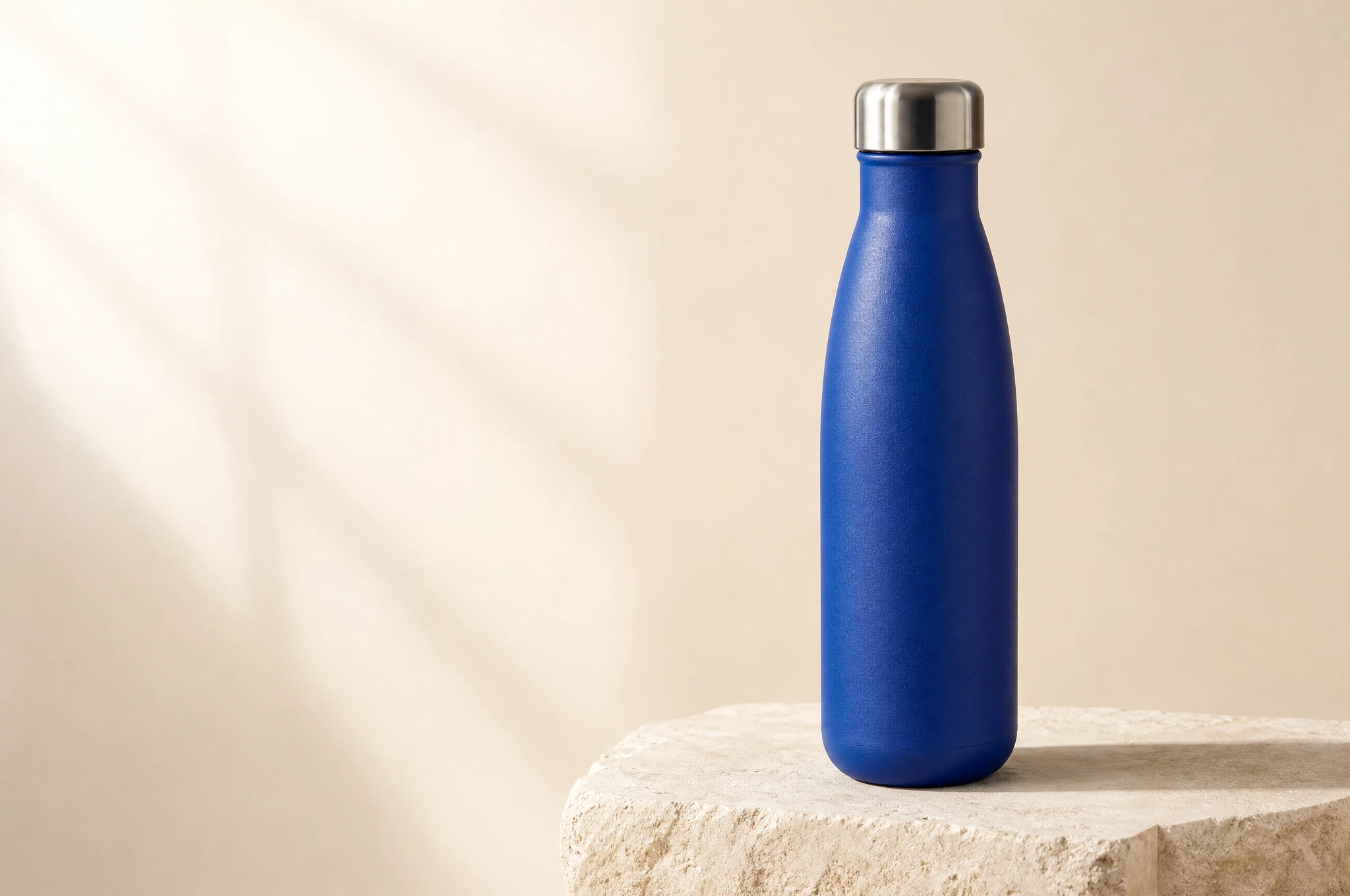
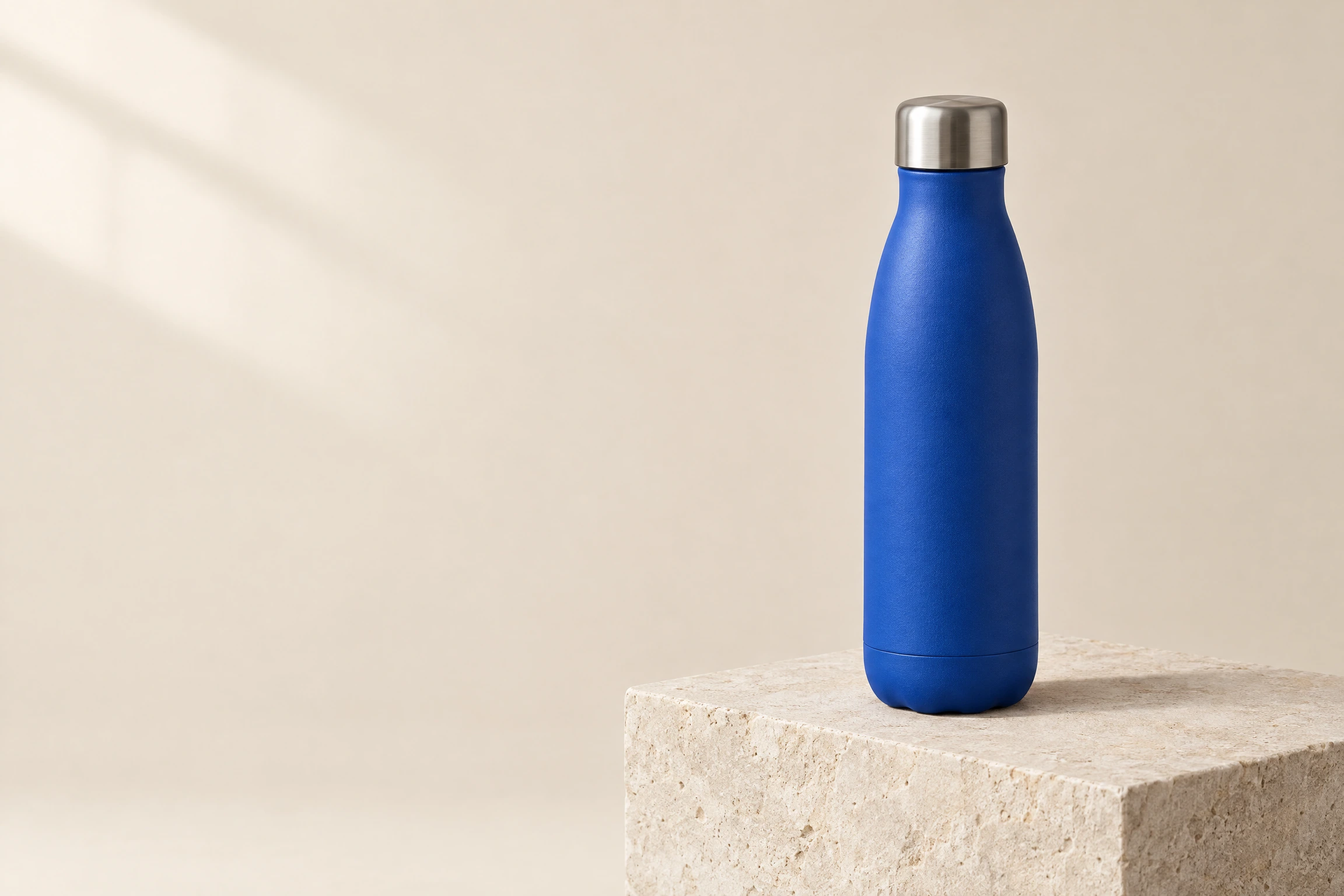
Studio product photograph for a small design brand.A single matte cobalt-blue insulated water bottle with a brushed stainless-steelcap stands on a pale limestone block. Three-quarter view, bottle fully visible,centered in the right half of a wide composition. Warm ivory seamless background,soft window light from the upper left, a believable contact shadow, finepowder-coated texture and restrained reflections on the cap. Leave the leftthird empty for headline copy added later. No text, no logo, no extra bottles,no decorative props.
GPT Image 2
GPT Image 2.5 Flare
GPT Image 2.5 Sunburst
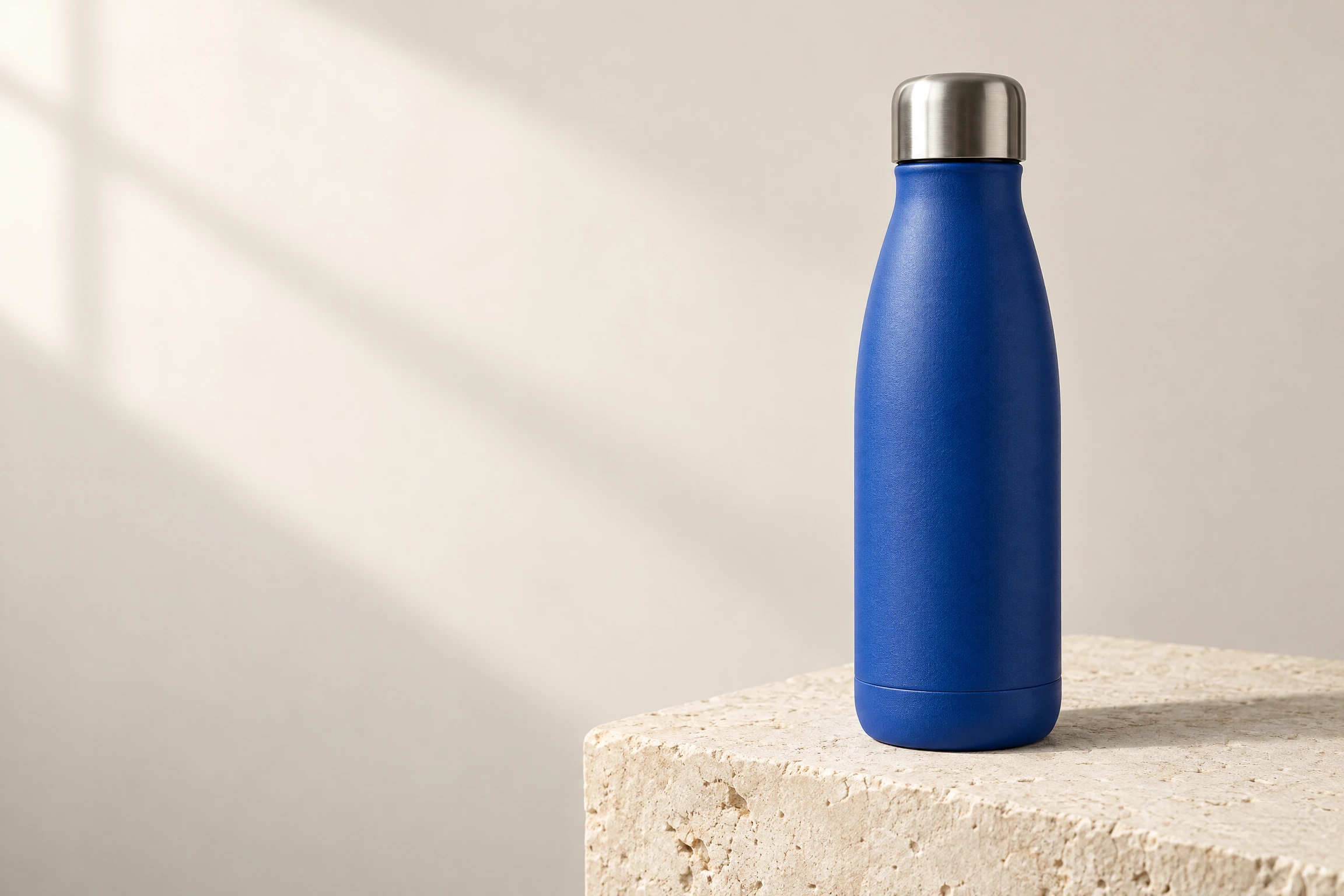
All three results keep the bottle fully visible on the right and leave the left third available for copy. The invented product itself changes: Flare adds a visible base seam and a scalloped bottom, while the other two bottles have different base shapes. Sunburst also gives the blue coating a pronounced grain. An identical text prompt establishes a shared brief, but does not lock product geometry across models.
Compare the things the brief actually asks for: whether the bottle is fully visible, whether the left third is usable, whether the cap reads as metal and whether the bottle casts a convincing shadow on the block. A prettier surface does not compensate for a layout that leaves nowhere to put your headline.
For a real product, supply a product photograph as a reference. A text-only prompt invents the bottle; it cannot establish the exact shape of your SKU.
Prompt 2: a poster with specified typography
Short text works best as a small, explicit layout brief: quote the words, describe their line breaks and place the secondary copy separately. Here the poster has one two-line headline and one footer.
Model: gpt-image-2.5-sunburst. Result: 1536 × 2048 pixels (3:4).
Create a finished editorial poster in a portrait composition.Warm ivory background. At the top, large crisp dark-navy uppercase typographyreads exactly "MAKE ROOM" on the first line and "FOR QUIET" on the second line.In the lower right, a sculptural spiral made of matte cobalt-blue ceramic restson a simple pale pedestal. Place the small footer "STUDIO NOTES / 01" at thebottom left. Strong alignment, generous margins, subtle paper texture and onesoft directional shadow. The poster itself fills the image: no frame, no wall,no mockup perspective. Render only the three specified text elements, withno additional words, letters, logos or watermarks.
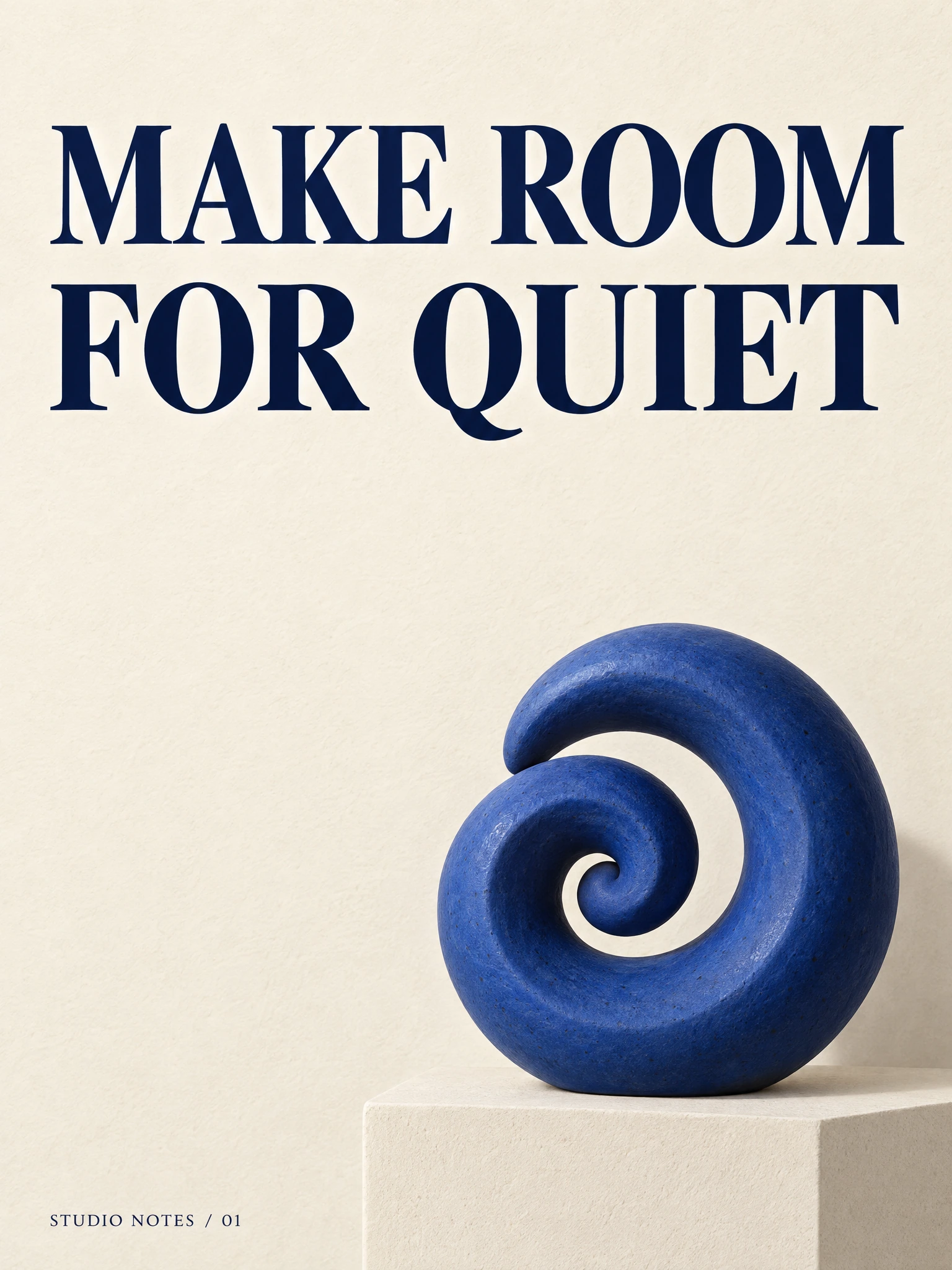
Sunburst rendered "MAKE ROOM", "FOR QUIET" and "STUDIO NOTES / 01" correctly in this result, with the headline above the sculpture and the footer at the bottom left. The full, uncropped result is 1536 × 2048 pixels, or 3:4. Leave room for a final crop when the destination has a fixed format.
Proofread the final file at the size it will be published. Check the footer as carefully as the headline: short secondary text is easy to miss. For copy that must change regularly or remain editable, generate the artwork with an empty text area and set the typography in your design tool.
Prompt 3: an illustration with a defined visual language
An editorial illustration has a different job from a product photograph. It can explain the idea of reuse through shape, repetition and material. Naming the medium makes that choice explicit before the model fills in the details.
Model: gpt-image-2.5-flare. Settings: size: "16:9",
resolution: "2k".
Wide editorial illustration for an article about reusable packaging.Build the scene as a tactile cut-paper collage: one cobalt-blue water bottlesurrounded by folded cream paper leaves and three simple circular ripples.Use an off-white handmade-paper background and a restrained sage-green accent.Show crisp cut edges, slight layering shadows and clean geometric silhouettes.Keep the bottle and most of the collage in the right two thirds; leave theleft third quiet for a headline added later. The artwork fills the image.No text, letters, numbers, logos, photographs or watermarks.
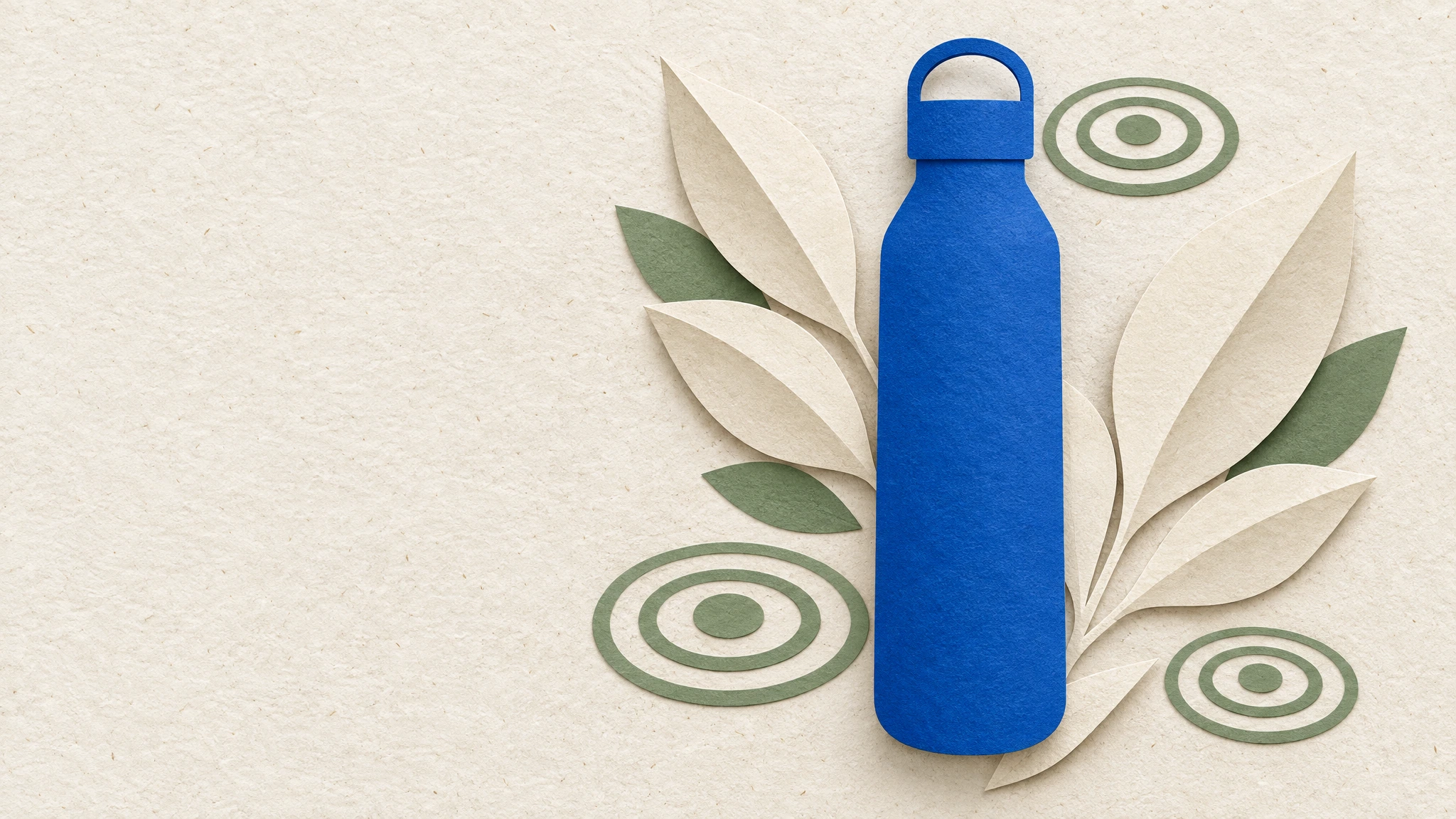
The result includes the folded leaves, three groups of concentric ripples and visible paper texture. The large empty area on the left remains usable, while the bottle becomes a flat paper silhouette with a loop-shaped cap. This is a new illustration from text; no product photograph was supplied as a reference.
The palette connects this illustration to the product images without requiring the same camera view or rendering style. For a series, reuse the palette, material description and layout constraints, then change the subject. Inspect each result for consistency before placing the series together.
Prompt 4: change the background and preserve the product
The input for this edit is the Flare product image from Prompt 1. Supplying it as a reference gives Sunburst an actual object to work with. The prompt names the requested change first, then lists the parts of the photograph that should stay fixed.
Model: gpt-image-2.5-sunburst. Settings: size: "3:2",
resolution: "2k", with the source image in urls.
Edit the supplied product photograph. Replace only the warm ivorybackground with a muted sage-green plaster wall with a very fine matte texture.Keep the cobalt-blue bottle, its brushed steel cap, the pale limestone block,the camera angle, crop and product placement unchanged. Preserve the directionof the light and the contact shadow. Keep the left third empty. Do not addtext, labels, logos, props or another bottle.
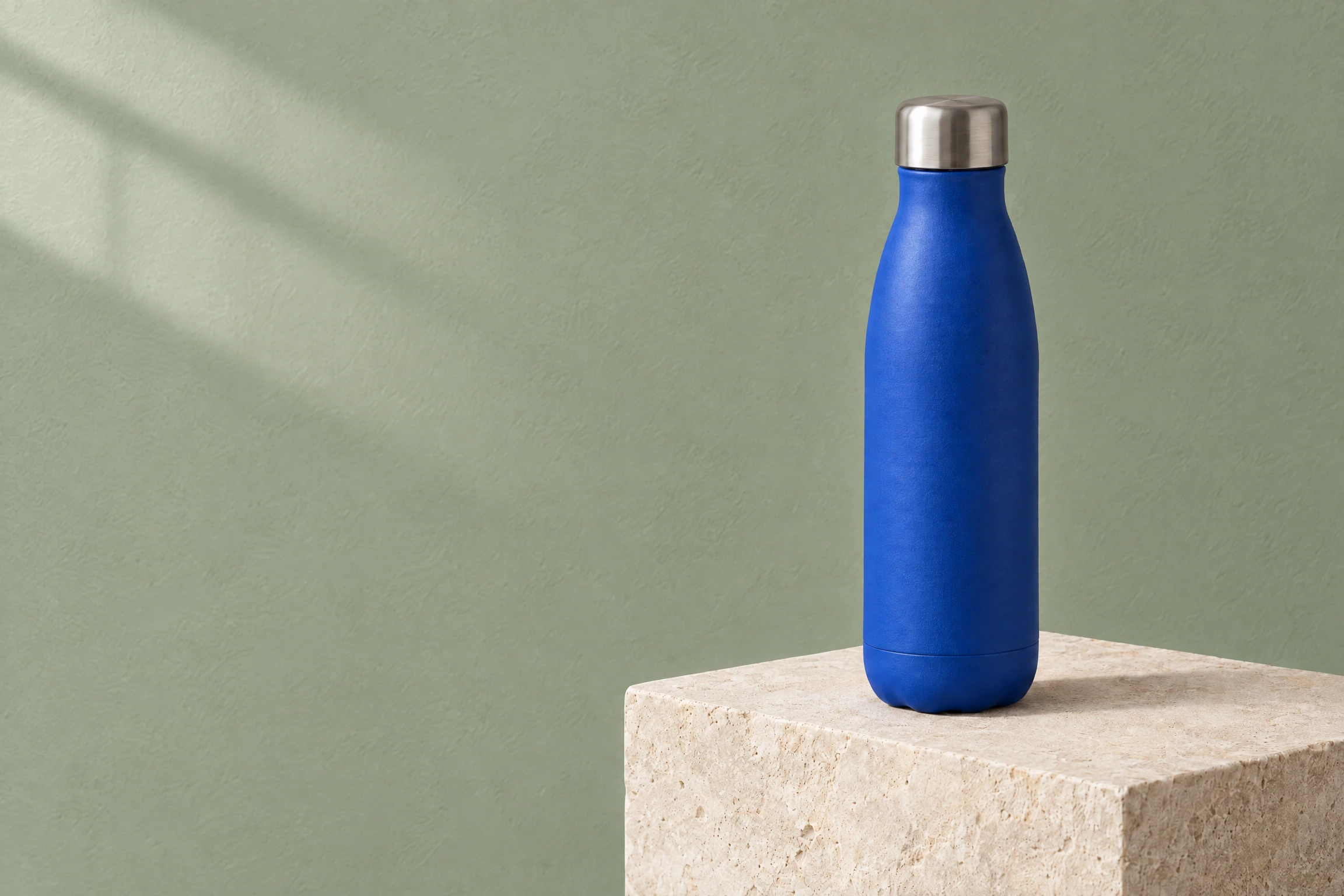
The background becomes a textured sage-green wall. The bottle stays in the same position, including the base seam, scalloped bottom and cap shape from the Flare source. Fine surface texture and reflections change slightly; the result preserves the composition without keeping every product pixel intact.
Check this against the Flare source above, especially the cap, silhouette, block edges and shadow. The instruction to preserve an object is a constraint to evaluate, not a guarantee of pixel-identical preservation. When a revision changes too much, narrow the next request to one visible difference and use the original approved image again.
A prompt structure you can reuse
The four prompts follow a common order:
- Purpose: product photograph, finished poster, editorial illustration or edit of a supplied image.
- Subject: what must be present, including the material or identity cues that matter.
- Composition: crop, placement and where text or another element will go.
- Visual treatment: lighting for a photo; medium and palette for an illustration; hierarchy for a poster.
- Constraints: exact text, the requested change, what must stay and what must not be added.
When the first result misses, change the instruction responsible for that miss. If the bottle is too central, make its placement more explicit. If an edit changes the cap, name the cap among the protected details. This keeps each iteration understandable.
Run GPT Image 2.5 through the API
This creates a new image task. Use the complete prompt from a recipe above when you want to reproduce that example; this shorter prompt is a quick start.
curl -X POST https://api.api-stock.com/api/v1/generation/create \-H "Authorization: Bearer $API_STOCK_KEY" \-H "Content-Type: application/json" \-d '{"model": "gpt-image-2.5-flare","input": {"prompt": "Studio photograph of a matte cobalt-blue bottle on pale limestone, warm ivory background, soft light from the upper left, room for a headline on the left, no text or logo.","size": "3:2","resolution": "2k"}}'
The response contains data.taskId. Poll that task until it reaches
finished or a terminal failure state:
curl "https://api.api-stock.com/api/v1/task/status/$TASK_ID" \-H "Authorization: Bearer $API_STOCK_KEY"
For a finished task, download the image from data.files[0].fileUrl. You can
also provide a top-level webhook URL instead of polling. See
tasks and webhooks for the complete lifecycle.
For an edit, keep the same endpoint and add the source to input.urls:
{"model": "gpt-image-2.5-sunburst","input": {"prompt": "Replace only the background with a muted sage-green wall. Keep the bottle, cap, block, framing and lighting unchanged.","urls": ["https://example.com/your-approved-product-photo.png"],"size": "3:2","resolution": "2k"}}
Replace the example URL with an accessible image URL or a supported base64
data URI. API Stock accepts up to 16 references for this family. Send one
generation request per desired result; there is no public n parameter.
Resolution, aspect ratio and price
In API Stock, size is the aspect ratio and resolution is the output
tier. For example, use size: "16:9" with resolution: "2k" for a wide
image. Resolution values are lower-case: 1k, 2k, 4k.
The generated GPT Image 2 product shot is 2048 × 1360 pixels. The 2.5 product shots and edited version are 2304 × 1536, the wide Flare illustration is 2048 × 1152, and the Sunburst poster is 1536 × 2048. Read the output dimensions before placing an image in a fixed layout.
GPT Image 2.5 supports the wide 3:1 and tall 1:3 ratios at 2k or 4k.
Use a supported combination rather than trying those two ratios at 1k.
For the complete current schema, open the
Sunburst reference
or Flare reference.
The catalogue prices below were checked on 10 September 2026. They are API Stock's USD prices per image, separate from OpenAI's direct token pricing.
| Model | 1K | 2K | 4K |
|---|---|---|---|
| GPT Image 2 | $0.013 | $0.021 | $0.032 |
| GPT Image 2.5 Flare | $0.010 | $0.035 | $0.035 |
| GPT Image 2.5 Sunburst | $0.010 | $0.035 | $0.035 |
At these catalogue rates, 100 images on either 2.5 variant cost $1 at 1K or $3.50 at 2K/4K, before any account-specific pricing. Check the current pricing page when budgeting a job.
Comparing the 2.5 variants. The current integration uses a shared 2.5 route at 1K. Choose 2K or 4K to compare the distinct Sunburst and Flare routes, as we did for this article. The public 2.5 request does not need a
qualityfield; the integration submits these jobs at high quality.
Turn a promising render into a usable asset
Start with the model closest to the job: Flare for a new visual direction, Sunburst for an edit with specific details to preserve. Keep the successful prompt and the input image with the result so the next revision has a clear starting point.
Before publishing, check spelling, object geometry, reference fidelity and the crop at its actual display size. OpenAI documents remaining limitations in text placement and visual consistency; these are useful things to include in your own review checklist. OpenAI image-generation limitations.
Open Flare or Sunburst, copy a prompt from this guide and try it with your own brief. For more reference-image workflows, continue with image editing; for turning a finished still into motion, see image to video.

Run this with your own key
Choose a model in the API Stock catalog, check its price and try it in your browser or through the API.