News
GPT Image 2.6 review: Flare, Sunburst, pricing and examples
GPT Image 2.6 now has separate Flare and Sunburst IDs and output up to 4K: check live prices, a poster budget, historical samples and the updated API request.
GPT Image 2.6 creates and edits images; on API Stock, a 1K request costs $0.013, while 2K or 4K costs $0.025 with Flare or $0.030 with Sunburst. Choose the variant by its model ID; both choices use a shared 2.6 engine at 1K, and select the named engine at 2K/4K. For a workshop poster, start with the Flare playground, check the wording at 1K, then budget for a larger final image.
Updated 7 November 2026. The live catalog replaced the single
gpt-image-2.6entry with separate Flare and Sunburst IDs and added 2K/4K tiers. This refresh updates prices, playground links and the API request, and explains the shared 1K engine. The preserved cover shows the original 5 November 1K price, which is still $0.013; the two sample images and their evidence remain from that date.
This is a launch overview with individual historical examples. We have not measured a quality ranking, typical generation time or improvement over GPT Image 2.5, and have not tested the new 2K/4K paths.
What is GPT Image 2.6, and what is new?
OpenAI released Images 2.6 on 4 November 2026. The two model names are gpt-image-2.6-flare and gpt-image-2.6-sunburst. Both are now separate entries in the API Stock catalog, dated 6 November; that catalog-entry date is distinct from OpenAI's launch date.
OpenAI documents complexity control, markup-guided editing, SVG generation and animated GIF output for the 2.6 family. Complexity controls planning before rendering; quality controls rendering detail. Those are separate settings in OpenAI's API. Official image-generation documentation.
Check the fields of the service you are actually using. The current API Stock integration provides raster generation and reference-based editing at 1K, 2K and 4K. It does not expose GIF, SVG, markup uploads, complexity, quality or a transparent-background control. A feature in the model family's announcement is not automatically a field accepted by this endpoint.
Should you choose GPT Image 2.6 Flare or Sunburst?
At 1K, either catalog choice uses the shared 2.6 engine. At 2K or 4K, the selected Flare or Sunburst engine runs at high quality. Choosing a different ID at 1K therefore does not establish a comparison of the two named engines. These conditions appear on the current Flare and Sunburst model pages.
For a larger deliverable, match the intended use to your brief, then inspect your own results.
| Your task | Starting version | What to check |
|---|---|---|
| Checking a poster's rough composition | Shared 1K tier | Unwanted objects and usable space for copy |
| Exploring larger illustration or campaign images | Flare at 2K/4K | Composition and lettering at the final display size |
| A dense poster or an edit with important small details | Sunburst at 2K/4K | Every word, label placement and areas meant to stay unchanged |
| Replacing a working 2.5 workflow | Corresponding 2.6 version at a matching tier | The same prompts and reference files against your existing outputs |
OpenAI positions Flare for interactive iteration and Sunburst for detailed compositions and edits. This is a starting recommendation, not a measured winner for your images. End-to-end task time also includes queueing, downloads and any retries.
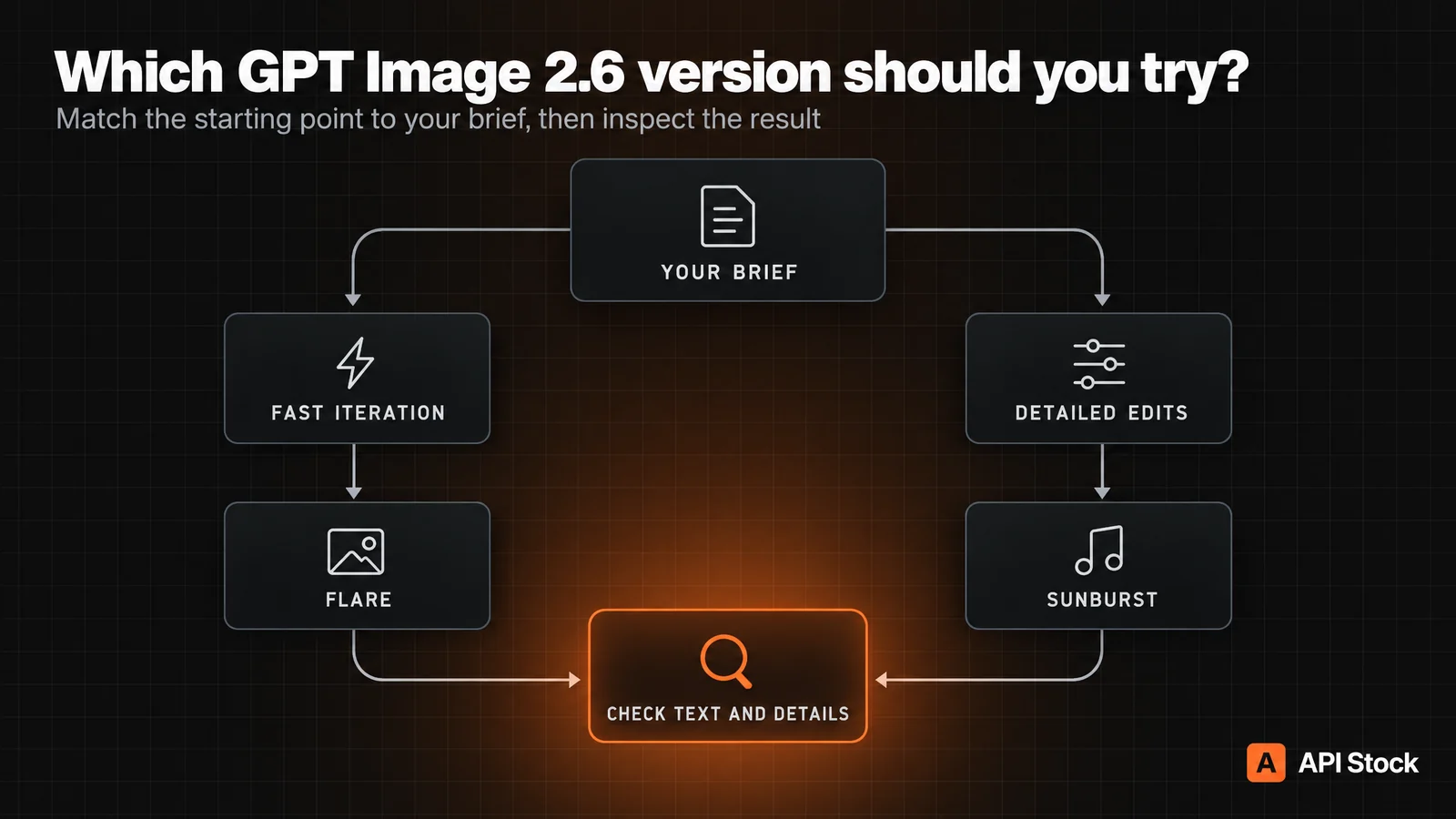
Original editorial decision diagram, generated with GPT Image 2.5 Sunburst, as was the cover. Apply its named-version choice to the current 2K/4K paths; 1K uses a shared engine. The botanical posters below are historical 2.6 outputs.
What does GPT Image 2.6 produce from the same prompt?
On 5 November 2026, we submitted the following exact prompt twice through API Stock: once requesting version: "flare", once requesting version: "sunburst". Both used the then-current model: "gpt-image-2.6", size: "1:1" and resolution: "1k". We kept the first returned image from each request, with no reruns or selection among candidates.
These labels record the requested versions under the old contract. They do not verify which engine served each historical request, or demonstrate the performance of today's separate 2K/4K variants. The samples remain examples of that dated workflow.
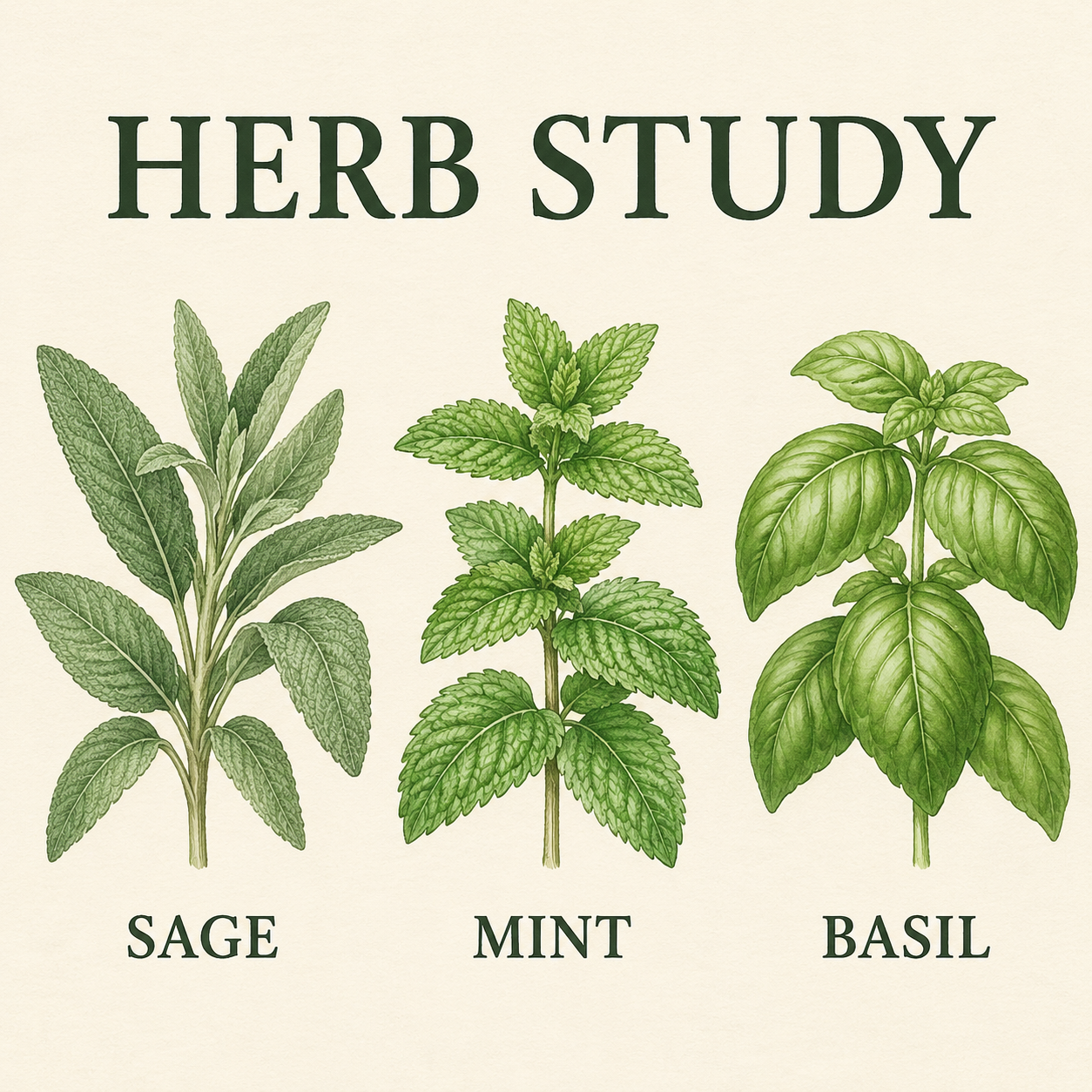
Create a square botanical workshop poster on warm white paper. Exact headline at the top: "HERB STUDY". Below it, arrange three separate botanical illustrations in one horizontal row: sage on the left, mint in the center, basil on the right. Beneath each illustration, print its exact label once: "SAGE", "MINT", "BASIL". Sage has long soft leaves, mint has serrated edges, basil has broad smooth leaves. Fine dark ink outlines, muted green washes, generous margins, clear readable typography. No other text, logos, or decorative objects.
Flare request, first historical output:
Sunburst request, first historical output:
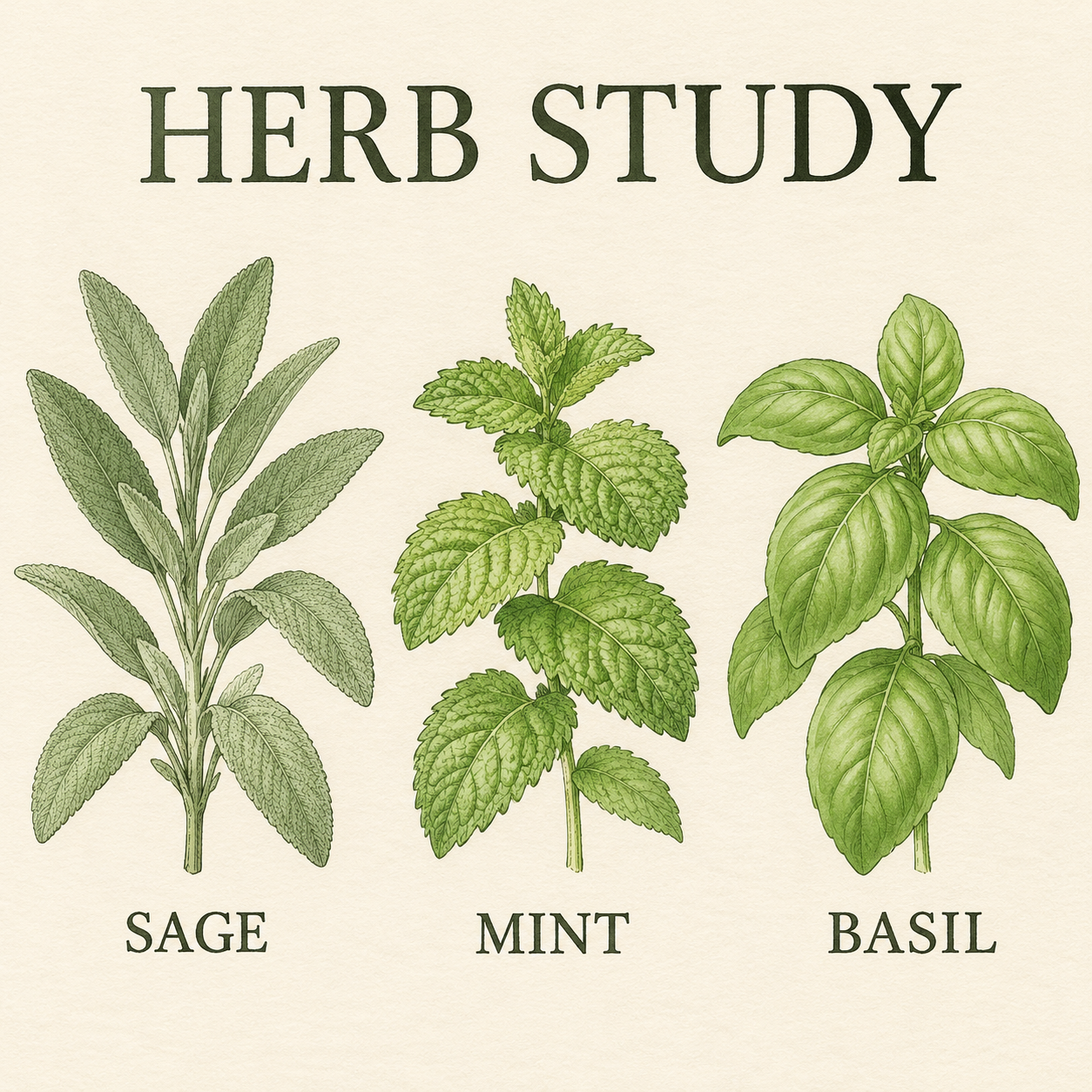
In these two files, all four requested text strings are legible and the labels follow the requested left-to-right order. The foliage scale and spacing differ. Both returned images measure 1254 × 1254 pixels; 1k was the requested resolution tier. This observation does not cover longer text or smaller lettering.
Judge these against the brief: does the headline match, are the labels in the requested order, and is the layout usable at the final display size? Botanical resemblance in an illustration is not evidence of correct plant identification. Use specialist references for educational or scientific work.
Both images are synthetic. Published files use lossless WebP conversion without resizing, cropping or retouching. The sample evidence file records the prompt, settings, date, dimensions and hashes. Two images cannot establish a success rate or typical speed; this example also does not test editing, Cyrillic, GIF or SVG.
How much does GPT Image 2.6 cost?
Public catalog prices as of 7 November 2026, in USD per image request through API Stock. These are resolution-tier tariffs for generation or reference editing, taken from the live catalog; OpenAI's direct API has its own billing.
| Model | 1K | 2K | 4K |
|---|---|---|---|
| GPT Image 2.6 Flare | $0.013 | $0.025 | $0.025 |
| GPT Image 2.6 Sunburst | $0.013 | $0.030 | $0.030 |
| GPT Image 2.5 Flare | $0.010 | $0.035 | $0.050 |
| GPT Image 2.5 Sunburst | $0.010 | $0.035 | $0.050 |
The two historical 1K sample requests have a combined catalog cost of $0.026. At today's tariff, ten 1K requests cost $0.13; 100 cost $1.30. These totals count requests, including new variations and edits, rather than approved assets. They use the public tariff, not an internal account's charge.
For one poster, suppose you use four 1K drafts and two 2K final attempts, then accept one final image. With Flare finals, the total is 4 × $0.013 + 2 × $0.025 = $0.102. With Sunburst finals it is $0.112. If exactly one image is accepted, that full total is also the cost per accepted poster. This is a planning scenario, not an observed acceptance rate; if neither final passes, you have spent the same amount without an accepted poster.
Accept a poster only when its headline and labels are correct, the requested order is preserved, and text remains readable at the intended display size. Stop rerunning for critical copy errors and place that text in a layout editor instead.
GPT Image 2.5 remains cheaper per 1K request. The current 2.6 2K/4K tariffs are lower than the matching 2.5 tiers, but price alone does not establish a better accepted result. Keep 2.5 Sunburst or 2.5 Flare if your existing output already meets the brief. Our GPT Image 2.5 guide includes earlier examples for a baseline.
Check current pricing before a large batch. The figures here are dated; they are not a future price guarantee or OpenAI's direct token-based API pricing.
How can you use GPT Image 2.6 online?
Open the GPT Image 2.6 Flare playground, sign in and check your available balance. Set 1K for a layout draft and a ratio that matches your placement: 1:1 for a square, 4:5 for a portrait card or 16:9 for a wide banner. A resolution tier is not a promise of the same width and height for every aspect ratio.
Paste the botanical prompt above for a reproducible starting brief. For your own poster, replace the headline and labels, keeping the wording short. Check spelling and line breaks at the size people will actually read. If the composition works, select 2K or 4K for a new final attempt; a larger request can still change the image. Use the Sunburst playground if you want to evaluate its named engine at those tiers. Add critical prices, legal copy or frequently changing dates in a layout editor when you need exact typography.
For an image edit, supply a reference and describe the change. For example:
Use the supplied product photograph as the reference. Replace the background with a warm white studio backdrop. Preserve the product silhouette, visible lettering, surface texture, camera angle and contact shadow. Keep the whole product visible. Add no objects or text.
This is an untested edit recipe, not an output shown in this review. Preservation instructions still need checking against the original. For a pixel-exact product or logo, retain the approved original and composite the background separately. See the reference-editing guide for the workflow.
How do you call GPT Image 2.6 through the API?
Use gpt-image-2.6-flare or gpt-image-2.6-sunburst as model. The current input has prompt, optional urls, size and resolution; it has no version field. If you copied the original review's request, replace the old model ID and remove version before submitting it.
This schema-checked, unexecuted example adapts our historical prompt to the current Flare 2K contract, quoted at $0.025. It was checked against today's catalog and live OpenAPI schema, not submitted as a paid test. Set API_KEY to your API Stock key:
curl --fail-with-body -X POST 'https://api.api-stock.com/api/v1/generation/create' \-H "Authorization: Bearer $API_KEY" \-H 'Content-Type: application/json' \-d '{"model": "gpt-image-2.6-flare","input": {"prompt": "Create a square botanical workshop poster on warm white paper. Exact headline at the top: \"HERB STUDY\". Below it, arrange three separate botanical illustrations in one horizontal row: sage on the left, mint in the center, basil on the right. Beneath each illustration, print its exact label once: \"SAGE\", \"MINT\", \"BASIL\". Sage has long soft leaves, mint has serrated edges, basil has broad smooth leaves. Fine dark ink outlines, muted green washes, generous margins, clear readable typography. No other text, logos, or decorative objects.","size": "1:1","resolution": "2k"}}'
The response contains a task ID. Set TASK_ID to that value, then poll:
curl --fail-with-body 'https://api.api-stock.com/api/v1/task/status/'"$TASK_ID" \-H "Authorization: Bearer $API_KEY"
Wait for data.status: "finished", then read data.files[0].fileUrl. Stop polling on failed or expired and handle the reported error. You can also pass a top-level webhook URL; the task documentation explains result delivery.
For editing, add urls to input with a public HTTP(S) image URL and change the prompt. The live schema accepts up to 16 references and a prompt up to 32,000 characters. These endpoints do not accept base64 data URIs. Create one task per image rather than adding an n field. The model page's API example and parameter table list the current fields.
FAQ
Is GPT Image 2.6 available now?
Yes. As checked on 7 November 2026, API Stock lists gpt-image-2.6-flare and gpt-image-2.6-sunburst, with 1K, 2K and 4K raster output. Use these separate IDs in new requests.
Is GPT Image 2.6 free?
The current public price starts at $0.013 per 1K request on API Stock. A 2K/4K request costs $0.025 for Flare or $0.030 for Sunburst; registration does not guarantee a funded generation.
Is Sunburst better than Flare?
OpenAI positions Sunburst for detailed visual work and Flare for fast iteration. On API Stock, 1K uses a shared engine; the named engines are selected at 2K/4K, which our historical samples do not test.
Can GPT Image 2.6 generate GIF or SVG files?
OpenAI documents those outputs for the model family. The current API Stock endpoint exposes raster images only, so GIF and SVG are not available through this integration.
Can I generate 4K images with GPT Image 2.6 here?
Yes. Both separate 2.6 model IDs offer a 4K tier, priced at $0.025 per Flare request or $0.030 per Sunburst request as of 7 November 2026. We have not tested those larger outputs in this review.
Can GPT Image 2.6 edit an existing photo?
Yes, the current integration accepts public image URLs as references. Describe what should change and inspect the details that must stay; this article's two sample generations do not measure editing fidelity.
- gpt-image
- image
- editing
- pricing
Try it with your own key
Choose a model in the API Stock catalog, check its price and try it in your browser or through the API.
Read next
 NewsNano Banana 2.1 review: 4K images at one flat priceNano Banana 2.1 brings 1K, 2K and 4K image generation and reference editing at a price of $0.014 per image. See its limits, use cases and API request.·7 min read
 NewsClaude API pricing after Sonnet 5.5 and Opus 5.5: cost per taskAnthropic released Claude Opus 5.5 and Sonnet 5.5 in late September 2026. What changed, what each Claude model costs per task, and which one to pick.·11 min read
 NewsSeedance 2.5 Spicy: less moderation, more creative freedomSeedance 2.5 Spicy brings relaxed content moderation to video generation: explore bolder ideas with audio, references and clips up to 30 seconds.·7 min read