Cas d'usage
AI agent: turn a brief into text and images
Use the new agent to turn a brief and reference files into text and images, choose models, set a spending limit and keep results in projects.
The new API Stock agent lets you describe a task, attach reference files and get text or generated media in one conversation. Set a spending limit for the run, then follow the model calls, questions and results as they appear. There is no separate agent markup: model work uses your existing balance, and temporary files and results remain available for up to three days.
What can you ask the agent to do?
Start with a deliverable rather than a model name: “Prepare a workshop invitation and one square illustration,” “Extract the key points from this PDF,” or “Create a short video using this image as a reference.” The agent can discover available models, inspect their parameters, estimate an action and use the platform's text, image, video or music tools.
It can also work with attachments, reuse an explicitly selected earlier conversation or result, and produce structured JSON. These are platform capabilities, not a promise that any selected model supports every input. Image analysis needs a compatible route; audio and video files can be generation references without implying that their contents can be transcribed or understood.
The agent does not automatically publish a campaign, send an email or operate your other accounts. You review and download the deliverables, then decide where to use them.
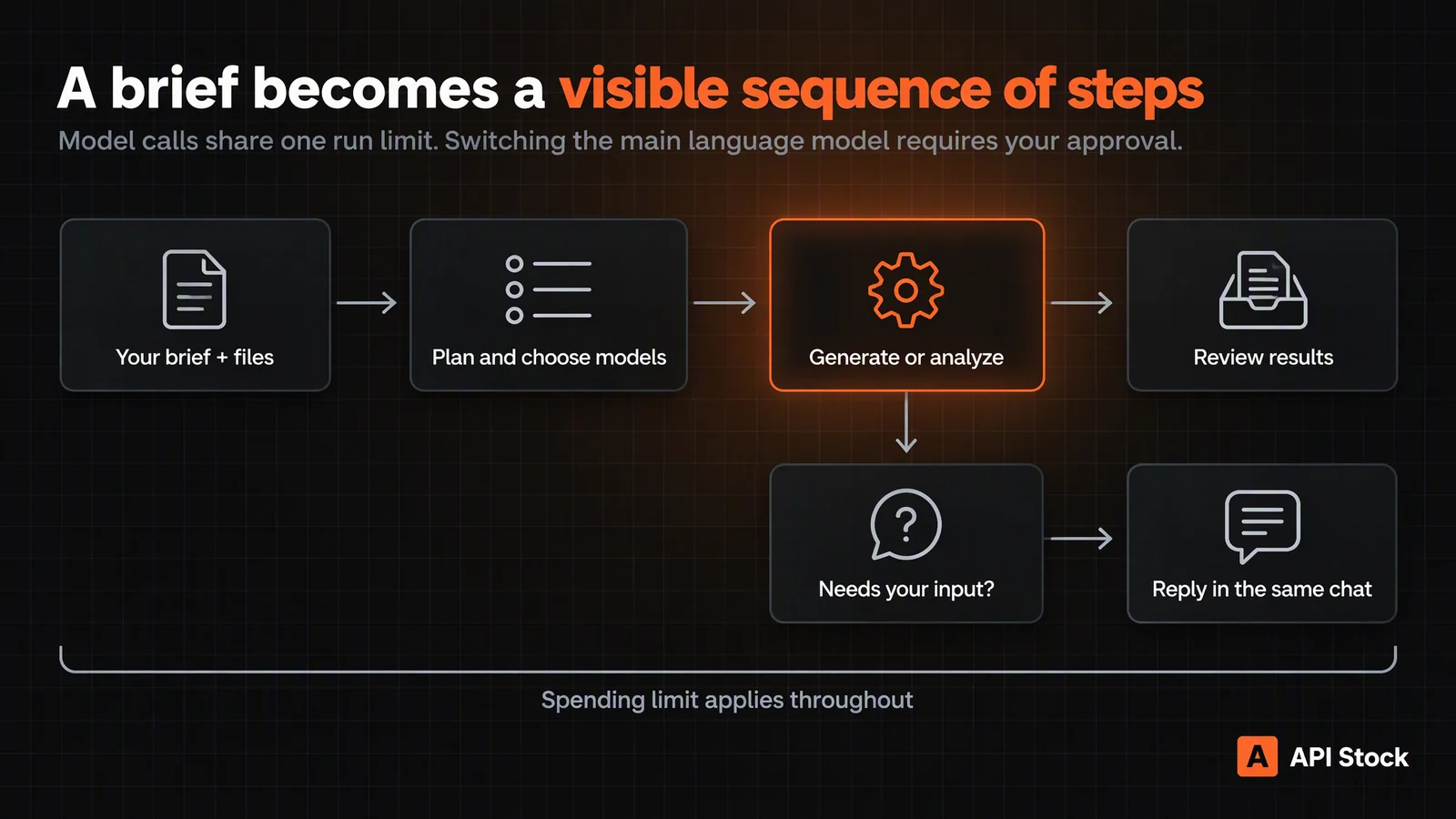
How do you start your first task?
Open Agent, start a conversation and describe three things: the result you want, the material it should use and what it must preserve. Add the format, language and number of outputs when they matter. A clear brief reduces the need for another paid planning round.
Before the first message, you can also choose a profile: Universal, Brand content or Social video. A profile supplies task-oriented instructions; your brief still defines the deliverables. For a workshop campaign, Brand content is a useful starting point.
For this walkthrough, we used a fictional botanical illustration workshop. The downloadable demo brief asks for three headlines, an 80–110-word invitation and one square illustration. It deliberately leaves the date, venue, price and registration link as placeholders.
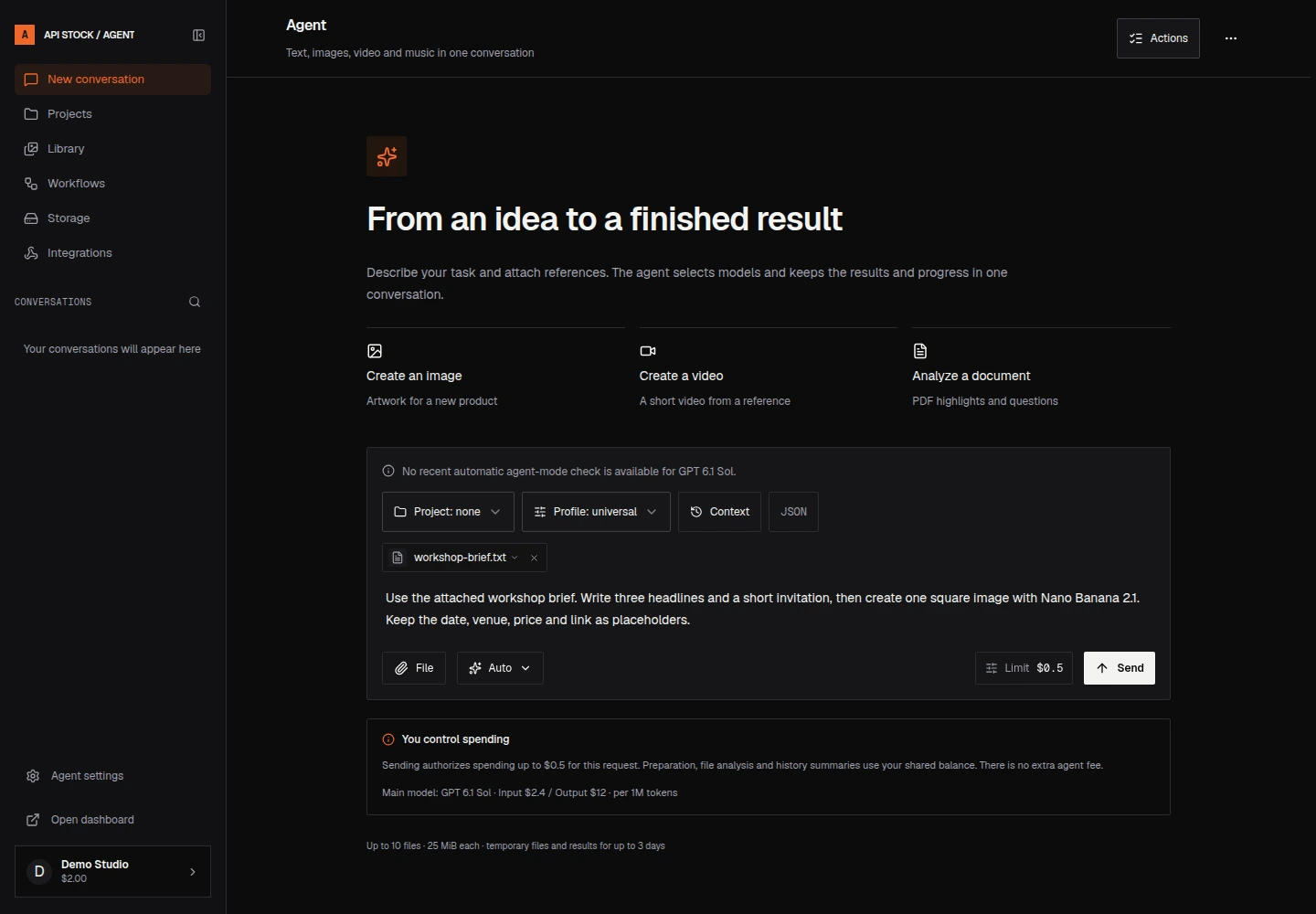
Copy this into a new conversation and attach the brief:
Use the attached workshop brief. Write three headlines and a short invitation, then create one square image with Nano Banana 2.1. Keep the date, venue, price and link as placeholders.
Choose a run limit before sending. $0.50 is the example ceiling used here, not a quoted price for this task. Your task may need a different allowance depending on the context, tools and media model. Check the current price list before increasing it.
What is the difference between Auto and choosing a model?
Auto lets the agent plan which platform tools and media models fit the task. The default main language model is GPT 6.1 Sol. You can change the main model and your image, video and music preferences in Agent settings.
A preferred media model is a starting preference: an explicit request in your message takes priority, and incompatible inputs can call for another model. A manually selected conversational model still has platform tools available; selecting an LLM does not turn an image request into a text-only chat.
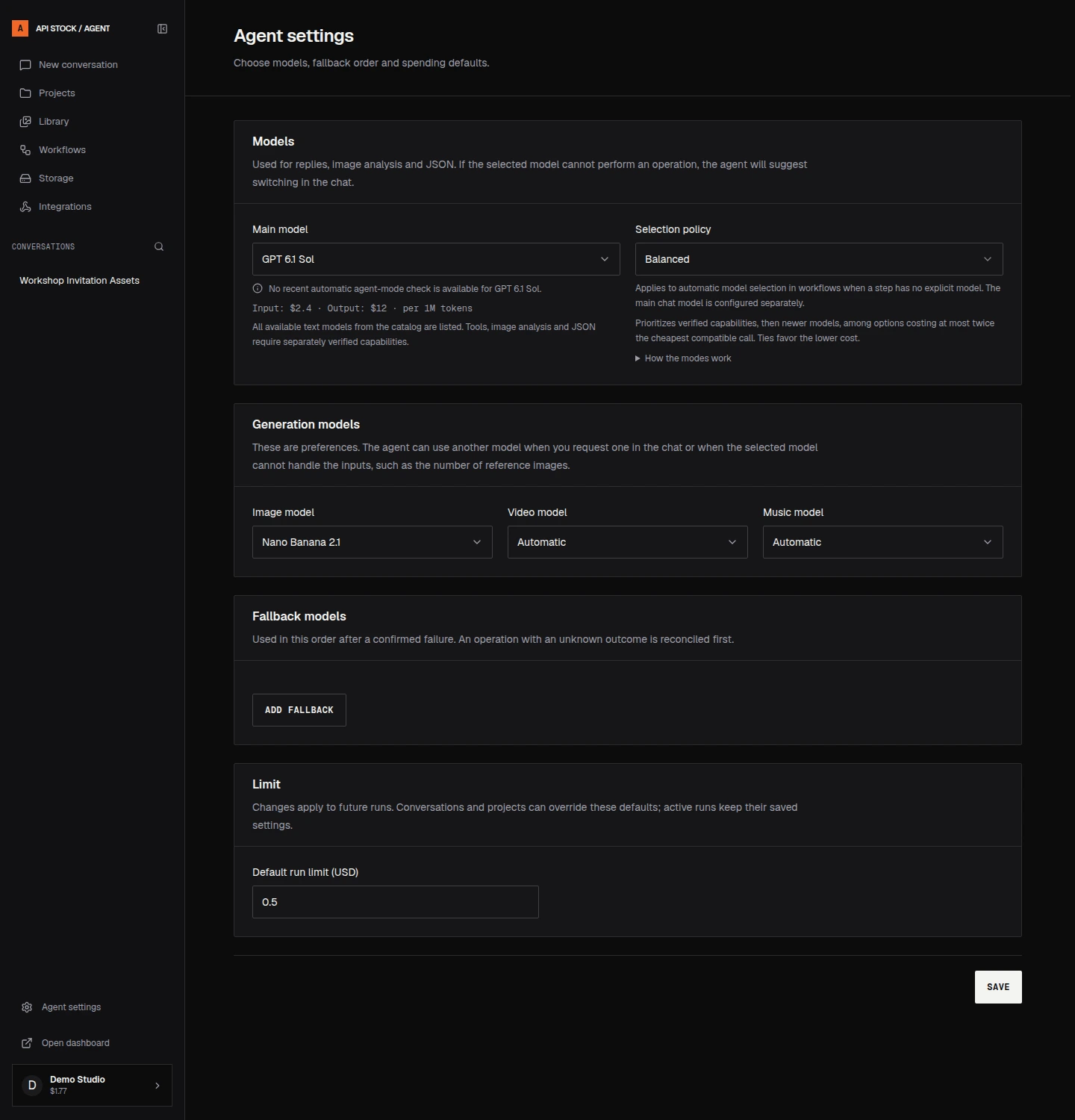
The Economy, Balanced and Quality policies guide automatic model selection in workflow steps that have no explicit model. They do not replace your chosen main chat model. Add fallback models in the order you prefer; they are used after a confirmed failure, while an unknown outcome is reconciled first.
A different language model may be needed for a capability the main model lacks. The chat can show a model-switch proposal and wait for your consent before dispatching the alternative. Review the proposed model and reason rather than assuming that a paused run has frozen.
How do limits, charges and stopping work?
The limit applies across the run's model work, not separately to each step. Planning calls, model-based attachment analysis, context summaries and JSON extraction can all contribute. A long conversation can therefore cost more than the final answer alone.
Model tariffs checked against the live catalog on 16 October 2026:
| Work | Public tariff | What the figure covers |
|---|---|---|
| GPT 6.1 Sol input | $2.40 per million tokens | Input tokens; output has a separate rate |
| GPT 6.1 Sol output | $12.00 per million tokens | Output tokens, not a flat message price |
| Nano Banana 2.1 | $0.014 per image | Listed 1K, 2K and 4K image tiers |
The LLM pricing guide explains token billing. The image tariff is only the media component of a task that also uses an LLM.
If a run needs a higher budget or a clarification, it pauses. Read the status, adjust the limit if appropriate and continue in the same conversation. Use Stop when you no longer want more work. Acknowledging a stop does not undo a media request already sent or instantly refund work already performed; final charges and unused reservations are settled from the actual outcome.
How do you review results and ask for a revision?
Keep the revision specific: “Keep the fern composition, make the background lighter and remove the decorative border,” or “Shorten the invitation to 60 words and retain every placeholder.” Select or attach the intended result instead of relying on “that picture” when several are present.
The chat keeps the work and its progress together. The Library helps you find generated results; open an item to inspect or download it. A revision can create another billed generation, so check your remaining limit before asking for several alternatives.
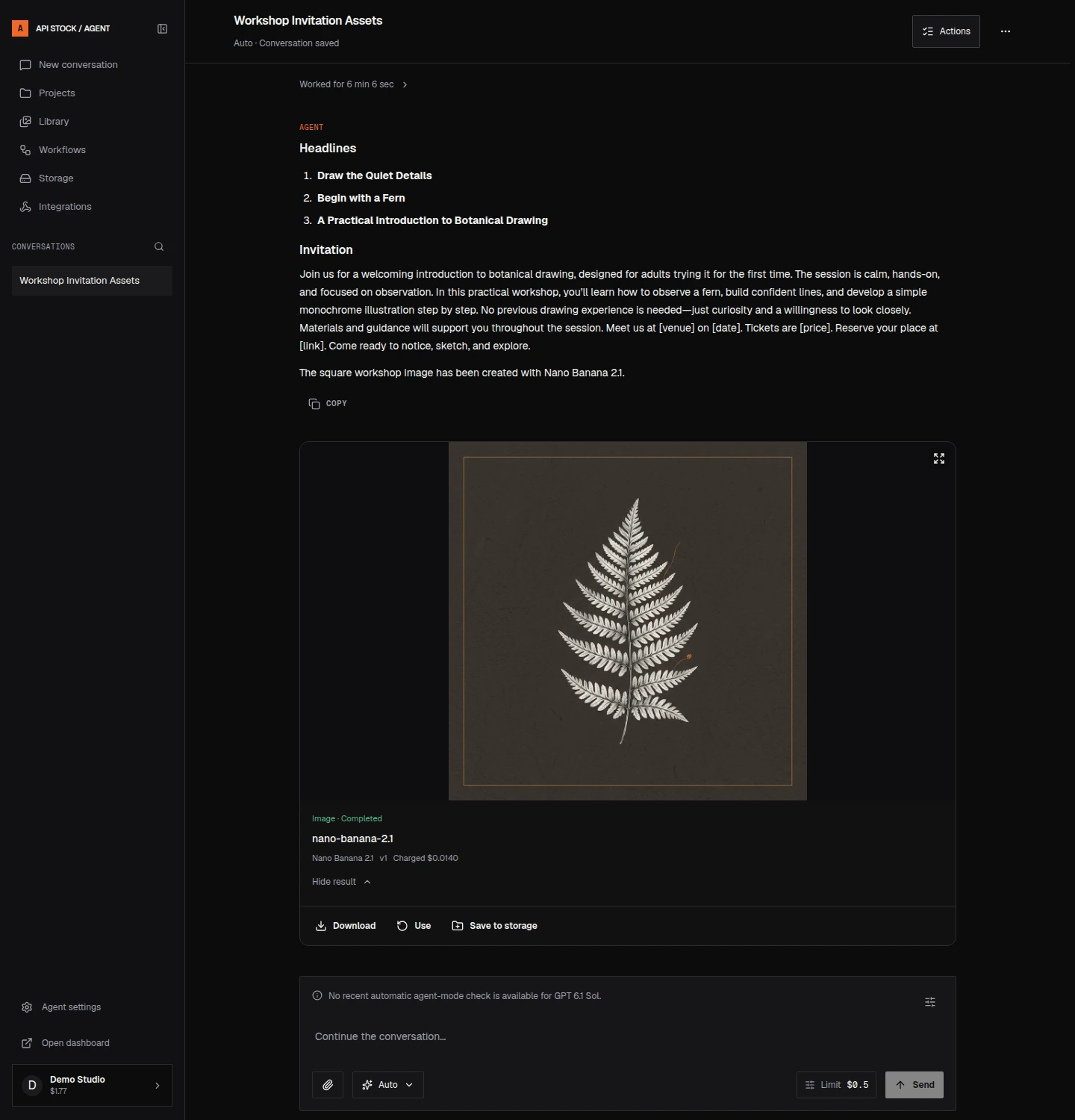
The real demo returned the requested headings and fern image. It also added a claim that materials would be provided, although the brief did not confirm that. Remove or verify such details: a polished answer still needs your review.
Review facts, spelling, placeholder fields and image details before publishing. In this example the invitation is not ready to post until you replace the workshop's date, venue, price and link with real information.
When should you use projects, workflows and storage?
Use a Project for repeated work for the same brand or client. Keep the instructions, brand context, reference assets and model preferences together so that the next conversation starts from the right material. Project settings are versioned; changing them applies to future runs rather than rewriting the context of an already accepted run.
A Workflow is useful when the same sequence repeats. The initial presets include Product card, Script to video and Cover and track. Inspect its inputs and steps before starting it. A preset still uses model calls and your run limit; it is not a fixed-price package or a guarantee that every model accepts every parameter.
Temporary uploads and results are kept for up to three days, with no cumulative file-count or storage-volume limit per account. The composer accepts up to 20 references, up to 100 MB in total. Download important outputs promptly. For longer retention, inspect Storage and explicitly save the files you need; paid storage has separate plans, object limits and service quotas.
Can you connect the agent to your own application?
Yes. Integrations provides lifecycle webhooks, and the Agent API exposes conversations, runs and results. A webhook tells your application about an event; it does not by itself publish the result to a social network.
For a developer starting the same kind of task, create a conversation with POST https://api.api-stock.com/api/v1/agent/conversations, then send a message to its /messages endpoint with a unique clientMessageId and maxCostMicroUsd. For example, 500000 means a $0.50 ceiling, since one dollar is one million micro-USD. Follow the Agent API guide for the request contracts, controls, attachments and webhook verification.
FAQ
Is there a fixed price per agent message?
No. The charge depends on the model work performed, including any planning, analysis or context compaction. The run limit is a ceiling, not an upfront quote for a standard number of steps.
Do I need to know every model parameter?
No. Describe the goal and constraints, then use Auto for discovery and planning. If you need an exact model or parameter, state it explicitly and review any clarification or proposed switch.
Does the agent remember every old conversation automatically?
No. Add the relevant earlier conversation, run or artifact as context explicitly. This makes the source of the information clear and avoids treating unrelated history as part of the current task.
Will uploaded files and results stay forever?
No. Temporary material is available for up to three days. Download it or explicitly retain it using Storage, subject to the selected plan and access rules.
Can I close the tab while the agent works?
Yes. Work continues and the result appears in the same conversation. Reopen it from your conversation list. To stop further work, use Stop.
- agent
- workflows
- images
- productivity
Agent
Texte, images, vidéo et musique dans une conversation
À lire ensuite
 Cas d'usageAI YouTube thumbnails: prompts, real screenshots and costMake an AI YouTube thumbnail backdrop for $0.014, add your real video still and editable title, then check the crop with practical tutorial prompts.·8 min de lecture
 Cas d'usageAI images for presentations: prompts and cost per slideCreate wide slide illustrations with Seedream 5.0 Pro from $0.042 per image, keep text editable, and budget for revisions with practical prompts.·9 min de lecture
 Cas d'usageAI wall paint color preview: your room, three shades and costPreview wall paint colors in your own room photo with Seedream Pro from $0.042 per image, using paint-only prompts and checks before buying real samples.·9 min de lecture