Bild
Bildbearbeitung
Bilder mit Referenzen bearbeiten: Hintergründe, Produkte, Stil und Midjourney-Aktionen.
Eine Bearbeitung ist eine Anweisung: erst die Änderung, dann alles, was unverändert bleiben muss. Referenzen vermitteln den gewünschten Look präziser als viele Adjektive.
Praktische Grundlagen
Wählen Sie das Modell nach der wichtigsten Eigenschaft — Tempo, Genauigkeit, Auflösung oder Kontrolle — und speichern Sie Parameter und Version jedes Ergebnisses. nano-banana-*, gpt-image-2, wan2.7-image and midjourney — Image editing.
Ändern Sie pro Versuch nur eine Sache. Gute Ausgaben werden zu Referenzen und damit zum zuverlässigsten Ausgangspunkt der nächsten Iteration.
Behandeln Sie finished und failed als Endzustände. Nutzen Sie Polling oder Webhooks, bewahren Sie Rohfehler serverseitig auf und zeigen Sie Nutzerinnen und Nutzern nur sichere Meldungen.
Prompts und API-Beispiele
Replace the overcast sky with a clear blue one. Keep the building, thelighting on the facade and the framing exactly as they are.
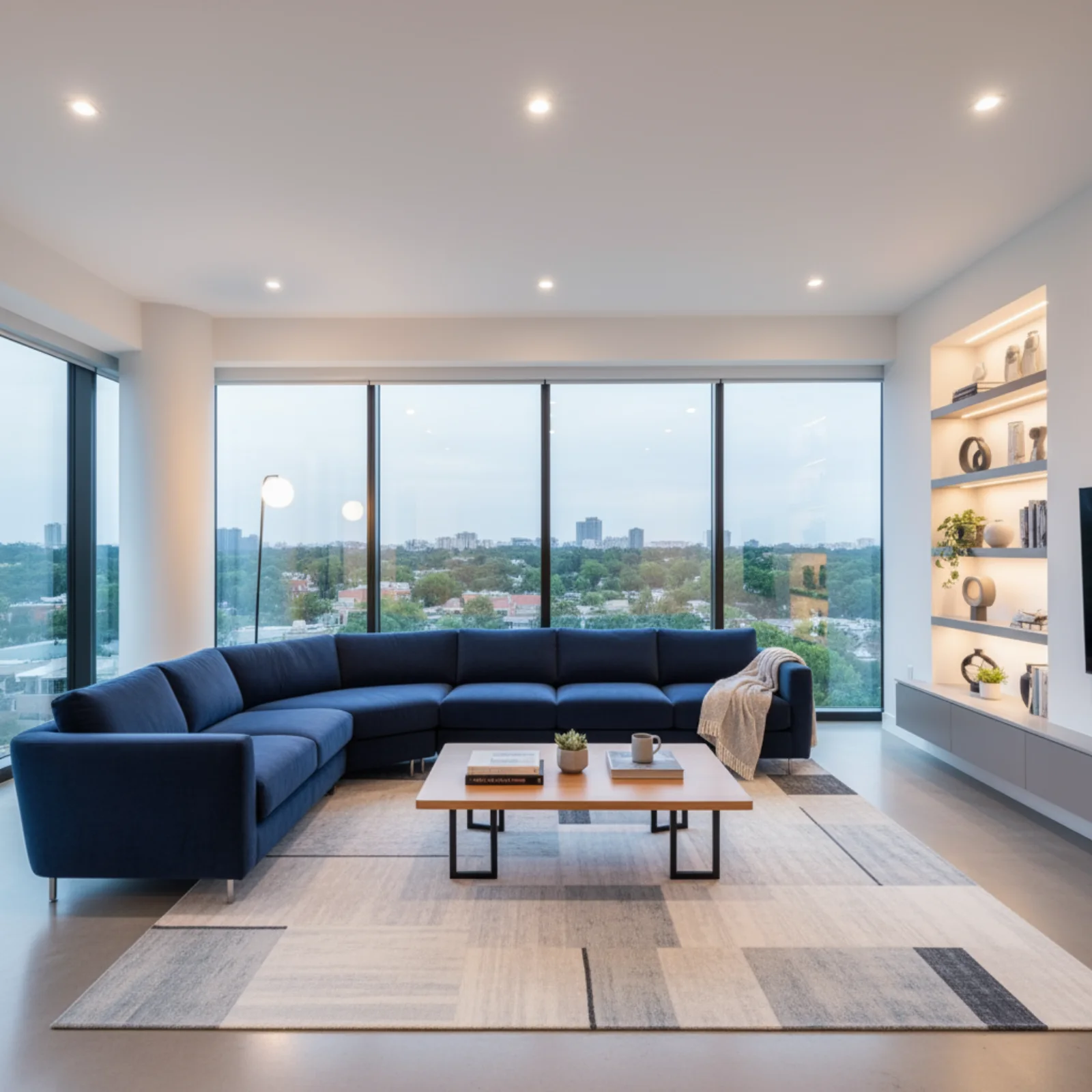
Source: Google AI for Developers, used under CC BY 4.0; format and dimensions adapted.
Using the provided image of a living room, change only the blue sofa to be avintage, brown leather chesterfield sofa. Keep the rest of the room, includingthe pillows on the sofa and the lighting, unchanged.
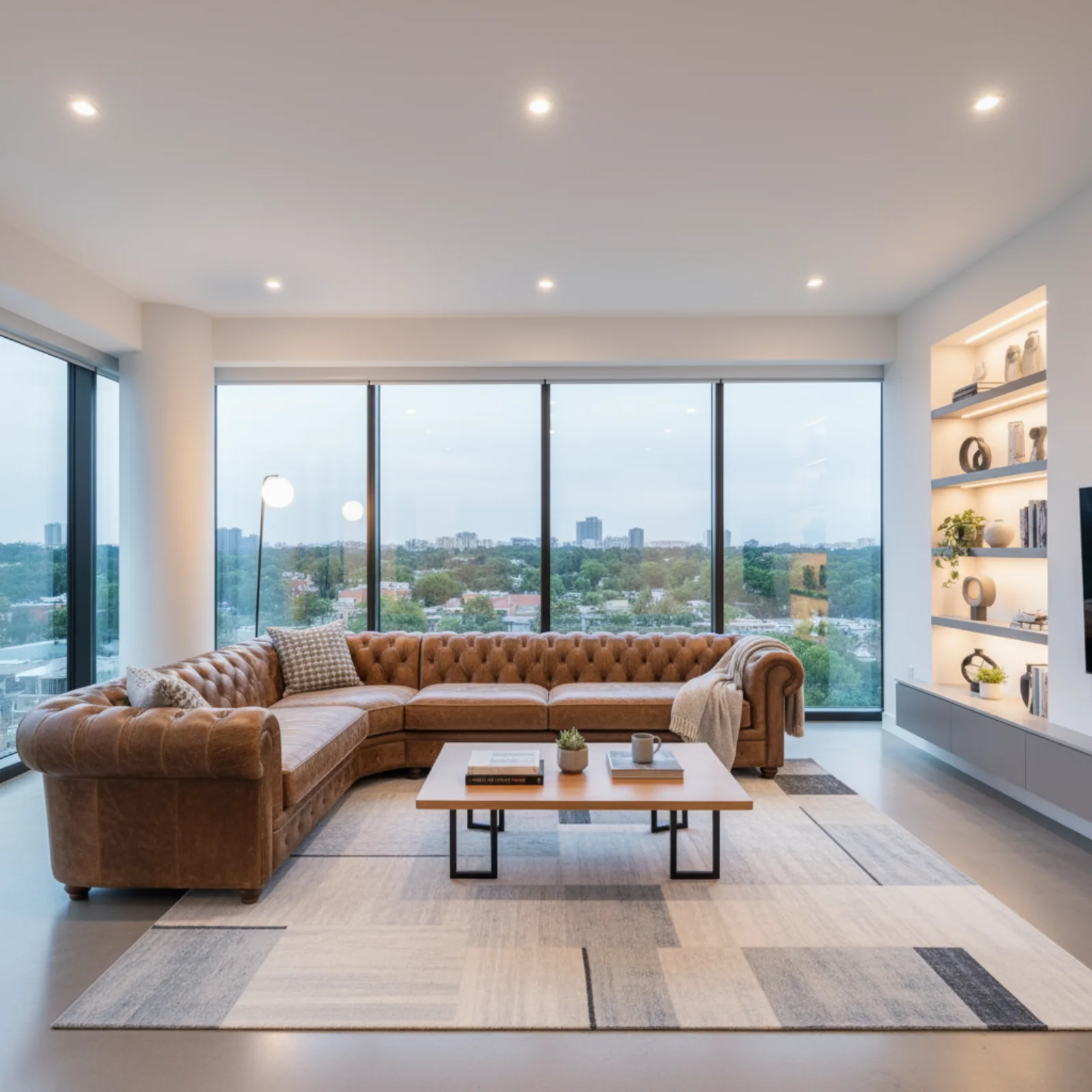
Source: Google AI for Developers, used under CC BY 4.0; format and dimensions adapted.
Put the chair from image 1 into the room from image 2. Match the window lightand cast a soft shadow on the floor. Do not change the room's furniture orthe chair's upholstery.
The person from the reference, now standing on a train platform at night,three-quarter view, rain, sodium lighting. Keep their face, hair and jacketidentical to the reference.
Redraw image 1 in the visual style of image 2 — same palette, line weight andgrain. Keep the composition and subject of image 1 unchanged.
A ceramic mug in the masked area, same lighting and perspective as the rest ofthe frame
About these samples. Ready-made examples are copied to our own storage only when their source permits reuse. The exact prompt appears above each result, and the original source and license are linked below the media.
{"model": "z-image","input": {"prompt": "Replace the overcast sky with a clear blue one, keep the lighting on the building consistent","urls": ["https://example.com/facade.jpg"]}}
{"model": "wan2.7-image","input": {"prompt": "Put the chair from image 1 into the room from image 2, matching the window light","urls": ["https://example.com/chair.png", "https://example.com/room.jpg"],"size": "3:2"}}
curl -X POST https://api.api-stock.com/api/v1/generation/create \-H "Authorization: Bearer sk-your-key" \-H "Content-Type: application/json" \-d '{"model": "midjourney","input": {"action": "imagine","prompt": "A weathered brass diving helmet on a workshop bench, volumetric dust","size": "1:1","version": "7","stylize": 300}}'
{"code": 200,"data": {"taskId": "019ca8c4-3e17-7b55-9f10-cc2b6de0a8f4","status": "not_started","createdAt": "2026-02-28T13:07:45.000Z"}}
{"code": 200,"data": {"taskId": "019ca8c4-3e17-7b55-9f10-cc2b6de0a8f4","status": "finished","files": [{"fileUrl": "https://storage.api-stock.com/generated/mj-grid-4c81.png","fileType": "image"}],"createdTime": "2026-02-28T13:07:45.000Z"}}
curl -X POST https://api.api-stock.com/api/v1/generation/create \-H "Authorization: Bearer sk-your-key" \-H "Content-Type: application/json" \-d '{"model": "midjourney","input": {"action": "upscale","parentTaskId": "019ca8c4-3e17-7b55-9f10-cc2b6de0a8f4","index": 2}}'
const BASE = "https://api.api-stock.com/api/v1";const KEY = process.env.API_STOCK_KEY!;async function submit(input: Record<string, unknown>): Promise<string> {const res = await fetch(`${BASE}/generation/create`, {method: "POST",headers: {Authorization: `Bearer ${KEY}`,"Content-Type": "application/json",},body: JSON.stringify({ model: "midjourney", input }),});const body = await res.json();if (!res.ok) throw new Error(`${body.error.code}: ${body.error.message}`);return body.data.taskId;}async function wait(taskId: string) {for (;;) {await new Promise((r) => setTimeout(r, 5_000));const res = await fetch(`${BASE}/task/status/${taskId}`, {headers: { Authorization: `Bearer ${KEY}` },});const body = await res.json().catch(() => null);if (!res.ok) {const message = body?.error?.message ?? `${res.status} ${res.statusText}`;throw new Error(message);}const { data } = body;if (data.status === "finished") return data;if (data.status === "failed") throw new Error(data.errorMessage);}}const gridId = await submit({action: "imagine",prompt:"A weathered brass diving helmet on a workshop bench, volumetric dust",size: "1:1",version: "7",stylize: 300,});await wait(gridId);const upscaleId = await submit({action: "upscale",parentTaskId: gridId,index: 2,});const upscaled = await wait(upscaleId);console.log(upscaled.files[0].fileUrl); // → https://storage.api-stock.com/...
{"model": "midjourney","input": {"action": "pan","parentTaskId": "019ca8c4-3e17-7b55-9f10-cc2b6de0a8f4","index": 2,"direction": "left"}}
{"model": "midjourney","input": {"action": "zoom","parentTaskId": "019ca8c4-3e17-7b55-9f10-cc2b6de0a8f4","index": 2,"zoomRatio": 1.5}}
{"model": "midjourney","input": {"action": "modal","parentTaskId": "019ca8c4-3e17-7b55-9f10-cc2b6de0a8f4","index": 2,"prompt": "Replace the bench with a slab of sea-worn granite","maskUrl": "https://example.com/mask.png"}}
{"model": "midjourney","input": {"action": "describe","imageUrls": ["https://example.com/reference.jpg"]}}
{"model": "midjourney","input": {"action": "blend","imageUrls": ["https://example.com/texture-a.jpg","https://example.com/texture-b.jpg","https://example.com/texture-c.jpg"],"dimensions": "LANDSCAPE"}}
{"code": 400,"error": {"message": "action \"variation\" requires index or customId","type": "BadRequest","code": "invalid_input"}}

Mit dem eigenen Schlüssel ausführen
Wählen Sie ein Modell im API Stock-Katalog, prüfen Sie den Preis und testen Sie es im Browser oder per API.